


61

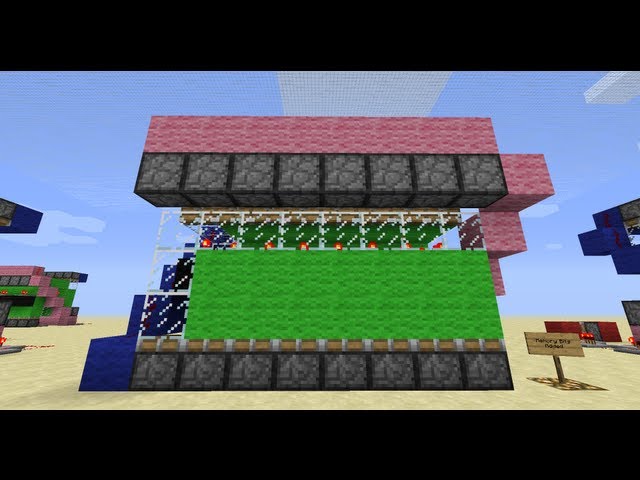
Piston Memory Array [How to Build a Redstone Clock!]

61 diamonds

  • 20,833
    Views, 35 today
  • 10,620
    Downloads, 11 today
  • 14
    Comments
  • 12
    Favorites
  • Flag / Report

Get Embed Code

Forum:
HTML:
Link:
avatar CNBMinecraft
Level 67 : High Grandmaster Pirate
Posted 11/03/11 8:10:43 pm
11/03/11
Howdy Partnoids! Todays vid is the first in a two/three part series detailing how to build a Redstone clock. I take you through the piston memory array that stores all the information for the clock and deals with outputting the time onto displays. Piston Memory of course has many other uses as well (I discuss this in the video!) Hope it's helpful for everyone!

Additional Details

Progress:
100
Tags:Redstone Device

More Projects by CNBMinecraftView All

2012-05-02 11:24:16
by CNBMinecraft

Join us to post comments.

Comments : 14

1 - 14 of 14

CastleCorp
Level 46
Master Pegasus
January 10, 2013, 5:45 am

is there another version of the world save somewhere that isn't a .rar file?

Dec10
Level 12
Journeyman Miner
November 17, 2012, 1:10 pm

it doesn't work could you update this for 1.4.2

Greyfang
Level 29
Expert Creeper Hugger
November 10, 2012, 9:11 am

It Never Works o.o

jonasman
Level 1
New Crafter
November 1, 2012, 10:36 am

why is it a .rar file?
the world save is a .rar file

killer3505
Level 12
Journeyman Artist
September 3, 2012, 4:28 pm

awesome man thx for this tutorial if u look at my projects i used this tutorial to learn to make my 4 digit counter that can easly be modified to anyhting else with 4 digits like clock/countdown/up etc and can be hooked up to make stuff happen at sertain numbers :P and the digits are 8 blocks for each line xD and redstone lamps instead of pistons realy makes it alot less memory using but when u made this tutorial u dint have those :P dia + fav again xD

picman4
Level 32
Artisan Droid
July 20, 2012, 2:06 pm

The clock part doesn't work for me!

connorox
Level 1
New Miner
July 12, 2012, 12:58 am

bull shit pc

DUBCRAFT123
Level 57
Grandmaster Creeper Hugger
June 26, 2012, 9:02 am

Hey Wow Very nice but i have some problems with it mabye you can fix it for me?
http://www.planetminecraft.com/project/i-need-some-help-with-my-awesome-redstone-project-one-count-is-not-working-please-help-me-out/


Thx!

Furtle_Turtle
Level 1
New Miner
February 9, 2012, 4:11 am

Im not sure how to be able to go on this map, i downloaded it, now what? can anyone help me?

jacobsnoopy1
Level 19
Journeyman Dragonborn
February 24, 2012, 6:58 pm

1)extract it2)go into the run program
a)windows 7: the search function at the start menu
b)windows XP: on your keybroad there should be a windows icon, press that while also pressing the letter r
3)open the folder .minecraft
4)open the folder saves
5)place the world in the saves folder
6)run minecraft
Hope this helped :D

Zatanic
Level 10
Journeyman Engineer
February 5, 2012, 12:25 pm

Hey love this!
Was fun to build this by myself with help of your video :)
I prefer more pictures instead of video but was educational nonetheless.
As you are good at making redstone projects small please see if you can make my "One wire screen" smaller (the sender, receiver & filter).

+1 diamond

MattexFilms
Level 36
Artisan Engineer
November 9, 2011, 8:19 am

I followed your tutorial and made a timer that counts to 999 http://www.planetminecraft.com/project/ultra-compact-0-999-counter-using-pistons-11x26x31-blocks/ You are credited for the tutorial. Great tut btw. You learn something new everyday :D

Ploopyandproud
Level 30
Artisan Blockhead
November 4, 2011, 12:03 pm

Y U NO MCEDIT SAVE?

H1y4
Level 1
New Miner
November 4, 2011, 2:50 am

Great video! :D I've looked for clock tutorials, but there's not really many of them out there. :P This is the first one I've seen, and I'll think it's going to be helpful for a lot of people. :D
Made myself and account here just to thumb this up. :P

1 - 14 of 14

