


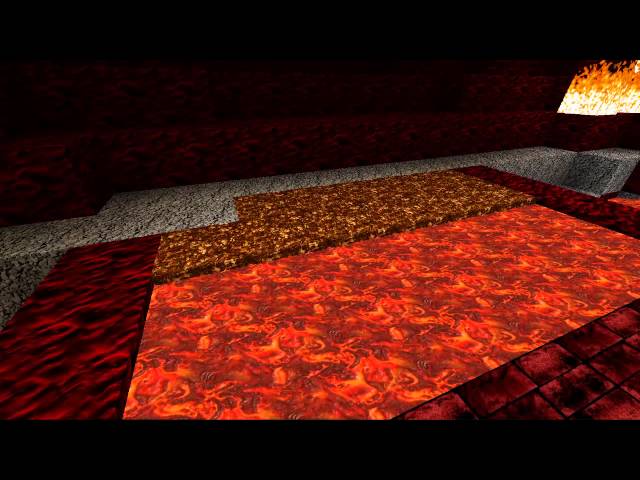
4 Real [1.4.7] [x512]
76 diamonds
Download
| 4 Real | |
| 4 Real Part 2 |
-
49,561Views, 56 today
- 17,043Downloads, 11 today
- Comments
- Favorites
- Flag / Report
Get Embed Code
Level 44 : Master Geek
Posted 12/24/12 12:54:04 am , last updated: 02/02/13 4:40:54 pm
12/24/12
Before you click download! you need both files 4 Real and 4 Real Part 2.
Why two? because I cant upload it as one file it is to big! but it runs fine.
Download 4 Real and 4 Real part two. Take the files in part two and drop them into the 4 Real zip.
That's all you got to do! It's that simple if it prompts you to overwrite do it. If you need help just post!
Skyrocket_Moon
ps, Optifine needed and this .bat (The .bat makes java run 2gb of ram so it wont crash trying to load the massive file.) *if you want my stars you will need better sky's patch from MCPatcher. and you can just add optifine as a mod in the patcher. Be sure to turn off MCPatchers HD, HD Font, Better Grass, and Conected Textures. (Rest of the features will be used later on as I continue to update the pack, so leave them checked.)
If you don't want mcpatcher and still want to know how to install optifine>(youtube how to install optifine)
The .bat File needs to be next to your Minecraft.exe (It looks like a grass block.)
Example grass block is on your desktop then the .bat needs to be on the desktop, if grass block in a folder then .bat needs to be in that folder. (not the shortcut the main block icon/right click shortcut icon, Open file Location.)
Once you have these you can double click the .bat and it will run java and open up Minecraft that means it works!
And yes you do need to leave the java open but you can down size it if it bothers you just don't close it or Minecraft closes. On a additional note you never have to download the .bat again there's no updating on it as long as you don't delete it.
Extra: if .bat doesn't work make sure you have the latest java version.
For those new to installing a texture pack here are the steps.
1. double click the .bat opens up Minecraft then once logged in click on the Texture Pack button.
2. On the bottom Click on Open texture pack folder.
3. Drag the 4 Real Zip into that folder (just drag and drop) and your done click done.
Takes 3 minutes ruffly for it to load it in it is a big file but 1gb graphics card can easily handle this.
What is your graphics card? You can find out through GPU-Z just google that program and download it.
It tells you everything about your graphics card and you should be able to see if your card is a 1gb or not :)
For Best Quality and Performance!
Log into minecraft (.bat way of course) click on Options/ video settings/ details/ Clouds: Fast, Grass: Fancy, Trees: Fancy, Water:Fancy, Rain:Fast, done.
Video Settings/Quality/ Mipmap: Off, Mipmap Type: Linear, Ani: OFF, ANT:Off, Better Grass:OFF,Everything else On, Connected Textures:Fast, Done.
Video settings/ Graphics: Fancy! Advance Open GL:FANCY! also:
When using "Chunk Loading: Multi-Core" make sure to Disable "Threaded Optimization" / "OpenGL Threading" in the graphics card control panel (example). When I use the optifine multi-core option I get 102fps with this pack.
Its a good idea for you to mess around with its settings to get the best quality from the pack for your pc! :)
Oh yah! and you will need to restart minecraft after or you will get the see through floors that comes with any load change.
new water! ignore the lines under the spray thats caused by un-updated optifine mixed with mcpatcher bad mix.
Additional Details

This work is licensed under a Creative Commons Attribution-NonCommercial-NoDerivs 3.0 Unported License.
If you guys see any thing stolen click on this it shows how to report it.
| Progress: | |
| Game Version: | Minecraft 1.4.7 |
| Resolution: | 512x512 |
| |
| Tags: | Real, Realistic, Best, True, Texture, Pack, 4 Real, Fantastic, Amazing, Epic, Awsome, Photo, Photo Realism, Foto, New, Newest, Terrain, Items, GUI, Mobs, Armor, Misc, Particles, Environment, Font |
Update #17 Chicken : 02/02/2013 4:40:54 pm2/02/13
Update #16 Cow! : 01/29/2013 1:01:38 am1/29/13
Update #15 Vingette : 01/23/2013 3:25:46 pm1/23/13
Vingette is the shadow that is casted on your screen when you go inside of dark caves or homes even when well lit.
I was working on mobs and found this problem with my pack so I have changed it.
Now the vignette wont show up when in lit homes and caves but will show up in unlit caves like its suppose to.
Update #14 Water now fixed! : 01/18/2013 11:15:16 pm1/18/13
Update #13 Armor item Art added, Terrain fixes : 01/16/2013 5:04:10 pm1/16/13
Added dirt on gravel, and fixed Command Block, In terrain Added into 4 Real.
Update #12 Gold Armor : 01/15/2013 11:36:02 pm1/15/13
Update #11 Diamond Armor : 01/14/2013 1:47:26 am1/14/13
Added Diamond Armor into 4 Real Part 2!
Update #10 Iron Armor And pictures : 01/13/2013 6:30:29 pm1/13/13
and updated some pictures on the site.
Update #9 Chain Mail : 01/12/2013 7:52:51 pm1/12/13
Update #8 Leather Armor : 01/11/2013 6:57:00 pm1/11/13
Update #7 Fire animation : 01/08/2013 4:09:11 pm1/08/13
Update #6 Misc Finished : 01/07/2013 12:35:24 am1/07/13
Update #5 Gui menu : 01/05/2013 2:03:06 am1/05/13
Update #4 Massive : 01/02/2013 12:10:49 pm1/02/13
Update #3 Pickaxes : 12/28/2012 10:14:19 pm12/28/12
Update #3 : 12/27/2012 8:46:03 pm12/27/12
Update #2 Environment, Sun/Moon : 12/26/2012 6:53:18 pm12/26/12
Enjoy :)
Join us to post comments.
Comments : 190
1234 next »
1 - 50 of 190
1234 next »
1 - 50 of 190


Reply
Delete
ToxxicReaper
Level 11
Journeyman Mountaineer
April 13, 2013, 11:25 am
Reply
Delete
jfcomst
Level 1
New Miner
March 8, 2013, 12:20 am
Reply
Delete
Skyrocket_moon
Level 44
Master Geek
March 12, 2013, 3:50 pm
Reply
Delete
jacob2436
Level 1
New Miner
March 7, 2013, 8:42 pm
Reply
Delete
Skyrocket_moon
Level 44
Master Geek
March 12, 2013, 3:49 pm
Reply
Delete
Halo boylol
Level 1
New Miner
March 7, 2013, 4:17 pm
Reply
Delete
Skyrocket_moon
Level 44
Master Geek
March 12, 2013, 3:50 pm
Reply
Delete
squarechique
Level 1
New Explorer
March 2, 2013, 3:57 pm
Reply
Delete
Skyrocket_moon
Level 44
Master Geek
March 2, 2013, 6:51 pm
all it is is this line in the txt:
javaw -Xmx2048m -Xms2048m -jar "Minecraft.exe"
saved as file name run.bat
a up to date java will recognize it automaticly as a batch file
so first check java for new update 2nd save the file again as run.bat
and if it doesn't work check windows 32 for updates on batch files.
Reply
Delete
glaava
Level 1
New Alien
February 21, 2013, 2:03 am
Reply
Delete
Skyrocket_moon
Level 44
Master Geek
February 24, 2013, 5:58 pm
As far as Google, I say good luck taking a image and instant matching it from there. Get better results in finding the image parts I used looking through the set of free and payed images through stock sites. I have listed links from images are provided in my rights document in the download and granted permissions for my use.
Reply
Delete
LunaTiK
Level 1
New Miner
February 18, 2013, 7:34 pm
Is this behavior normal? Should the game be running with this much memory just in the menu?
After placing the entire .minecraft folder on a ramdisk the problems have mostly gone away. I now have fps consistently over 300 and often in the 400s peaking in 500s just above ground. Even higher below ground. Occasionally it drops to 0 and freezes for a brief moment.
Reply
Delete
Skyrocket_moon
Level 44
Master Geek
February 24, 2013, 6:19 pm
fps is still around 66, 67.
and it looks like it still works with the optifine and mc patcher links i have provided.
are you trying to run it on a multiplayer server? Since that also takes more use on your system and slows things down.
Here is what my system is and maybe from there you can find out if its just ram or some other issue.
i5 cpu 3gz, 8GB ram, windows 7 64bit, 560gtx 2GB.
:/ wish i could be more of help but unless i was over your shoulder I'm not really good at type instructions other than what i have already provided.
Reply
Delete
Skyrocket_moon
Level 44
Master Geek
February 24, 2013, 6:04 pm
but yes that doesn't sound right.
I'm sure you followed everything to a T
all i can think of is maybe a new optifine or patcher is happening now giving problems.
im going to take a look into it i havent updated anything yet.
Reply
Delete
Skyrocket_moon
Level 44
Master Geek
February 18, 2013, 9:39 am
Reply
Delete
Superblock
Level 1
New Miner
February 7, 2013, 8:26 pm
Reply
Delete
Skyrocket_moon
Level 44
Master Geek
February 8, 2013, 9:47 am
also video Settings/ Performance: 65 FPS or higher.
make sure Video Settings/QualityAnisotropic filtering: OFF, Antialiasting:Off,
lets see render distance: normal +80
That's about all I can think of that will affect that
and remember to close down minecraft and log back in.
Should deffenutly work no problem with your set up.
It's kind of strange your system set up is better than mine. lol I'm just a 5 core.
Try updating your graphic driver too wouldn't hurt.
That's really about all I can think of.
Ohh... it might just be that too. If this doesn't work it might just be optifine hasnt updated multi core for 6core systems >.< you may have to run it without multi core if that is the case I would change it to default and not smooth because smooth with stick it at 25fps all the time and make it look like crap. The water needs to have 30 fps for it to look right. This is why a lot of people don't like the water lol. Thier pc just can't handle it.
Reply
Delete
F0dey
Level 1
New Miner
February 4, 2013, 8:43 pm
Reply
Delete
Skyrocket_moon
Level 44
Master Geek
February 5, 2013, 12:28 pm
Reply
Delete
bananaboatgirl
Level 1
New Miner
February 2, 2013, 8:23 pm
Reply
Delete
Skyrocket_moon
Level 44
Master Geek
February 2, 2013, 9:04 pm
Reply
Delete
AndrewOrlean
Level 1
New Explorer
February 2, 2013, 8:13 pm
Reply
Delete
Skyrocket_moon
Level 44
Master Geek
February 2, 2013, 9:02 pm
But like I said packs still a wip(work in progress) doesn't mean its going to stay that way.
There's things I want to rework but as soon as I stop with putting the basic structure together, it will never get done. I get too into nitpicking it to finish working on the other textures.
Reply
Delete
Skyrocket_moon
Level 44
Master Geek
February 2, 2013, 11:41 am
Please remember to merge it to 4 Real.
Reply
Delete
sadfjkl
Level 1
New Miner
February 2, 2013, 10:28 am
Reply
Delete
Skyrocket_moon
Level 44
Master Geek
February 2, 2013, 11:36 am
I do plan on resizing it to 256 and 128 but only after I finish making mobs and then updating it to 1.5 on its release. I have a lot still to make its still a wip. I want to finish it before resizing it or it will take to much time continuously updating all of them.
Reply
Delete
sadfjkl
Level 1
New Miner
February 2, 2013, 10:26 am
Reply
Delete
Jesse4060
Level 12
Journeyman Mage
February 1, 2013, 5:03 pm
Reply
Delete
Skyrocket_moon
Level 44
Master Geek
February 1, 2013, 8:14 pm
Tell me what your computer graphics card is and how much ram you have.
I'll beable to tell you whether its just some tweaks need to be made with optifine to get it to run.
Reply
Delete
Emeraldew
Level 1
New Artist
January 30, 2013, 8:03 am
Reply
Delete
Skyrocket_moon
Level 44
Master Geek
January 30, 2013, 8:50 am
Reply
Delete
sadfjkl
Level 1
New Miner
January 29, 2013, 11:39 am
Reply
Delete
Skyrocket_moon
Level 44
Master Geek
January 29, 2013, 1:51 pm
Reply
Delete
sadfjkl
Level 1
New Miner
January 29, 2013, 11:39 am
Diamond!
Reply
Delete
Skyrocket_moon
Level 44
Master Geek
January 29, 2013, 1:54 pm
Reply
Delete
Darek_C
Level 1
New Miner
February 12, 2013, 2:46 am
Hey Skyrocket! Rememver me? I downloaded the tp and all the stuff and it worked fine! Except wehn I do too much tnt work. It crashes. But still I gave you a diamond and a fav. Nice job!
Reply
Delete
Skyrocket_moon
Level 44
Master Geek
February 12, 2013, 8:18 am
Reply
Delete
taterman88
Level 49
Master Ninja
January 28, 2013, 10:28 pm
Reply
Delete
Skyrocket_moon
Level 44
Master Geek
January 29, 2013, 7:34 am
Reply
Delete
Skyrocket_moon
Level 44
Master Geek
January 28, 2013, 8:04 pm
Now continuing work, chicken is next.
Reply
Delete
Skyrocket_moon
Level 44
Master Geek
January 28, 2013, 11:53 am
Link.
Reply
Delete
HerbertDiesel
Forum Moderator
Level 32
Artisan Nerd
January 26, 2013, 10:24 pm
When do you plan on having it ready for the current snapshot?
Reply
Delete
Skyrocket_moon
Level 44
Master Geek
January 27, 2013, 7:23 am
I'm putting the snapshot aside going to wait till 1.5 release since I'm still in progress with making the mobs. I guess you can say I'm working up to the last minute on this.
Reply
Delete
HerbertDiesel
Forum Moderator
Level 32
Artisan Nerd
January 28, 2013, 8:02 am
Unsticher is downright awesome! It cuts up your terrain.png and items.png into the appropriate sized images and even creates the new folders for you as well. Effectively creating a copy of your texture pack that is compatible with the snapshot. All you got to do is add your old terrain.png and items.png back into the new pack that it creates in order to keep it backwards compatible.
This is now SUPER helpful for me when downloading texture packs I want to try out but aren't compatible with the snapshot. Which is almost all of them. :) Now I can make them compatible with a click of a button!
I'm letting you know because I didn't know about it when I converted my texture pack. To say the least it was a HUGE pain to do it manually.
Reply
Delete
Skyrocket_moon
Level 44
Master Geek
January 28, 2013, 11:23 am
Yes! I was worried over having to click all 255 textures and resizing them >.< one by one.
This is so helpful! Thank you very much.
Reply
Delete
HerbertDiesel
Forum Moderator
Level 32
Artisan Nerd
January 28, 2013, 12:33 pm
Reply
Delete
Skyrocket_moon
Level 44
Master Geek
January 26, 2013, 8:56 pm
Reply
Delete
Supernova666
Site Moderator
Level 35
Artisan Electrician
January 23, 2013, 11:26 am
Reply
Delete
Skyrocket_moon
Level 44
Master Geek
January 23, 2013, 12:35 pm
deviant
artists have free textures got the steel,snow,car glass and ice mix for
diamond armor, oh yes and chain mail. leather.they have a lot of really
good texture artists.
Things like the wood, minecart railing, note
block are images I have taken from around my home. wood is from my deck
its stained wood it and I manipulated it, railing is from my toy train
tracks its franks winter time its express super old, the noteblock is a
image from my ceiling fan :O cool huh? Oak leaves are from my back yard
:D tho its just one leaf I used.
123RF.com I bought my tree textures from there and patterned shaded it so its seamless.
lets
see turbosquid.com has a few tumbnails that are free they also have
realy big high def photos that are WAY to expensive. got moss from them.
Freegreatpicture.com got me ink and quill. they have alot of cool stuff.
Trying to remember what all I got where.
cobble
stone wall, is from some cobble stone company, i cant remember which
one i cut out 4 stones cut them in half reshaped and colored and pieced
those stones together to form the seamless wall, so I can't even began
to look for where the original is on it. It's no longer what it was.
Same
with that African stone I can't seem to be able to find where I found
it. It has changed to much to be found lol. Made it into a totaly
different texture than where it began.
The endstone and stone slab and piston are from The Stone Company! <3
I
have mostly just listed the places that I have gotten images from but I
have forgotten where each was from where because I visited so many of
them to find particular things.
http://openwalls.com
http://www.freegreatpicture.com
http://ftextures.com/textures
www.dreamstime.com
http://basictextures.com
www.turbosquid.com(thumbnails downloads)moss stone
http://www.mayang.com (IS AMAZING <3 brickwalls, grass, sand,gravel)<3 good amount from them.
http://www.freepik.com
deviantart.com *various awesome artists who give free stock textures* <3
http://www.pixeldetail.com/freebies
http://www.rgbstock.com
http://stockarch.com
http://designinstruct.com/free-resources/textures
http://www.photos-public-domain.com "for any use including commercial"
http://www.flickr.com
http://www.webdesignhot.com
http://vectorgraphicsblog.com/free-vector-graphics
http://www.photo-dictionary.com (not free had to buy)good for finding everything
hope that quenches your curiosity if not ill have to research back into my research LOL did so much!
Reply
Delete
Supernova666
Site Moderator
Level 35
Artisan Electrician
January 23, 2013, 1:03 pm
The ceiling fan for the noteblock is inspiring, I hope this doesn't come across patronising, but I am really impressed, you have your new number one fan. (No pun intended) :D
Reply
Delete
Skyrocket_moon
Level 44
Master Geek
January 23, 2013, 1:17 pm
Tho I do have a really nice fur throw I bought at wallmart during Christmas that I am probly going to use alot for the wolf and cats. Right now I'm working with the cow since rgbstock has the high def cow skin.
Reply
Delete
Supernova666
Site Moderator
Level 35
Artisan Electrician
January 23, 2013, 1:32 pm
Reply
Delete
Skyrocket_moon
Level 44
Master Geek
January 23, 2013, 2:59 pm
Reply
Delete
Supernova666
Site Moderator
Level 35
Artisan Electrician
January 23, 2013, 9:28 pm
Reply
Delete
Skyrocket_moon
Level 44
Master Geek
January 24, 2013, 6:41 am
with the mobs before I make smaller versions of it. I will do a 256 and
128 but not going smaller than that because the quality will no longer
be visible and will just become blur colors.
Reply
Delete
Skyrocket_moon
Level 44
Master Geek
January 23, 2013, 10:27 am
Reply
Delete
Skyrocket_moon
Level 44
Master Geek
January 21, 2013, 7:35 am
Reply
Delete
5Jason5
Level 1
New Miner
January 22, 2013, 1:08 am
Reply
Delete
Skyrocket_moon
Level 44
Master Geek
January 22, 2013, 8:01 am
Reply
Delete
5Jason5
Level 1
New Miner
January 24, 2013, 3:46 pm
Not really and I am Minecraft5Jason5 If you have a server I would love to review it with you! It would be my first texture pack review and I only have 2 subscribers so nobody would watch me
Reply
Delete
Skyrocket_moon
Level 44
Master Geek
January 24, 2013, 4:43 pm
Reply
Delete
Skyrocket_moon
Level 44
Master Geek
January 19, 2013, 7:14 pm
If you love my pack or theirs please click on the flag on his texture pack and report him.
I
have contacted all the site moderators and flaged myself, but he is
still there and they haven't removed him. So please help me out and flag
him. he has me on ignore and taken my comments down showing how much of
a scumbag this guy is to the hard working artists. Have a heart and
flag him, you have my gratitude.
Reply
Delete
Skyrocket_moon
Level 44
Master Geek
January 19, 2013, 6:52 pm
mobs but dang my waters so much fun to boat on, even I'm addicted to my
own pack lol. I would diamond myself but apparently doing that, it takes
diamonds off instead of adding one. *sad face*
Reply
Delete
firedeath57
Level 5
Apprentice Explorer
January 18, 2013, 8:56 pm
Reply
Delete
Skyrocket_moon
Level 44
Master Geek
January 18, 2013, 9:37 pm
Maybe you can help me out and let me know what it is exactly I can do?
Oh nvm miss- understanding on my part o.o
Thanks very much for the comment xD now that I understand what you where trying to say lol.
Reply
Delete
Skyrocket_moon
Level 44
Master Geek
January 18, 2013, 6:17 pm
Its really awesome for boating makes you feel like your riding the waves.
Reply
Delete
Skyrocket_moon
Level 44
Master Geek
January 18, 2013, 5:07 pm
and a half days D: still it was a lot of angry fist pumping and head
to keyboard bashing. But everything turned out fine and I hope you guys
enjoy the effort! > or I will beat you guys with my pet angelfish. grr...
It is getting uploaded so please enjoy your search engines in the mean time, lol.
I cant tell how long it will take the 16% is covering the minutes but my guess is like 25mins.
Reply
Delete
DerAudiFan_Audi
Level 1
New Miner
January 18, 2013, 11:00 am
iron and diamond lapilazui ..... (and the black wood) (im from german) is not so great but the rest is good
Reply
Delete
Skyrocket_moon
Level 44
Master Geek
January 18, 2013, 2:04 pm
I would truly like to see you make it look more real than a true real texture from camera footage!
à I would have to name you Deraudifan_God! If you succeed! be like something out of the 7th dimension.
Now the black wool I can kind of understand the texture isn't from a image, made that myself, but its texture is exactly the same as all the others so why just that one? lol that's a mind trip for me why one out of all of them.
let me also educate you a bit here too, iron reprocessed with other materials makes steel, hence why the block is steel and not unrefined iron, cause it takes Iron to make it! :)
Reply
Delete
Skyrocket_moon
Level 44
Master Geek
January 18, 2013, 8:00 am
however near the ocean i get about 25fps with it LOL >.> dang it.
so now I'm trying to find away to render it shorter so it doesn't hang
up the frame rate so much. but it looks so pretty, compared to the last
one! *picture*
Ok nvm my performance was just set to 25 I've brought it up to 50fps so isn't the water hurray.
I'm currently working on fixing the flowing water, pun intended.
Reply
Delete
Lex3051
Level 6
Apprentice Modder
January 17, 2013, 4:04 pm
Reply
Delete
Skyrocket_moon
Level 44
Master Geek
January 17, 2013, 5:29 pm
Reply
Delete
Lex3051
Level 6
Apprentice Modder
January 18, 2013, 9:49 pm
Reply
Delete
vuduy772001
Level 33
Artisan Soldier
January 17, 2013, 4:02 am
Reply
Delete
Skyrocket_moon
Level 44
Master Geek
January 17, 2013, 7:43 am
And thanks again for your support to you have diamond me couple days back and I have remembered it.
