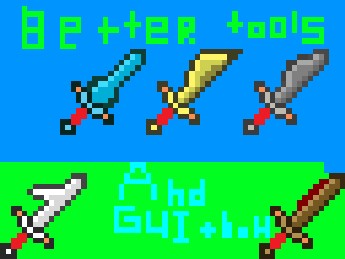
better tools and GUI (1.2.5) + bow
11 diamonds
Download
| Download Texture Pack |
-
12,827Views, 2 today
- 2,412Downloads, 0 today
- Comments
- Favorites
- Flag / Report
Get Embed Code
Level 44 : Master Enderdragon
Posted 03/25/12 5:41:16 pm , last updated: 05/30/12 6:20:50 pm
03/25/12
Additional Details
| Progress: | |
| Game Version: | Minecraft 1.2.5 |
| Resolution: | 16x16 |
| |
| Tags: | Font, GUI |
Update #23 : 05/30/2012 6:20:50 pm5/30/12
Update #21 : 05/29/2012 7:43:21 pm5/29/12
Update #21 : 05/29/2012 7:42:54 pm5/29/12
Update #20 : 05/08/2012 3:36:48 pm5/08/12
Update #19 : 04/28/2012 9:18:32 pm4/28/12
Update #18 : 04/23/2012 7:20:59 am4/23/12
Update #17 : 04/21/2012 3:16:33 pm4/21/12
Update #16 : 04/20/2012 6:57:16 am4/20/12
Update #15 : 04/16/2012 7:46:29 pm4/16/12
Update #14 : 04/15/2012 6:28:34 am4/15/12
Update #13 : 04/14/2012 8:00:27 am4/14/12
Update #12 : 04/13/2012 3:54:39 pm4/13/12
Update #11 : 04/12/2012 5:06:43 pm4/12/12
Update #10 : 04/11/2012 5:52:42 pm4/11/12
Update #9 : 04/11/2012 5:17:39 am4/11/12
Update #8 : 04/06/2012 4:28:41 pm4/06/12
Update #6 : 03/29/2012 5:52:13 pm3/29/12
Update #6 : 03/29/2012 4:34:30 am3/29/12
Update #4 : 03/28/2012 3:17:00 pm3/28/12
Update #5 : 03/28/2012 4:33:24 am3/28/12
Update #3 : 03/28/2012 4:07:48 am3/28/12
Update #1 : 03/27/2012 7:18:21 pm3/27/12
Update #1 : 03/27/2012 7:17:57 pm3/27/12
Join us to post comments.
Comments : 40
1 - 40 of 40
1 - 40 of 40


Reply
Delete
hunterrocksya1
Level 1
New Miner
May 29, 2012, 4:11 pm
what does it make things better
Reply
Delete
Exitox
Level 1
New Explorer
May 29, 2012, 3:47 pm
Reply
Delete
ummmm
Level 44
Master Enderdragon
May 29, 2012, 3:50 pm
Reply
Delete
Exitox
Level 1
New Explorer
May 29, 2012, 4:59 pm
Reply
Delete
ummmm
Level 44
Master Enderdragon
May 30, 2012, 12:50 am
Reply
Delete
Exitox
Level 1
New Explorer
May 30, 2012, 2:29 am
Reply
Delete
ummmm
Level 44
Master Enderdragon
May 30, 2012, 11:39 am
Reply
Delete
Exitox
Level 1
New Explorer
May 30, 2012, 12:28 pm
Reply
Delete
ummmm
Level 44
Master Enderdragon
May 30, 2012, 2:14 pm
Reply
Delete
Exitox
Level 1
New Explorer
June 1, 2012, 11:30 am
Reply
Delete
ummmm
Level 44
Master Enderdragon
June 1, 2012, 11:34 am
Reply
Delete
Exitox
Level 1
New Explorer
May 29, 2012, 4:54 pm
Reply
Delete
elijah10
Level 2
Apprentice Crafter
May 8, 2012, 12:29 pm
Reply
Delete
ummmm
Level 44
Master Enderdragon
May 8, 2012, 12:44 pm
Reply
Delete
dialMforMONKEY
Level 4
Apprentice Explorer
April 29, 2012, 3:37 pm
Reply
Delete
Joshielamont
Level 3
Apprentice Architect
April 15, 2012, 3:41 pm
Reply
Delete
SD22
Level 4
Apprentice Miner
April 15, 2012, 4:02 am
Reply
Delete
SD22
Level 4
Apprentice Miner
April 15, 2012, 4:00 am
Reply
Delete
ummmm
Level 44
Master Enderdragon
April 15, 2012, 4:02 am
Reply
Delete
LV_Miner
Level 11
Journeyman Architect
April 20, 2012, 3:26 am
Reply
Delete
ummmm
Level 44
Master Enderdragon
April 20, 2012, 3:45 am
Reply
Delete
LV_Miner
Level 11
Journeyman Architect
April 20, 2012, 5:56 am
Reply
Delete
SD22
Level 4
Apprentice Miner
April 15, 2012, 4:05 am
Reply
Delete
ChaosMaker
Level 1
New Miner
April 13, 2012, 12:28 pm
Reply
Delete
ummmm
Level 44
Master Enderdragon
April 13, 2012, 12:32 pm
Reply
Delete
ChaosMaker
Level 1
New Miner
April 13, 2012, 12:43 pm
Reply
Delete
ummmm
Level 44
Master Enderdragon
April 13, 2012, 12:44 pm
Reply
Delete
joeph1998
Level 1
New Miner
April 11, 2012, 11:06 am
Reply
Delete
ummmm
Level 44
Master Enderdragon
April 11, 2012, 11:16 am
Reply
Delete
lil gremlen
Level 4
Apprentice Hunter
March 29, 2012, 3:01 am
Reply
Delete
ummmm
Level 44
Master Enderdragon
March 29, 2012, 3:02 am
Reply
Delete
zaq123wsxcde
Level 1
New Miner
March 27, 2012, 4:16 pm
Reply
Delete
olivermad
Level 31
Artisan Wolf Whisperer
March 28, 2012, 4:25 am
minecraft. So i am going to teach you how to download YOUR very favorite
texture.
1.Find the texture pack that you desire. (like me, Faithfulpack)
2.You should see DOWNLOAD or GET TEXTURE PACK somewhere; click on the link.
3.windows explorer should pop up. hit save [remember which folder you saved it in]
4.open up minecraft (the client not the website)
5.Go to Texture Packs on the minecraft client
6. hit open texture pack files, windows explorer should pop up again
7.
You should have TWO windows explorer windows, one with the save, and
the one to place Texture Packs in, Then click-drag the LINK into the
texturepack folder, and WALLA! there you go!
please Subscribe if I have helped you out =)
Reply
Delete
ummmm
Level 44
Master Enderdragon
March 28, 2012, 12:04 am
Reply
Delete
jzpelaez
Level 3
Apprentice Engineer
March 26, 2012, 2:13 pm
Can you make this 1.2.4 and more textures ?
Reply
Delete
ummmm
Level 44
Master Enderdragon
March 26, 2012, 3:40 pm
Reply
Delete
Minecraftier2001
Level 6
Apprentice Artist
March 25, 2012, 2:02 pm
Reply
Delete
ummmm
Level 44
Master Enderdragon
March 25, 2012, 2:04 pm
Reply
Delete
Minecraftier2001
Level 6
Apprentice Artist
March 25, 2012, 1:42 pm
Reply
Delete
ummmm
Level 44
Master Enderdragon
March 25, 2012, 1:45 pm