




- 273,756 views, 4 today
- 41,231 downloads, 0 today

75
The Awaken Dreams Mod
- A Lord of the Rings & The Hobbit Mod
(Middle-Earth)

- Give diamond, favorite & subscribe if you support us

Description:
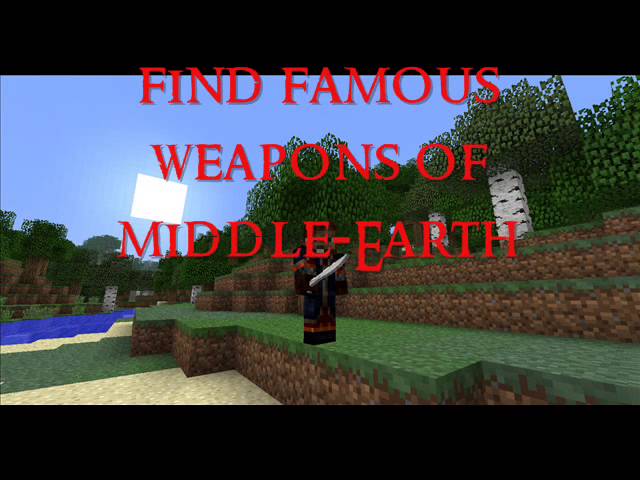
The Awaken Dreams Mod is a mod that is made to go along with The Valar Project's server. This mod aims to completly recreate Middle Earth in Minecraft. It is a total conversion of the minecraft game. Awaken Dreams is a Lord of the Rings mod with two primary components: a single player and multiplayer experience.
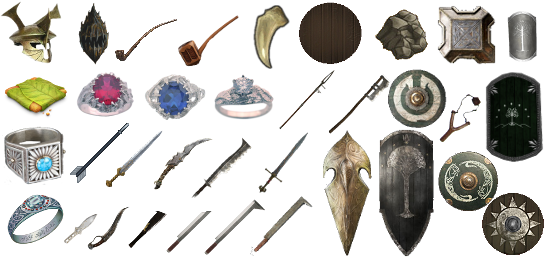
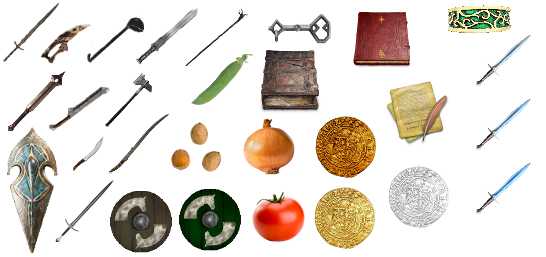
The mod will add over 500+ new blocks, 100+ new mobs, over 200+ new weapons & armours, 150+ new items. and add many new features and all of Arda etc.
See complete changelog here (from Minecraft to Awaken Dreams version 0.2 (0.3 coming soon)).
Made by scribblemaniac
Please give a diamond and favorite! Doing so will encourage us to continue working on this project and making updates for you to enjoy.
This mod can also found on moddb.com here
We are currently not accepting donations, but we may in the future so stay tuned!
LIKE US ON FACEBOOK!
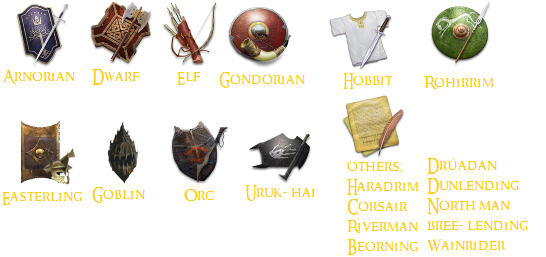
Race choosing example:
LATEST INSTALLATION INSTRUCTIONS!
Version 0.4 [1.7.2]
To manually install download the mod by clicking "Version 0.4 (1.7.2)" from the side. Extract the folder and put it in .minecraft/versions. Start the regualar minecraft launcher and create a new profile. Click Edit Profile and select release AD0.4 from the dropdown menu next to 'Use version'. Save that profile and then play minecraft with that profile.
To manually install download the mod by clicking "Version 0.4 (1.7.2)" from the side. Extract the folder and put it in .minecraft/versions. Start the regualar minecraft launcher and create a new profile. Click Edit Profile and select release AD0.4 from the dropdown menu next to 'Use version'. Save that profile and then play minecraft with that profile.
Server: here
(PLEASE GIVE A DIAMOND!)
Website: here
Awaken Dreams ID LIST (outdated); here
Downloads:
Version 0.4 [1.7.2]
To manually install download the mod by clicking "Version 0.4 (1.7.2)" from the side. Extract the folder and put it in .minecraft/versions. Start the regualar minecraft launcher and create a new profile. Click Edit Profile and select release AD0.4 from the dropdown menu next to 'Use version'. Save that profile and then play minecraft with that profile.
Windows Installer Download (Link may temporarily be broken)
Proper instructions coming soon (as well as a changelog!). Downloads can be found on the side of this page.
Changelog:
-Added a few more blocks
-Added stair and slab version for almost all mod blocks
-Added a candle, it currently does not light up, but it will in the future
-More saplings, flowers and seeds have been added
-Many new sorts of crops you can grow; strawberry plants, grapes, pipeweed
-Temporary Removed some spawn eggs (humans, orcs, hobbits)
-Added more heroes to the mod along with their weapons
-Many texture updates to existing weapons & blocks in the mod
-Many more weapons in the mod
-You can now write elvish in the stone inscription
-Telescope works
-weapons now damage properly
- You get stuck in leaves (like cobweb)
-removed the discs with LOTR music
-Added stair and slab version for almost all mod blocks
-Added a candle, it currently does not light up, but it will in the future
-More saplings, flowers and seeds have been added
-Many new sorts of crops you can grow; strawberry plants, grapes, pipeweed
-Temporary Removed some spawn eggs (humans, orcs, hobbits)
-Added more heroes to the mod along with their weapons
-Many texture updates to existing weapons & blocks in the mod
-Many more weapons in the mod
-You can now write elvish in the stone inscription
-Telescope works
-weapons now damage properly
- You get stuck in leaves (like cobweb)
-removed the discs with LOTR music
There is a bug in the latest version that will freeze minecraft if you attempt to generate a new world. To get around this, you must create the world in a regular minecraft 1.7.2 profile and then switch profiles to your modded minecraft. This will be fixed in the next version of the mod.
Bug list
*Updated to 1.7.2
- You can't create a new world, you have to do it in normal 1.7.2
- Some textures for weapons are inaccurate (it does nothing except some of the weapons face the wrong way)
- pipes does not work yet
- Galadriel's phial does not light up
- Azog can't swim
- Armours are either not working or missing textures
- crops seems to get destroyed very easily
- You are suppoed to fall faster through leaves, not getting stucked like cobweb
- When placing trapdoors they face in a wrong direction
- Some of the saplings can't grow into trees (this have simply not been added yet)
-War hack is supposed to be called Battle Pickaxe
-The weapons the heroes are supposed to hold is stuck in their legs
- minor spelling mistakes with some of the names
-parchment does not work yet
-You can't use large characters when writing elvish
-flaming arrows are not on fire
-lamps does not work properly
- You can't create a new world, you have to do it in normal 1.7.2
- Some textures for weapons are inaccurate (it does nothing except some of the weapons face the wrong way)
- pipes does not work yet
- Galadriel's phial does not light up
- Azog can't swim
- Armours are either not working or missing textures
- crops seems to get destroyed very easily
- You are suppoed to fall faster through leaves, not getting stucked like cobweb
- When placing trapdoors they face in a wrong direction
- Some of the saplings can't grow into trees (this have simply not been added yet)
-War hack is supposed to be called Battle Pickaxe
-The weapons the heroes are supposed to hold is stuck in their legs
- minor spelling mistakes with some of the names
-parchment does not work yet
-You can't use large characters when writing elvish
-flaming arrows are not on fire
-lamps does not work properly
Version 1.6.2
Version 0.3.3 [1.6.2]
Download this old version here* Fixed creatures glitching through floor
- Removed a couple of features
USE THE INSTALLER; here
installer notes:
run the exe file and follow the steps.
will install:
-Minecraft 1.6.2
-Forge for 1.6.2
-Awaken Dreams Mod 0.3.3
-Shaders mod
-LB Photo Realism x32 (resource pack we use)
-Optifine for 1.6.2
Mac / Linux Installation Instructions:
1. Download the forge installer and run it. Make sure "Install Client" is selected and that the path below leads to your minecraft folder. Click "OK" to complete forge installation.
2. Download the AwakenDreams.zip and extract the contents. Move the resulting ADModInstaller into your minecraft folder (~/.minecraft/bin/ for linux, ~/Library/Application Support/minecraft/ for Mac).
3. Open terminal and type 'cd ' and then drag the recently moved ADModInstaller folder onto the terminal window. Press enter. Then type 'bash install.sh'.
4. Open up the new minecraft launcher and look under the profile dropdown menu. You should fine an option labeled forge. Select that option and press play.
5. Enjoy the wonders of middle earth!
If you still have problems or questions please leave a comment below or send me a pm.
GET THE EXTRA TEXTURES UPDATE!
-tutorial can be found on the blog
CLICK HERE! (items)
CLICK HERE! (blocks)
Download this old version here* Fixed creatures glitching through floor
- Removed a couple of features
USE THE INSTALLER; here
installer notes:
run the exe file and follow the steps.
will install:
-Minecraft 1.6.2
-Forge for 1.6.2
-Awaken Dreams Mod 0.3.3
-Shaders mod
-LB Photo Realism x32 (resource pack we use)
-Optifine for 1.6.2
Mac / Linux Installation Instructions:
1. Download the forge installer and run it. Make sure "Install Client" is selected and that the path below leads to your minecraft folder. Click "OK" to complete forge installation.
2. Download the AwakenDreams.zip and extract the contents. Move the resulting ADModInstaller into your minecraft folder (~/.minecraft/bin/ for linux, ~/Library/Application Support/minecraft/ for Mac).
3. Open terminal and type 'cd ' and then drag the recently moved ADModInstaller folder onto the terminal window. Press enter. Then type 'bash install.sh'.
4. Open up the new minecraft launcher and look under the profile dropdown menu. You should fine an option labeled forge. Select that option and press play.
5. Enjoy the wonders of middle earth!
If you still have problems or questions please leave a comment below or send me a pm.
GET THE EXTRA TEXTURES UPDATE!
-tutorial can be found on the blog
CLICK HERE! (items)
CLICK HERE! (blocks)
Known Bugs 0.3.3
* texture for Sharku's short sword is missing
* The Telescope does not work
* Main Title (Lord of the Rings) is temporary removed
* Orcs, Humans & Hobbits no longer fight (AI temporary removed)
* the pipe is temporary removed
* the rucksack is temporary removed
* hobbit textures are messed up
* the one ring only works for a short time period
* mobs attack you while being invisible with the ring
* other rings have no function
* you can't plant new plant in pots
* no AI for heroes yet
* when throwing stones or rocks texture is missing
* none of the weapons damage as supposed
* the mobs is a bit glitchy
* hobbits don't move their legs
* you can outrun orcs with ease
* The Telescope does not work
* Main Title (Lord of the Rings) is temporary removed
* Orcs, Humans & Hobbits no longer fight (AI temporary removed)
* the pipe is temporary removed
* the rucksack is temporary removed
* hobbit textures are messed up
* the one ring only works for a short time period
* mobs attack you while being invisible with the ring
* other rings have no function
* you can't plant new plant in pots
* no AI for heroes yet
* when throwing stones or rocks texture is missing
* none of the weapons damage as supposed
* the mobs is a bit glitchy
* hobbits don't move their legs
* you can outrun orcs with ease
Version 0.3.2 [1.5.2]
changelog
* increased size for some weapons
* ruby ore is now found in worlds
* updated to 1.5.2
* updated several weapons & items
* changed the elven short sword to; dwarven axe of Moria
* uruks & orcs work again
* fixed textured for weapons & blocks
+ added background music (different songs for each biome)
+ added the one ring (functional)
+ added The Horn of Gondor (functional)
* ruby ore is now found in worlds
* updated to 1.5.2
* updated several weapons & items
* changed the elven short sword to; dwarven axe of Moria
* uruks & orcs work again
* fixed textured for weapons & blocks
+ added background music (different songs for each biome)
+ added the one ring (functional)
+ added The Horn of Gondor (functional)
Version 1.5.2
prerequisites:
version 0.3.2 of the mod (link will come soon)
Forge Universal
instalation instruction:
1. download forge universal & the mod.
2. extract files for both forge & the mod.
3. open the forge folder and copy all files.
4. paste the forge files in minecraft.jar (located in .minecraft/bin)
5. open the folder in the mod. make sure it's extracted.
6. copy the folder called resources. make sure it's the folder not the files inside it. then paste it in .minecraft. make sure to give permission to overwrite files if you got older versions of the mod. if you don't do this part there WONT be any sounds in the mod.
7. go back to the folder (awaken dreamsv0.3.2). open up the folder called "minecraft". copy all the files and paste it in the Minecraft.jar (located in .minecraft/bin).
now the mod should work for you. if you got problems after following this short tutorial please delete these files:
the folder called META-INF inside the .jar
open up the folder Config (in .minecraft) then find a file called AwakenDreams.cfg
delete that file and the mod should work.
if you still got problems or have questions please leave a comment below or send me a pm.
version 0.3.2 of the mod (link will come soon)
Forge Universal
instalation instruction:
1. download forge universal & the mod.
2. extract files for both forge & the mod.
3. open the forge folder and copy all files.
4. paste the forge files in minecraft.jar (located in .minecraft/bin)
5. open the folder in the mod. make sure it's extracted.
6. copy the folder called resources. make sure it's the folder not the files inside it. then paste it in .minecraft. make sure to give permission to overwrite files if you got older versions of the mod. if you don't do this part there WONT be any sounds in the mod.
7. go back to the folder (awaken dreamsv0.3.2). open up the folder called "minecraft". copy all the files and paste it in the Minecraft.jar (located in .minecraft/bin).
now the mod should work for you. if you got problems after following this short tutorial please delete these files:
the folder called META-INF inside the .jar
open up the folder Config (in .minecraft) then find a file called AwakenDreams.cfg
delete that file and the mod should work.
if you still got problems or have questions please leave a comment below or send me a pm.
known bugs
* texture for Sharku's short sword is missing
* the pipe is temprorary removed
* the rucksack is temprorary removed
* hobbit textures are messed up
* hobbits fall out of the world
* humans fall out of the world
* the one ring only works for a short time period
* mobs attack you while being invincible with the ring
* other rings have no function
* you can't plant new plant in pots
* no AI for heroes yet
* the pipe is temprorary removed
* the rucksack is temprorary removed
* hobbit textures are messed up
* hobbits fall out of the world
* humans fall out of the world
* the one ring only works for a short time period
* mobs attack you while being invincible with the ring
* other rings have no function
* you can't plant new plant in pots
* no AI for heroes yet
Version 0.3.1 BETA! [1.5.1]
Changelog
* Fixed flaming arrow recipe
* Fixed Halabarad's skin
* Changed "Pike Club" to "Spiked Mace"
* Increased the size of a throwing rock
* Changed uruk sword orientation
* Changed it so that human children do not attack uruk-hai. Also added fear of evil and decreased health
* Changed Mithril Ore hardness
* Fixed Dwarven Torch Placement Glitch
* Fixed Windows glitchyness
* Upadated to MC 1.5
+ Re-added telescope blur
+ Added a hell of a lot more blocks (over 90)
+ added new beds
+ added new doors
+ added Ecthelions boots (armour)
- Removed potatoes (vanilla one still remains)
- Removed temple spawning
* Fixed Halabarad's skin
* Changed "Pike Club" to "Spiked Mace"
* Increased the size of a throwing rock
* Changed uruk sword orientation
* Changed it so that human children do not attack uruk-hai. Also added fear of evil and decreased health
* Changed Mithril Ore hardness
* Fixed Dwarven Torch Placement Glitch
* Fixed Windows glitchyness
* Upadated to MC 1.5
+ Re-added telescope blur
+ Added a hell of a lot more blocks (over 90)
+ added new beds
+ added new doors
+ added Ecthelions boots (armour)
- Removed potatoes (vanilla one still remains)
- Removed temple spawning
version 0.3.1 of the mod
Forge universal
instalation instructions:
1. download forge universal & the newest version of the mod.
2. extract files for both forge & the mod.
3. open the forge folder and copy all files.
4. paste the forge files in minecraft.jar (located in .minecraft/bin)
5. open the folder in the mod. make sure it's extracted.
6. copy the folder called resources. make sure it's the folder not the files inside it. then paste it in .minecraft. make sure to give permission to overwrite files if you got older versions of the mod. if you don't do this part there WONT be any sounds in the mod.
7. go back to the folder (awaken dreamsv0.3.1). open up the folder called "minecraft". copy all the files and paste it in the Minecraft.jar (located in .minecraft/bin).
now the mod should work for you. if you got problems after following this short tutorial please delete these files:
the folder called META-INF inside the .jar
open up the folder Config (in .minecraft) then find a file called AwakenDreams.cfg
delete that file and the mod should work.
if you still got problems or have questions please leave a comment below or send me a pm.
2. extract files for both forge & the mod.
3. open the forge folder and copy all files.
4. paste the forge files in minecraft.jar (located in .minecraft/bin)
5. open the folder in the mod. make sure it's extracted.
6. copy the folder called resources. make sure it's the folder not the files inside it. then paste it in .minecraft. make sure to give permission to overwrite files if you got older versions of the mod. if you don't do this part there WONT be any sounds in the mod.
7. go back to the folder (awaken dreamsv0.3.1). open up the folder called "minecraft". copy all the files and paste it in the Minecraft.jar (located in .minecraft/bin).
now the mod should work for you. if you got problems after following this short tutorial please delete these files:
the folder called META-INF inside the .jar
open up the folder Config (in .minecraft) then find a file called AwakenDreams.cfg
delete that file and the mod should work.
if you still got problems or have questions please leave a comment below or send me a pm.
known bugs for 0.3.1 (older bugs which is not fixed yet is not indluded)
* when hitting mobs with flaming arrows it doesn't harm.
* texture for elven long sword & elven short sword is missing or are incorrect
* the block texture for Iron hills floor is missing
*when hobbits are spawned they fall out of the world
*you can't place the new flowers, saplings or mushrooms in pots
*you can't eat the new food in the mod
* many of the staffs don't work
* rings still don't have any effect
* texture for sharkus sword is missing
* Narsil is normal size again
* when using the hobbit bow some arrows act weird.
* texture for elven long sword & elven short sword is missing or are incorrect
* the block texture for Iron hills floor is missing
*when hobbits are spawned they fall out of the world
*you can't place the new flowers, saplings or mushrooms in pots
*you can't eat the new food in the mod
* many of the staffs don't work
* rings still don't have any effect
* texture for sharkus sword is missing
* Narsil is normal size again
* when using the hobbit bow some arrows act weird.
Version 0.3 [1.4.7]
Changelog
* Fixed Telescope
* Fixed Boromir's Sword
* Fixed GuiMainMenu and added blend to make logo look better
* Fixed Crossbow FOV Multiplier
* Made weapons Textures 32x32
* Fixed some of the rings not labeled as ID in the config
* Sorted out the rings in the magics tab
* Fixed error with some of the bronze and mithril rings indices
* Moved NPC interation to EntityNPC, Added automated name labels multi-quote support and entity override
* Fixed Elven Short Sword, Hobbit Axe, Orc Sword 2, Sharkus Short Sword, Goblin Sword, Knife, War Hack, and Uruk Sword rendering orientation appearing upside down when equipped
* Fixed some items not showing up when entities are holding them
* Fixed Healing Staff, left render switch on from testing, also fixed particle effect
* Updated to Minecraft 1.4.6
* Shifted Item Ids up 3000 spots
* Changed block registry to include block name
* Fixed throwing stone breaking particle
* Fixed Record Names
* Changed many block textures to HD (32x32)
* Fixed Bree Glass Pane Glitch
* Fixed error with a few of the bronze ring textures
* Changed sting to glow when orcs are nearby
* Changed salt category
* Fixed fire arrows not setting on fire
* Changed some textures that were wrong
* Changed Human mob to gondorian nobel
* Fixed Herugrim block action
* Updated Uruk sword, orc sword 2, war hack, green arrow, red arrow, yellow arrow and flaming arrow textures, all HD now
* Readded Quest Button (still disabled)
* Updated orc ai for selecting entites to attack
* Tweaked shield rendering
* Fixed sun staff and rain stick
* Changed Human textures and AI
* Updated to 1.4.7
+ Added Narsil, Morgul Sword, Elven Long Sword, and Berserker Sword
+ Added Boromir
+ Added Bree Glass Pane
+ Added ItemStaff class, takes up less memory and is easier to modify
+ Created whole new system to allow changes to the pre and post rendering of equipped, dropped, and framed items
+ Added class to allow the scaling of items in-world and one for custom glow effect
+ Built system to update ADCM, requires restart, LOL this didn't work
+ Added Arlans Slipper
+ Added Telescope overlay fade in
+ Added Numenorean block
+ Added EntityOrc and EntityHobbitVillager
+ Added Dwarf Inner Wall Decoration, Dale Stone, and Dwarf Inner Wall Stone, Dwarven Torch
+ Created system to assign block page number based based on where the texture is
+ Added animation to pipe smoking (quadratic easing ooooh!)
+ Added direction to dwarven hall floor
+ Added custom renderer for dwarven torch
+ Added Dark Dwarf Stone and Medium Dark Dwarf Stone
+ Added fully functional mud blocks with tracks left behind when an entity is walking in the direction that they were walking
+ Added hobbit bow
+ Added Rohan Shield 6
+ Added shield to dunedain, for display purposes only
+ Added Vazkii and TheWhiteWolves' Mod Update Manager (Super awesome!)
+ Added Gondorian Brickstone Stairs
+ Added Uruk-hai
+ Added Hobbit AI to run away from uruk-hai
+ Added light brown wood, old tree, and bree bookshelf
+ Added Cirdan, Denethor, Elrond, Faramir, Gandalf the Grey, Gandalf the White, Lurtz, Nazgul, Saruman, Theoden, Thranduil, and Gamling
o�� Removed some depreciated and unused classes
o�� Removed carrot (vanilla minecraft one remains)
o�� Removed Dunedain
o�� Removed Spawn eggs for fat mob and female mob (no textures)
o�� Removed Nazgul spawn egg (currently impossible to kill)
* Fixed Boromir's Sword
* Fixed GuiMainMenu and added blend to make logo look better
* Fixed Crossbow FOV Multiplier
* Made weapons Textures 32x32
* Fixed some of the rings not labeled as ID in the config
* Sorted out the rings in the magics tab
* Fixed error with some of the bronze and mithril rings indices
* Moved NPC interation to EntityNPC, Added automated name labels multi-quote support and entity override
* Fixed Elven Short Sword, Hobbit Axe, Orc Sword 2, Sharkus Short Sword, Goblin Sword, Knife, War Hack, and Uruk Sword rendering orientation appearing upside down when equipped
* Fixed some items not showing up when entities are holding them
* Fixed Healing Staff, left render switch on from testing, also fixed particle effect
* Updated to Minecraft 1.4.6
* Shifted Item Ids up 3000 spots
* Changed block registry to include block name
* Fixed throwing stone breaking particle
* Fixed Record Names
* Changed many block textures to HD (32x32)
* Fixed Bree Glass Pane Glitch
* Fixed error with a few of the bronze ring textures
* Changed sting to glow when orcs are nearby
* Changed salt category
* Fixed fire arrows not setting on fire
* Changed some textures that were wrong
* Changed Human mob to gondorian nobel
* Fixed Herugrim block action
* Updated Uruk sword, orc sword 2, war hack, green arrow, red arrow, yellow arrow and flaming arrow textures, all HD now
* Readded Quest Button (still disabled)
* Updated orc ai for selecting entites to attack
* Tweaked shield rendering
* Fixed sun staff and rain stick
* Changed Human textures and AI
* Updated to 1.4.7
+ Added Narsil, Morgul Sword, Elven Long Sword, and Berserker Sword
+ Added Boromir
+ Added Bree Glass Pane
+ Added ItemStaff class, takes up less memory and is easier to modify
+ Created whole new system to allow changes to the pre and post rendering of equipped, dropped, and framed items
+ Added class to allow the scaling of items in-world and one for custom glow effect
+ Built system to update ADCM, requires restart, LOL this didn't work
+ Added Arlans Slipper
+ Added Telescope overlay fade in
+ Added Numenorean block
+ Added EntityOrc and EntityHobbitVillager
+ Added Dwarf Inner Wall Decoration, Dale Stone, and Dwarf Inner Wall Stone, Dwarven Torch
+ Created system to assign block page number based based on where the texture is
+ Added animation to pipe smoking (quadratic easing ooooh!)
+ Added direction to dwarven hall floor
+ Added custom renderer for dwarven torch
+ Added Dark Dwarf Stone and Medium Dark Dwarf Stone
+ Added fully functional mud blocks with tracks left behind when an entity is walking in the direction that they were walking
+ Added hobbit bow
+ Added Rohan Shield 6
+ Added shield to dunedain, for display purposes only
+ Added Vazkii and TheWhiteWolves' Mod Update Manager (Super awesome!)
+ Added Gondorian Brickstone Stairs
+ Added Uruk-hai
+ Added Hobbit AI to run away from uruk-hai
+ Added light brown wood, old tree, and bree bookshelf
+ Added Cirdan, Denethor, Elrond, Faramir, Gandalf the Grey, Gandalf the White, Lurtz, Nazgul, Saruman, Theoden, Thranduil, and Gamling
o�� Removed some depreciated and unused classes
o�� Removed carrot (vanilla minecraft one remains)
o�� Removed Dunedain
o�� Removed Spawn eggs for fat mob and female mob (no textures)
o�� Removed Nazgul spawn egg (currently impossible to kill)
Prerequisites:- Minecraft Forge Universal
Download
installation instructions
1. Download the latest version of Forge and this mod.
2. Copy all files from forge
3. Paste the files into minecraft.jar
4. Delete any files in the META-INF folder that start with MOJANG.
_____ forge should work now
4. Download our mod.
5. Copy all files in the resources folder and paste them in the folder called resources (in the .minecraft folder. If you have other mods which adds stuff here, you will have to navigate to the files and copy them to there proper spot individually.
6. Copy the files from "minecraft" folder and paste them in minecraft .jar except for the cpw folder. Open up the cpw folder in your download and in the minecraft.jar, from there open up the mods folder in both of them. The minecraft.jar should have a folder called FML and your download should have a folder called awakenDreams. Copy the awakenDreams folder into the same place that the FML folder is.
7. Go to your config folder in your minecraft folder. Delete the AwakenDreams.cfg if there is one. This step is very important if you wish to go onto the server. If you have made changes to the config, change the name of the file to something else and then run minecraft. The updated config will be generated and then you will have to merge changes manually.
2. Copy all files from forge
3. Paste the files into minecraft.jar
4. Delete any files in the META-INF folder that start with MOJANG.
_____ forge should work now
4. Download our mod.
5. Copy all files in the resources folder and paste them in the folder called resources (in the .minecraft folder. If you have other mods which adds stuff here, you will have to navigate to the files and copy them to there proper spot individually.
6. Copy the files from "minecraft" folder and paste them in minecraft .jar except for the cpw folder. Open up the cpw folder in your download and in the minecraft.jar, from there open up the mods folder in both of them. The minecraft.jar should have a folder called FML and your download should have a folder called awakenDreams. Copy the awakenDreams folder into the same place that the FML folder is.
7. Go to your config folder in your minecraft folder. Delete the AwakenDreams.cfg if there is one. This step is very important if you wish to go onto the server. If you have made changes to the config, change the name of the file to something else and then run minecraft. The updated config will be generated and then you will have to merge changes manually.
EXTRA: TEXTURE UPDATE!
follow the guide in this link to update your block textures:
Here
Old Versions
Click to reveal
Click to reveal
Click to reveal
- Minecraft Forge Universal
Download (Dropbox)
Installation Instructions:
1. Download the latest version of Forge and this mod.
2. Install Forge and then the Awaken Dreams Mod. If you do not know how to install mods or are having trouble, this is a good place to learn.
Download (Dropbox)
Installation Instructions:
1. Download the latest version of Forge and this mod.
2. Install Forge and then the Awaken Dreams Mod. If you do not know how to install mods or are having trouble, this is a good place to learn.
Mod Plans:
Mod Folder v4
Outdated Plans

The Awaken Dreams Mod by Connor Deptuck is licensed under a Creative Commons Attribution-NonCommercial-NoDerivs 3.0 Unported License.
MORE PICTURES!
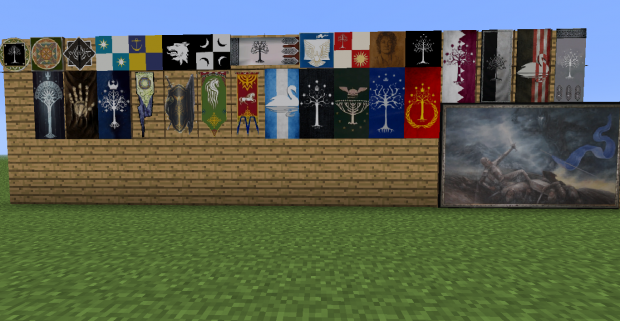
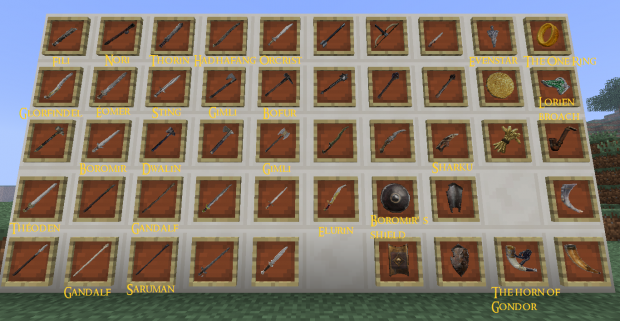
Mod Future
We have lots planned for this mod. The current plan includes new textures, new food, new weathers, new biomes, new blocks, new mobs, NPC's, quests, ingame jobs, new mob animals, magics, commands for mobs, a mana bar, a reputation bar, factions, ingame gamble games, ability to wear rings, ability to use two weapons, new plants, new weapons, a quest-board, new potions, new items, new vehicles, two-handed weapons, new achivements, ability to block with weapons, small blocks, gates, musical instruments, ability to see other players health, new valueables, coins, LOTR music, new height level, new neather (valinor now), a save block, goblins and gollum can crawl on walls, water in waterfalls get white, new sounds, new fighting system, keys & locks, new minecraft logo, ability to kick, new star heaven, new sort of water, horns, bells, upgrading system, fire arrows, new ores, add gore, smoke block, ability to smoke a pipe, a telescope, fireworks, snow & mud slows you, ability to become drunk, add cloaks and coats, travel faster on road blocks, special LOTR stuff and lots more .our plan is to create the world of Tolkien combined with other game facts. We will try as hard as we can to make the world the most realistic in the spirit of Tolkien and Peter Jackson's movie.
User Feedback
If you got some mod ideas go to our mod-idea blog and leave a post (link seen in our update log).
If you think you may have found a bug or glitch please do not comment below. Instead post it in the bug list here.
As always, if you like it, give diamond, subscribe and favorite!
Miscellaneous
Miscellaneous
I, nicrlaitheking, have been working on the plans for the mod for nearly 4 years now so don't post any stupid replies like: 'add orcs' or can 'i kill aragorn?!
I have been working with the universe of Tolkien for 14 years and the plans is based upon my knowledge i got in for the last 8-9 years.
The plan is that people can walk around in middle earth and explore. No LOTR or the Hobbit quests will be made. Many quests are planned. LOTR and Hobbit extension may be made after this mod is done - it will most likely just add new quests & NPC's.
The mods will be combined with some player possibilities on our server so check the list on our project site for more details.
Credits:
Nicrlaitheking - Texturer, Skinner, Model maker, planner, ("coder") & photographer (for the mod)
Scribblemaninac - Texturer, Expert modder & Expert coder
Rafael Krux- Professional Music Composer for The Valar Project (stopped)
Lenzen2 - Coder (stopped)
Ghostgunner - Coder (stopped)
Dtr011= Coder (stopped)
austinminecraft1= expert skinner (stopped)
Aximili= Expert NPC skinner
Lord Elessar = skinner & expert texturer (stopped)
nickgoss= skinner & expert texturer
the gravity block= Texturer (stopped)
LordKajetan= banner texturer & gather pictures for texturing. (stopped)
Trevor Miller- Expert Texturer (stopped)
Hadowkai - Expert skinner (permission to use skins)
jackfoo22/ GandalfNine - NPC skinner
Jonypony - Creator of our launcher
Pandasaurus - mob skinner
| Credit | scribblemaniac (Eru Iluvatar), dreader4321 (King of Valar), nicrlaitheking |
| Progress | 45% complete |
| Game Version | Minecraft 1.7.2 |
| Tags |
43 Update Logs
Update #2 : by TheValarProject 01/04/2016 3:37:10 amJan 4th, 2016
Fixed the Download Link, you can now download the mod
LOAD MORE LOGS
tools/tracking
771480
7
awaken-dreams-the-valar-project
![Lord of the Rings & The Hobbit Mod (HD!) - Awaken Dreams [Link Fixed] Minecraft Mod](https://static.planetminecraft.com/files/resource_media/screenshot/1328/Awaken-Dreams-Title3_5903056_thumb.jpg)


 Molitoola
 sniffercraft34
 ingridguerci94
 Noncommercial
 Anthony101990Jones
 MoonAstraea

 Harleyd007
 _Plume

 Rohit0099
 regfunkid
Create an account or sign in to comment.
Finally, the server for which is this mod supposed to is still on and running. Check it out and be sure to join if you like it! www.planetminecraft.com/server/the-valar-project-1839157/