




Published Dec 9th, 2012, 12/9/12 1:24 pm
- 42,115 views, 3 today
- 4,798 downloads, 0 today


5,939
Magic Circles 2: Rotate & Polar Array
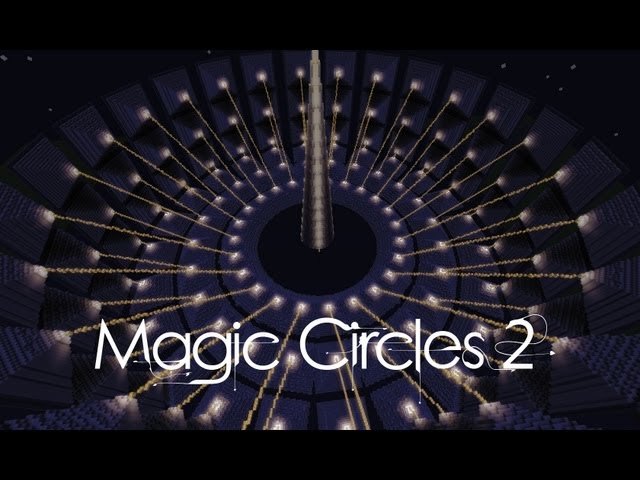
Hello all, I am excited to release to you my latest advancement in Minecraft circle technology, Magic Circles 2! This version now allows full 3D object rotating, and circular arraying to any angle, or angle increment you want. Another great new addition to this version is that it comes with both a worldedit craftscript, and MCedit filter, allowing use in singleplayer, multiplayer and MCedit!
Tutorial Video
Worldedit Craftscript
Install Guide
Singleplayer
1) Install the SinglePlayerCommands mod, which also comes with WorldEdit.
2) Open your main "%appdata%/.minecraft" folder up. (The one with bin and saves folder)
3) From the .minecraft folder navigate to the mods folder then to the spc folder.
4) Copy the downloaded, unzipped folder "craftscripts" into it, merging with existing folder if necessary.
5) Find the worldedit.properties file in the same folder and open with any text editor.
6) Go to the line that reads "scripting-timeout=" and change the value to 30000.
7) Save the file and close all folders, open Minecraft and test it out with the command "/cs rotate".
*You must own/have access to server files to install scripts.
1) These scripts all require the worldedit plugin, make sure to have it installed before attempting.
2) Once installed you just need to copy all the script files to your "plugin/worldedit/craftscripts/" directory.
3) Make sure to increase script timeout value in the "plugins/worldedit/config.yml" file to at least 30000.
How to Use
There are three things you must do to run this script correctly. The first is setting an active 3D selection with worldedit, to the blocks you want rotated. Once you have that, you need to bind the rotate brush to a non-useable item, with the commands listed below. Once the brush is bound all you need to do is click where the center should be, and it will copy, and rotate everything around that point.
Command Usage
/cs rotate increment, resolution, singleStep, brushMode
increment - Step between rotations. (positive number = total items in the circle, negative = exact angle)
resolution - The accuracy of filling in blocks, slowy increment this if you encounter gaps in blocks.
singleStep - Specifies if you want a full circular rotation, or a single one (0=single, 1=full)
brushMode* - Specifies if the command should bind to a brush = 1, or run now, using player origin = 0.
*SPC and worldedit brushes are somewhat unstable at the moment, setting this to 0 may prove to be more crash resistant if using this in singleplayer.
-Only the increment argument is required, all others are optional.
-Exclude commas when entering in arguments.
Errors/Troubleshooting
Problem: Error Message "Failed to find an installed script engine." when using script.
Fix: Go here, download the Rhino Zip file. Unzip it and copy the included js.jar to your "/.minecraft/bin" folder.
Problem: Error Message "Script does not exist ..." when using script.
Fix: Worldedit can't find the script in the craftscripts folder, make sure you copied it to the right location.
Problem: Error Message "Make a region selection first." when using script.
Fix: Just like it says, you need to have an active worldedit selection, using the //wand or //pos commands.
If there are other problems you come across, please let me know.
MCedit Filter
Install Guide
1) The first you need to do is open the directory in which mcedit was installed.
2) From there, navigate to the appdata folder, then to the folder of your current mcedit version.
3) In that directory there should be a filters folder with all the normal default *.py filters.
4) All you need to do now is copy the downloaded filter file into that directory.
5) The next time you open the filters menu up in MCedit, it will be on the list.
How to Use
There are a few things you must do to run this filter correctly. The first is setting an active selection in MCedit, to the blocks you want rotated. Once you have that, you need to open the filters menu up ,and locate the "3D Rotate & Polar Array" option on the dropdown list. Once you have selected that, the filter interface options will show up and let you rotate your selection by hitting the filter button.
User Interface & Options

Special thanks to abrightmoore for helping me when I got stuck!
| Progress | 100% complete |
| Game Version | Minecraft 1.4 |
| Tags |
tools/tracking
1609072
7
magic-circles-2

![Magic Circles 2 - AutoRotate & Polar Array [Craftscript/Filter] Minecraft Mod](https://static.planetminecraft.com/files/resource_media/screenshot/1248/Title_Good4_4281535_thumb.jpg)
![Terraforming Toolkit - [Worldedit Script Collection] Minecraft Mod](https://static.planetminecraft.com/files/resource_media/screenshot/1236/Toolkit2_3549843_thumb.jpg)
![Magic Circles - 3D Revolve [Worldedit Script] Minecraft Mod](https://static.planetminecraft.com/files/resource_media/screenshot/1224/INTRO_2575221_thumb.jpg)
![Super Spiral Generator [WorldEdit Scripts] Minecraft Mod](https://static.planetminecraft.com/files/resource_media/screenshot/1146/2011-11-14_223202_836090_thumb.jpg)


![[Oriental Build pack] + "Download link"](https://static.planetminecraft.com/files/resource_media/screenshot/1707/small/art2210852973_thumb.jpg)
 ApparentlySkilled
 snoopbobb
 Hebgbs
 ScotsMiser
 nos1130

 deadlyPig
Create an account or sign in to comment.
"importPackage(Packages.com.sk89q.worldedit.command.tool.brush);"
right after these import package lines.
Thank you.