NovaSkin - Online Skin and Texture Pack Editor
615 diamonds
Download
| Install on Chrome | |
| direct link |
-
329,758Views, 711 today
- 55,037Downloads, 106 today
- Comments
- Favorites
- Flag / Report
Get Embed Code
Level 64 : High Grandmaster Technomancer
Posted 01/10/11 9:28:06 pm , last updated: 03/14/13 5:56:55 pm
01/10/11

Features:
- Just click and draw over a player skin.
- It's online. You need a modern web browser. No download/flash/java. Works in Firefox, Google Chrome, Opera, Safari, IE9, etc.
- You can zoom, rotate and move by pressing shift+mouse or using on screen tools.
- Load skins from your files (load button or drag & drop), from a url or load any minecraft player skin.
- Multiple color slots, gradient lines, rectangles, ellipsis and eye dropper.
- Middle click or spacebar performs the same eye dropper action.
- Flood fill tool.
- Color rotator to change the skin colors.
- Multiple layers: add, remove, combine.
- Show/Hide grid and parts. (to draw on head hide the hat)
- You can get your skin previewed by url.
- Skins and parts can be imported from different websites: skindex, skincache, minecraft armory, minecrafties.
- Undo!
- The skin can be saved as a png image, uploaded direct to minecraft.net;
- You can also share the links.
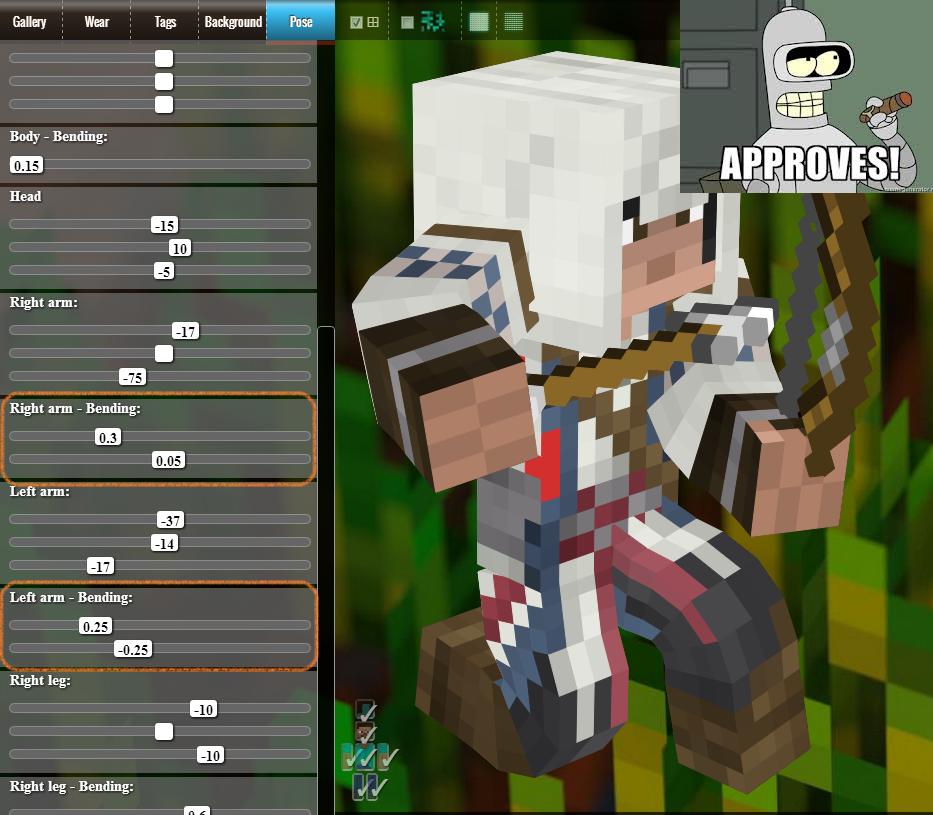
- Take screenshots with your skin in different poses, holding an item.
- The skins previews are rendered with alpha blending and a transparent background.
- Embeddable (copy&paste html code) to display a animated, rotatable skin preview for your blog or own site.
- Papercraft helper.
- Live gallery with latest skins.
- Login to save skins.
- Full 2D editor (pixlr) integration.
Tips:
- Nova skin works offline, access the site once online, go offline, go to nova skin, it works.
- Double click fill the entire area.
- Right click acts as an eraser.
- Space bar, middle click acts as the color picker.
- Drag files from your computer and drop on novaskin. They'll be loaded.
- Edit skins with Gimp, Photoshop or any other external image editor. When the file is saved, novaskin automaticaly reloads the changes. Userful from real time preview. Use a professional editor, preview, make changes, save online and get screenshots with novaskin.
- The erase hat button clear the entire upper head cube, util from some skin without transparency.
- Type a player name at name/url field to load the player skin.
- Login, novaskin will remember you skins creations. When you save a new skin, it will be added to your collection.
- All skins saved online at gallery are public. When you save a skin you get:
- Short link to your skin (novaskin.me/identifier)
- The skin will be uploaded to imgur and hosted online.
- Forum BBCode (with screenshot, instant aply link) to share your skin with the community.
- HTML code to embed the 3D skin preview in you own site.
- The skin is uploaded to the online gallery. - If you do not your skin to be public, use the aplly to minecraft button, the skin will not be saved or shown on public gallery. Or click save, right click the flat skin image and choose save image as and close the save window.
- Use the search tab to find skins on several skins sites at once.
- Use the nice2draw pose, don't forget to fill the skin parts hidden by the default pose.
- Check the randomize color checkbox to avoid flat colored skins.
- Click the pickaxe, choose a holding item and draw over it, setup a nice custom pose, save to get a nice scrrenshot.
- Change the background to test the skin in different sittuations, try to use soft colors, in game they will look better.
- Use the flip bottom faces button to fix skins created before 1.0.
- Chrome users: install the App in Chrome Web Store.
Texture Pack Editor:
- In fact, it is a complete texture pack manager, preview, edit, create skins for:
- Mobs
- Items
- Blocks
- Schematics
- Also with More player models and Mo'Creatures
- Open texture packs from:
.zip files,
directory,
automatically import from your .minecraft/texturepacks folder,
load texturepacks form your dropbox - Save texturepack skin:
to the local nova skin texture pack manager
to your dropbox
instantly apply to minecraft and test in game
save to the online gallery
- No, it is not related to UberHaxorNova... click here to discover what nova skin means. The logo is inspired on a beer.
- This was the first "mod" posted in planet minecraft. This is not a mod, i know. That time there are fewer categories. Anyway, projects are for world levels, blogs are for stories. The site miss a "tools" category.
- The editor works on any version of minecraft. Skins implementation mostly remain unchanged between versions of the game. The unique change was the bottom face flipping in beta/1.0 transition.
- This is a site, you don't need to download anything.
- Abcd is better. Nice, use that.
- No, it's not "Google Chrome" only. Will work with Firefox, Safari, Opera, even ie9. But you will love how smooth it runs in webkit browsers, especially Google Chrome.
Additional Details
| Progress: | |
| Game Version: | Minecraft 1.5 |
| Tags: | Skin, Editor, Aesthetic, Texture Packs |
| Credit: | @saviski |
Note: Showing last 25 of 53 logs.
Update #53 : 05/16/2013 2:16:54 am5/16/13
- Added bending and two item holding.

Update #52 : 03/14/2013 5:56:55 pm3/14/13
- Added the 1.5 new blocks
- New texture packs projects are created with "empty" textures, just the edited textures will be included in the generated .zip
- Texture pack explorer show the missing files for a texture pack.
Update #51 : 03/06/2013 5:15:02 am3/06/13
- Texture pack editor updated to minecraft 1.5
- New block added
- Block and Items now are saved in separated texture files inside a textures folder.
- Added integration with Techne Online
- Added a voting system to the skins inthe gallery
- Texture pack editor save window polishment, simplified but maintains the same functionality.
- Corrected bugs with skin uploads and cursors positionation
Update #50 : 01/22/2013 2:04:57 am1/22/13
- Added Techne support
Update #49 : 01/11/2013 3:28:08 am1/11/13
- Updated texture pack editor model centralization in screen;
- Locally save the skin and restore it to present lost of work in case of unwanted page reloads.
- Fixed issue loading skin edited with pixlr
Update #48 : 01/09/2013 11:40:44 pm1/09/13
- Added gallery search to the texture pack editor. Let's see if it help increase creativity like happened with the player skin editor :)
Update #47 : 12/20/2012 2:08:47 pm12/20/12
Texture Pack Editor
- Import texture packs from minecraft
- Load .zip texture packs
- Import skins from a directory
- Synchronize with dropbox
- Edit all the mob, items and blocks
- Show texture packs with 3d previews for everithing
- Load schematics
Update #46 : 08/24/2012 5:59:19 pm8/24/12
- Added blocks.
aka: texture pack editor (terrain.png) 
Update #45 : 08/20/2012 8:11:13 pm8/20/12
- Updated the Mo'Creatures Mobs in the Mob Skin editor:
- Added NewHorse, new Wolves, Goat, JellyFish, Ostrich, Ray, Snake and FishBowl.
Update #44 : 08/07/2012 5:33:52 pm8/07/12
Update #43 : 07/25/2012 8:39:35 pm7/25/12
- added randomobs support
Update #42 : 06/26/2012 1:32:14 pm6/26/12
- now a kind of "instant skin search" was added.
Update #41 : 06/15/2012 6:34:34 am6/15/12
- Gallery improvements
- Mob skins listing and new appearance
- Server-side changes to reduce resource usase during searches
- Skin authors now can delete skins
Update #40 : 05/30/2012 12:21:45 am5/30/12
- Changed how "undo" works with pixels, now ctrl+z undo all the drawings from the last click-move-leave sequence instead of undo pixel-by-pixel.
Update #39 : 05/27/2012 11:18:07 pm5/27/12
- Apply mob skins from gallery to a custom texture pack
- http://novaskin.me/post/23756601535/texturepack

Update #38 : 05/12/2012 2:53:05 am5/12/12
- left, right, up, dowd - rotate the model
- ctrl+s - show the save dialog
- + and - - change the zoom
Update #37 : 05/11/2012 12:27:51 am5/11/12
- new textured-bsptree-triangle render, allows support for load HD skins.
- pencil options, size, brush type, new color selection UI
- enderdragon is almost finished, now it does not freeze the browser anymore
- UI improvements, new icons
- Pixlr integration
- Can load skins from the gallery
- You can load texturepacks .zip and folder to preview the mob skins, now there are big buttons showing this, Try it!
- a lot of bug fixes
- and a lot more, check and see.
Update #36 : 03/26/2012 3:50:04 pm3/26/12
- some layout fixes in firefox
- removed the alert message for new version, now show a notification in the status bar.
Update #35 : 03/22/2012 10:08:51 pm3/22/12
- added Iron Golen and Ocelot to the mob skin editor
http://mob.novaskin.me/editor/IronGolen
http://mob.novaskin.me/editor/Ocelot - flipped bottom faces
- right click select parts in mob editor, now it toggle beetwen all the clicked areas.
Update #34 : 03/18/2012 11:35:01 pm3/18/12
You can also go to your profile page (http://minecraft.novaskin.me/gallery/profile/my ) and check your skins to see if anyone has edited a skin based on one of yours creations. There is a derivations link for each skin page.
Update #33 : 03/08/2012 10:55:09 pm3/08/12
Update #32 : 03/07/2012 4:03:10 pm3/07/12
- Play animation button
Update #31 : 02/28/2012 11:00:03 pm2/28/12
Main page show the most commom tags
Search with tags suggestions
Profile pages
Favorites
3d Preview
Mobile friendly (to be improved)
Update #30 : 02/24/2012 12:46:46 am2/24/12
- iframe skin preview was moved to its own subdomain, (preview.novaskin.me), the old addres (novaskin.me/preview) redirects to the new one.
- The preview now is animated! See it workin here http://preview.novaskin.me?play=true#saviski
Update #29 : 02/15/2012 2:12:54 pm2/15/12
- Fixed a issue with login.
Join us to post comments.
Comments : 431
123456789 next »
1 - 50 of 431
123456789 next »
1 - 50 of 431


Reply
Delete
Kaelikbug
Level 1
New Explorer
May 24, 2013, 6:11 pm
Reply
Delete
stzyik97
Level 9
Apprentice Pokemon
May 14, 2013, 8:22 am
Reply
Delete
Nomadic Miner
Level 1
New Skinner
May 7, 2013, 5:05 am
Love it!
Reply
Delete
Jfishhero24
Level 1
New Explorer
April 30, 2013, 11:31 am
Thanks so much,
Jfishhero24
Reply
Delete
saviski
Level 64
High Grandmaster Technomancer
May 15, 2013, 10:14 pm
In fact, I've already found it on youtube and it is really funny and informing!
Hope you continue doing more tutorial videos.
If you need any help with novaskin features just send-me a PM or contact me http://novaskin.me/contact
Reply
Delete
Jfishhero24
Level 1
New Explorer
May 21, 2013, 11:46 am
Keep up the good work!
Reply
Delete
karic24
Level 1
New Miner
April 29, 2013, 1:35 pm
Reply
Delete
WestsidePhoenix
Level 1
New Crafter
May 11, 2013, 9:03 am
Reply
Delete
Significs
Level 1
New Miner
April 27, 2013, 5:53 pm
Reply
Delete
Rostta1234568
Level 1
New Miner
April 19, 2013, 12:22 pm
Reply
Delete
Rostta1234568
Level 1
New Miner
April 19, 2013, 12:22 pm
Reply
Delete
YourMom521756
Level 1
New Explorer
April 12, 2013, 7:51 pm
Reply
Delete
Magmalord
Level 13
Journeyman Toast
March 14, 2013, 4:32 pm
Reply
Delete
saviski
Level 64
High Grandmaster Technomancer
April 24, 2013, 6:01 pm
Reply
Delete
zan6387
Level 3
Apprentice Explorer
March 9, 2013, 4:09 am
Reply
Delete
BeastDiamondXD
Level 30
Artisan Droid
March 14, 2013, 5:19 pm
Reply
Delete
alex259679
Level 1
New Miner
April 19, 2013, 3:58 pm
Reply
Delete
898860
Level 10
Journeyman Mage
March 26, 2013, 5:47 am
Reply
Delete
xXShufflin101Xx
Level 3
Apprentice Architect
March 13, 2013, 5:07 am
Reply
Delete
ihasapod
Level 17
Journeyman Engineer
March 9, 2013, 1:36 pm
Reply
Delete
ObsidianMinerMan
Level 13
Journeyman Dragonborn
March 6, 2013, 12:41 pm
Reply
Delete
kikih66
Level 9
Apprentice Hunter
March 6, 2013, 1:44 am
Reply
Delete
ice374
Level 50
Grandmaster Programmer
March 3, 2013, 11:39 pm
Reply
Delete
saviski
Level 64
High Grandmaster Technomancer
March 6, 2013, 12:08 am
Also, a quick note here:
The texture pack editor was updated to minecraft 1.5
Minecraft still 1.4 to date, so it means you need to use the last snapshot to be able to test the block and items textures.
Reply
Delete
AlexthekidRS
Level 6
Apprentice Miner
February 26, 2013, 3:01 pm
Everyone knows about NovaSkin! Why did you do that? Theres probably hundreds of people who have already done this!
Reply
Delete
saviski
Level 64
High Grandmaster Technomancer
March 6, 2013, 12:05 am
Also, I'm glad to hear "Everyone knows about NovaSkin" =D
Reply
Delete
timelord25
Level 1
New Miner
February 16, 2013, 6:09 am
you can get it with crome and login with google acoont it relly fun can aney on give advide on what to do
Reply
Delete
joshminecraft123
Level 1
New Miner
February 13, 2013, 10:11 pm
Reply
Delete
mj1999
Level 19
Journeyman Architect
February 12, 2013, 11:56 am
Reply
Delete
legomaniac1998
Level 1
New Explorer
February 6, 2013, 7:34 am
Reply
Delete
fragmen52
Level 31
Artisan Modder
February 5, 2013, 4:42 am
Reply
Delete
Chrag521
Level 3
Apprentice Warrior
January 31, 2013, 12:45 pm
Wow!!!
Reply
Delete
MAX490907
Level 14
Journeyman Engineer
January 25, 2013, 2:24 pm
Reply
Delete
saviski
Level 64
High Grandmaster Technomancer
March 6, 2013, 12:17 am
Reply
Delete
ThirstySoul
Level 1
New Crafter
January 23, 2013, 6:05 am
Reply
Delete
mcmodjarhelp
Level 1
New Miner
January 22, 2013, 7:12 am
This group really helps if you need help installing this mod
Reply
Delete
N8TLAW
Level 20
Expert Spider Rider
January 21, 2013, 12:39 pm
Reply
Delete
Jurascuka5
Level 15
Journeyman Lumberjack
February 15, 2013, 8:07 am
Reply
Delete
DerpNuke42
Level 1
New Explorer
January 20, 2013, 8:12 am
Reply
Delete
Nikihak
Level 1
New Crafter
January 18, 2013, 6:28 am
Reply
Delete
deluxe1mod
Level 8
Apprentice Dragon
January 6, 2013, 1:43 am
Reply
Delete
RedXtreme
Level 23
Expert Pixel Puncher
January 6, 2013, 12:26 am
and I click save, it takes me back to novaskin and it doesnt add the changes I made with pixlr.
Reply
Delete
saviski
Level 64
High Grandmaster Technomancer
January 9, 2013, 8:32 am
Reply
Delete
RedXtreme
Level 23
Expert Pixel Puncher
January 10, 2013, 3:09 am
Reply
Delete
saviski
Level 64
High Grandmaster Technomancer
January 10, 2013, 10:23 pm
Reply
Delete
RedXtreme
Level 23
Expert Pixel Puncher
January 11, 2013, 4:34 am
Reply
Delete
loukio
Level 13
Journeyman Architect
January 2, 2013, 4:28 pm
Reply
Delete
saviski
Level 64
High Grandmaster Technomancer
January 9, 2013, 8:34 am
Reply
Delete
terrorisreality
Level 1
New Miner
December 28, 2012, 4:41 am
Reply
Delete
marty4179
Level 5
Apprentice Miner
December 15, 2012, 8:41 pm
Reply
Delete
Bomzeez
Level 9
Apprentice Archer
December 7, 2012, 7:22 am
Reply
Delete
the modder
Level 1
New Miner
December 4, 2012, 3:51 pm
Reply
Delete
Nova_Drew74
Level 7
Apprentice Artist
December 1, 2012, 4:54 pm
Reply
Delete
websurfer915
Level 18
Journeyman Mountaineer
January 8, 2013, 12:43 pm
Reply
Delete
isaaco12310
Level 1
New Explorer
November 30, 2012, 5:36 pm
Reply
Delete
saviski
Level 64
High Grandmaster Technomancer
December 2, 2012, 5:06 pm
Reply
Delete
SaladFury1
Level 1
New Miner
November 12, 2012, 1:22 am
Reply
Delete
thegoodboy03
Level 1
New Miner
November 9, 2012, 11:39 pm
Reply
Delete
GrandiosCraft
Level 5
Apprentice Narwhal
November 2, 2012, 5:12 pm
Reply
Delete
Korside
Level 4
Apprentice Skinner
November 1, 2012, 11:49 pm
Reply
Delete
saviski
Level 64
High Grandmaster Technomancer
December 2, 2012, 5:07 pm
Reply
Delete
JeterNYY
Level 1
New Explorer
October 26, 2012, 9:57 am
Reply
Delete
speedster1212
Level 1
New Dolphin
October 11, 2012, 12:56 pm
Reply
Delete
Darkflame2050
Level 3
Apprentice Ranger
October 9, 2012, 2:56 pm
Reply
Delete
Marronchoco
Level 1
New Explorer
October 7, 2012, 3:36 am
Reply
Delete
ham114
Level 9
Apprentice Hunter
September 24, 2012, 10:36 pm
Reply
Delete
Maddis
Level 1
New Miner
September 6, 2012, 9:36 pm
Reply
Delete
saviski
Level 64
High Grandmaster Technomancer
September 27, 2012, 12:30 pm
Reply
Delete
acedemo
Level 18
Journeyman Lumberjack
August 31, 2012, 10:13 am
Reply
Delete
Bearsbite
Level 1
New Explorer
August 30, 2012, 1:20 pm
Thanks for making this site! AMAZING!
Reply
Delete
Rjsbuilder
Level 1
New Miner
August 30, 2012, 11:00 am
Oh well THANK YOU now i can finnaly have my own skin