
312

Custom Tree Repository

312 diamonds

  • 28,222
    Views, 407 today
  • 7,171
    Downloads, 119 today
  • 236
    Comments
  • 145
    Favorites
  • Flag / Report

Get Embed Code

Forum:
HTML:
Link:
avatar lentebriesje
Level 58 : Grandmaster Architect
Posted 12/25/12 5:42:54 am , last updated: 03/10/13 2:35:56 pm
12/25/12

pcjrbqN.pngOobADTJ.pngO68at8v.png325FtlG.png


rRHNzaf.png


11_zps99225e3d.png

12_zpsa609eb0c.png

15_zps8727252d.png13_zps814e7c35.png14_zpsb309854f.png


Additional Details

Progress:
100
Tags:Environment, Landscaping, Lentebriesje

More Projects by lentebriesjeView All

2012-10-13 11:10:26
by lentebriesje

Update #4 : 03/10/2013 2:35:56 pm3/10/13

Added a new filter option, an Excel sheet with checkboxes to help you decide which trees would fit your need! Do watch the video if you get stuck with it!

Update #3 : 02/01/2013 2:05:36 pm2/01/13

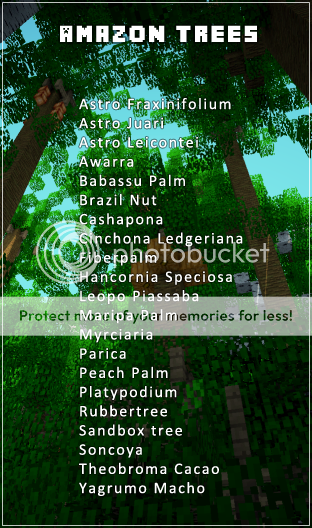
i've added 42 trees from the Amazon to the Tree Repository. I'd has a right variety of trees which will fit in most tropical settings.

Update #2 : 12/29/2012 9:28:52 am12/29/12

Ball_Lightning made a lovely cinematic showing of the two test islands thus far. It is said a picture tells more than a thousand words, by that logic a cinematic must be the equivalent of an atlas. About as good as it gets without downloading the project and actually looking at it ingame. :)

Update #1 : 12/28/2012 5:19:07 pm12/28/12

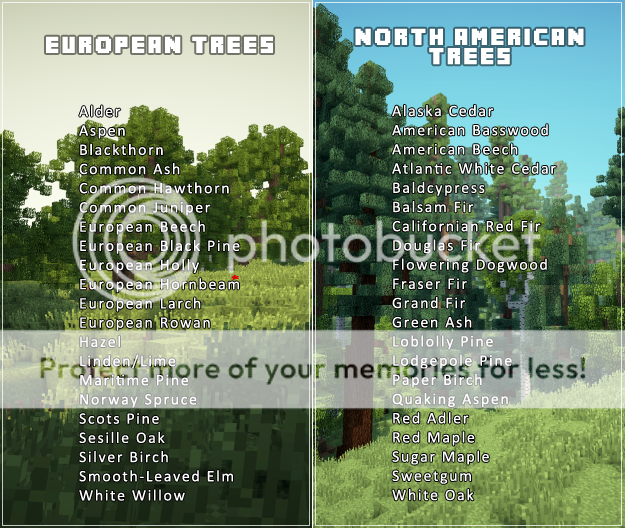
Added 43 templates for native North American trees

Join us to post comments.

Comments : 236

1 - 50 of 236

Skinnymin14
Level 17
Journeyman Dragon
May 24, 2013, 1:18 am

Amazing! Do you Have a tutorial on how to get these trees on world painter?!
Also may i use this for my HG Map?

lentebriesje
Level 58
Grandmaster Architect
May 24, 2013, 2:29 am

Click the [ + ] button in the layers menu, click "add custom object layer" and put in the .schematics or .bo2's in the menu that pops up. I suggest you fool around with it, trial and error. Export pieces of the map and tweak it untill it's to your liking!

14manj01
Level 1
New Miner
May 23, 2013, 5:07 pm

I wish there was a way to see pictures of indvidual trees so i can see what i'm placing..

lentebriesje
Level 58
Grandmaster Architect
May 23, 2013, 5:36 pm

There are so many maps using these trees, shouldn't be hard to find a map to check a few out :)

fishin_fool
Level 1
New Miner
May 23, 2013, 1:50 pm

nevermind i got it

fishin_fool
Level 1
New Miner
May 23, 2013, 1:24 pm

i tweeted this but how do i download it?

thunderclaws
Level 1
New Miner
May 23, 2013, 9:59 am

nice trees btw :D

RetroBot
Level 1
New Explorer
May 19, 2013, 12:04 pm

Why do I have to endorse it in order to download it.

lentebriesje
Level 58
Grandmaster Architect
May 19, 2013, 12:10 pm

Because i've spend spend a lot of time creating & perfecting this. A whole lot of people use it, and i assume you are here because you saw examples using it and you as well want to use it? If this is the case i'll also assume you like it, an endorsement seems to me a fair trade for using this. 

tommat6000
Level 7
Apprentice Ranger
May 19, 2013, 3:22 am

Hi! These look great. I am currently making a custom terrain map, for use on a server and possible at some point for download on PMC, is it ok if I use a few of these to give some islands some more character? :)
Thanks

lentebriesje
Level 58
Grandmaster Architect
May 19, 2013, 5:42 am

yeah man

Preian
Level 1
New Miner
May 11, 2013, 8:15 am

Is it possible to use this in World Painter?

lentebriesje
Level 58
Grandmaster Architect
May 11, 2013, 8:24 am

yes it is

Muntantcreeper51
Level 8
Apprentice Cake
May 16, 2013, 11:34 am

So i can use these in my own projects if i give you credit?


Plz reply

Preian
Level 1
New Miner
May 11, 2013, 8:49 am

Great! I was hoping to use those trees for my MCSG map. Is it ok for you? I will of course give you credit.

lentebriesje
Level 58
Grandmaster Architect
May 11, 2013, 8:57 am

yes you can

Preian
Level 1
New Miner
May 11, 2013, 9:00 am

Well, I just learned the basics about WP so I'm not sure how to upload it. Could you please help me?

lentebriesje
Level 58
Grandmaster Architect
May 11, 2013, 9:22 am

For the custom objects layer do as follows:


Click the [ + ] button in the layers menu
Click "Add a custom object layer"
Click the [ + ] button in the popup menu
Navigate to the folder with the tree schematics you want to use
Select and open the tree schematics you want to use in that particulair brush [you can have a multitude of brushes]
When you've added all the schematics you want click [ OK ]
A new [ ] will show in the layers menu, it works just like other brushes and you have to use intensity to make the brush stronger or weaker. This can require trial and error, going ingame and checking whether the forest isn't to dense or not dense enough.

Good luck!

Preian
Level 1
New Miner
May 11, 2013, 9:55 am

Thank you very much :)

Hellomynameis99
Level 1
New Miner
May 8, 2013, 10:27 pm

NOOO! I just realised you had to "Pay with a Tweet"


I.... Don't.... I don't have twitter.... Or Facebook (Which is neither a face, nor a book :)


Is there another way to download?

lentebriesje
Level 58
Grandmaster Architect
May 9, 2013, 12:18 am

Nope, make a twitter account? It's easy and free, plus, you might start to enjoy checking out what minecraft youtubers/creators put on twitter. 

LeafNode
Level 37
Artisan Pixel Painter
May 8, 2013, 12:00 pm

Lente, why are you deleting my comments?


I really don't want to post this on my facebook and would like to just have a free download.

lentebriesje
Level 58
Grandmaster Architect
May 8, 2013, 12:33 pm

I'd say it's a small price to pay for getting this repository. If you perceive it as such too, then why not publicly endorse it? If you think it's a steep price to pay, if you don't think it's worth endorsing, then i feel sad for you not appreciating the effort i put in this repository. And you could just also not download it in that case.

LeafNode
Level 37
Artisan Pixel Painter
May 8, 2013, 5:15 pm

I appreciate the effort you put into this, I would gladly wait the 5-7 seconds for an adfly link.


But, to share this on my facebook page is foolish. For one, none of the people I know play minecraft. Two, people that do are often made fun of, besides me. Three, you are the only person I know that requires this.

I would endorse this on PlanetMinecraft or the MinecraftForums, as those are meant for Minecraft. 

lentebriesje
Level 58
Grandmaster Architect
May 9, 2013, 12:18 am

I'm aware that some people might not like this function were i ask them to share it with friends, and i take that in consideration, but the initial response seems actually to be more positive as negative. Besides, anyone can make a twitter account, you might actually enjoy seeing what other minecraft creators put on twitter. 

Flint_Norris
Level 1
New Explorer
May 8, 2013, 11:59 am

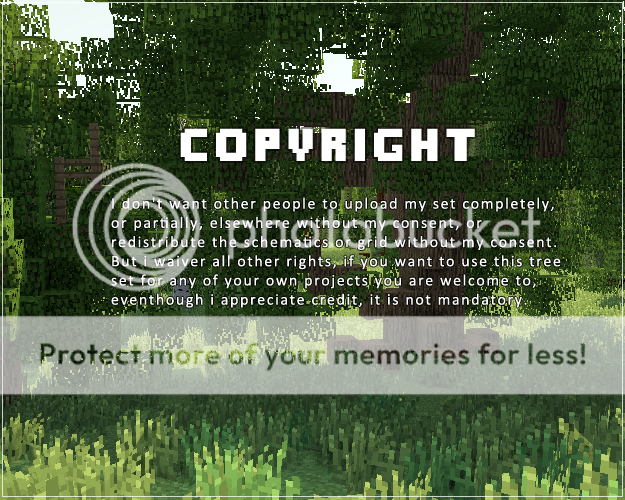
Lent, can you be more specific with your copyright? What does "partially upload my set" all entail? I would like to upload a map I made with your repository, but does this breach the ToS? Do I need to get permission to upload anything that has to do with your repository or is it just saying not to upload the actual tool?

lentebriesje
Level 58
Grandmaster Architect
May 8, 2013, 12:02 pm

Not to redistribute the individual trees or grid, so if people want to get this repository themselves, they come here to download it. 

Flint_Norris
Level 1
New Explorer
May 8, 2013, 12:05 pm

Okay, so for just using the material and uploading what I created with it, I don't have to get permission every time right? I just need to give credit. Am I correct on this?

lentebriesje
Level 58
Grandmaster Architect
May 8, 2013, 3:01 pm

You don't need to credit me, eventhough i appreciate it as a curtosy. You cannot however claim the trees as being your own work, so if someone explicitly asks where you got your trees from, you refer them to this repository. :)

Hellomynameis99
Level 1
New Miner
May 5, 2013, 9:32 pm

Hi! I'm thinking of using this here. All due credit will be given (On the website and a sign of honour at spawn), and as a server, nobody will be able to get the schematics without visiting this project page.

I didn't want to start anything without your permission, so I'll be waiting! (:

lentebriesje
Level 58
Grandmaster Architect
May 6, 2013, 1:02 am

yeah man, go ahead

Hellomynameis99
Level 1
New Miner
May 6, 2013, 10:01 pm

Great, thanks! I'll get the IP to you when the server is running, if you want to see the trees (:

Dr_A
Level 10
Journeyman Unicorn
May 3, 2013, 11:40 am

If you don't mind, I would love to use some of these in a SG map I'm working on right now

Dralyona
Level 40
Master Dragon
April 29, 2013, 5:30 am

These trees are awesome! I love trees! And there are rarely such grand creations the revolve around trees! Great job :) Also, do you think you will ever make Australian trees? (For science)

ninilac
Level 1
New Miner
April 24, 2013, 4:04 pm

Hey, love your trees! Can i use them for the SAO project that I,Zedeik and coolmencolmen got going on, please?

lentebriesje
Level 58
Grandmaster Architect
April 24, 2013, 11:28 pm

yeah, go ahead :)

ninilac
Level 1
New Miner
April 25, 2013, 1:49 pm

thanks! :D

duckziller123
Level 3
Apprentice Blacksmith
April 18, 2013, 8:17 am

can i please use these tree in a world painter map and post it on planet minecraft i will give you credit and thank you in a youtube video if you let me

lentebriesje
Level 58
Grandmaster Architect
April 18, 2013, 9:35 am

yeah man, go ahead

duckziller123
Level 3
Apprentice Blacksmith
April 18, 2013, 12:37 pm

thanks, your a legand

absolutereverie
Level 1
New Crafter
April 17, 2013, 7:03 pm

You don't mind if I use some of your tees on a map I am making? I will give you all the respected credit to you.

OmerHart
Level 15
Journeyman Mountaineer
April 16, 2013, 12:42 am

ty you helped me so match right now diamond and sub

jaxxn_1
Level 1
New Miner
April 7, 2013, 2:05 am

Hey! I love this tree compilation however I'd like to solely use the schematics. Using Minecraft structure Planner I only see the leaves, and not the logs. Any reason for this? thanks.

edit: Ok after looking into it and looking at how the logs look in game, I can see that the log bocks are broken. There texture is not correct, I'm seeing the side texture of the log on the bottom and also the top of the log block, therefore MCstructure planner can not detect it. Is there anything I can do to resolve this? Thanks.

BEskind
Level 19
Journeyman Nerd
April 5, 2013, 12:49 pm

Lente, You Are Awesome!
I'm using this repository for my map:

Massive Middle Earth

lentebriesje
Level 58
Grandmaster Architect
April 5, 2013, 1:03 pm

Looks cool man! 


If you experience any problems with worldpainter, i dabble in it myself aswell, just shoot me a message :)

creepus_killerus
Level 1
New Miner
April 5, 2013, 10:04 am

Hey, I really like your trees. They inspired me to start makeing maps by myself.
I have just one question: in your test-worlds you have a lot of grass on the ground and i can't find a solution to make this too. Please just tell me, if there is any option in worldpainter to make a BUNCH of grass on the floor of my jungle. ;D
Ps: I also subscribed your Youtube channel. :D

lentebriesje
Level 58
Grandmaster Architect
April 5, 2013, 10:41 am

There is:
  • Click the [ + ] button in the layers menu
  • Click "add custom ground cover layer"
  • Set block id to 31 and the data value to 1 (important!)
  • Keep thickness 1, otherwise it's going to stack a tall grass on top of a tall grass
  • Click [OK]
  • Paint it on the map like you would any other ground cover!

Good luck with worldpainting, and thanks for the subscription! :)

creepus_killerus
Level 1
New Miner
April 5, 2013, 10:50 am

Thank you for the fast answer! I gonna try this out as fast as can. I'm sure this will work! Thank you verry much. :D

TheFuremanator
Level 15
Journeyman Architect
March 29, 2013, 8:05 am

Is there any way to make the schematics only replace air blocks and not cut squares out when importing them via World Edit?  I tried pasting a tree in an empty space, and rather than fit perfectly it just deleted a huge square replacing every block with air and the tree.

Timkat1994
Level 11
Journeyman Architect
April 5, 2013, 1:33 am

//paste -a

Peridicus
Level 1
New Miner
March 26, 2013, 12:11 pm

this helped a lot, it used to be i couldn't make a half decent tree to save my life. still not much better, but a bit.Thanks

TheDom102
Level 17
Journeyman Engineer
March 25, 2013, 9:38 pm

So damn awesome! :D

TheArtist
Level 28
Expert Pixel Painter
March 23, 2013, 3:36 pm

Damn, that's cool!

Schnogot
Level 30
Artisan Architect
March 23, 2013, 10:47 am

So damn epic =D

XKingofDiamondsX
Level 2
Apprentice Architect
March 17, 2013, 1:15 pm

How are you so good at.. just.. trees.. Its crazy :O

Tobihobbit95
Level 9
Apprentice Miner
March 17, 2013, 8:18 am

Thank you so much for this masterpiece :D

Unnatural_Apple
Level 32
Artisan Turtle
March 10, 2013, 12:50 pm

Cool new stuff, nice to see you on CN 

Epic_Lil_Dude2
Level 4
Apprentice Skinner
March 9, 2013, 1:20 pm

wait no i meant Diamond but i thought this was something else

Epic_Lil_Dude2
Level 4
Apprentice Skinner
March 9, 2013, 1:18 pm

Diamond wait nevermind

Wrxth
Level 29
Expert Electrician
March 8, 2013, 9:51 am

How did you get full wood blocks? i want to use them too but i dont know how

lentebriesje
Level 58
Grandmaster Architect
March 8, 2013, 9:57 am

They are just different block id's: 17:11, 17:12, 17:13, 17:14


Assuming that you know what that means and how to use either world edit or mcedit, to name two tools.

Aug88
Level 2
Apprentice Architect
March 4, 2013, 12:20 am

hey lente dit is echt super werk, en we willen ze graag gebruiken voor onze mmo server ! kom gerust even langs als je wilt !!!

lentebriesje
Level 58
Grandmaster Architect
March 4, 2013, 12:22 am

cool, wie weet kom ik een keer langs :) 

Aug88
Level 2
Apprentice Architect
March 4, 2013, 12:33 am

ik was de link vergeten www.kingdom-mc.net hehe

MrFruitTree
Level 64
High Grandmaster Artist
March 3, 2013, 7:04 pm

This is so beautiful :O

Noezz
Level 37
Artisan Artist
March 3, 2013, 5:49 am

Nice

mikeyto1o
Level 72
Legendary Architect
February 24, 2013, 11:44 am

are they in bo2 form for terrain control? 

lentebriesje
Level 58
Grandmaster Architect
February 24, 2013, 12:00 pm

No, they are in .schematics files. The Bo2 converter that i used to use has problems with certain blocks. I've heard there is a good converter for mac's but i'm on a windows PC. 

mikeyto1o
Level 72
Legendary Architect
February 24, 2013, 12:20 pm

ok, i might give it a try (i use mac :))

distortion
Level 24
Expert Architect
February 19, 2013, 1:09 pm

Idk if I missed this or something but is there a tutorial on how to make these into a custom world painter brush?

lentebriesje
Level 58
Grandmaster Architect
February 19, 2013, 1:21 pm

There was a tutorial, but removed. I thought nobody was reading the wall of text anyway.

Click the [ + ] button in the layers menu
Click "Add a custom object layer"
Click the [ + ] button in the popup menu
Navigate to the folder with the tree schematics you want to use
Select and open the tree schematics you want to use in that particulair brush [you can have a multitude of brushes]
When you've added all the schematics you want click [ OK ]
A new [ ] will show in the layers menu, it works just like other brushes and you have to use intensity to make the brush stronger or weaker. This can require trial and error, going ingame and checking whether the forest isn't to dense or not dense enough.

Good luck!

distortion
Level 24
Expert Architect
February 19, 2013, 1:44 pm

Thanks!

Meingras
Level 1
New Miner
February 19, 2013, 10:29 am

Honestly, I was taken back by the wonder this brought to my world. 

[Black-Wolf]
Level 11
Journeyman Architect
February 18, 2013, 2:04 pm

Wow, these are amazing! Great work!
May I request that you possibly add some dead trees, mushrooms, and fantasy trees?

Just me xD
Level 1
New Explorer
March 15, 2013, 8:23 am

If you got MCedit, you can make anykind of tree (or structere ;)) generate, if you build something, copy it, and save it as a mc schematic =)

1 - 50 of 236