44

[MC 1.9][64x]T42's HD Texture Pack

44 diamonds

Notice: This HD texture pack requires the HD texture pack fix before you can use it.

  • 177,885
    Views, 178 today
  • 58,872
    Downloads, 57 today
  • 89
    Comments
  • 23
    Favorites
  • Flag / Report
Share |

Get Embed Code

Forum:
HTML:
Link:
avatar tpelham42
Level 59 : Grandmaster Creeper Hugger
Posted March 15th, 2011 , last updated: 09/22/11
03/15/11
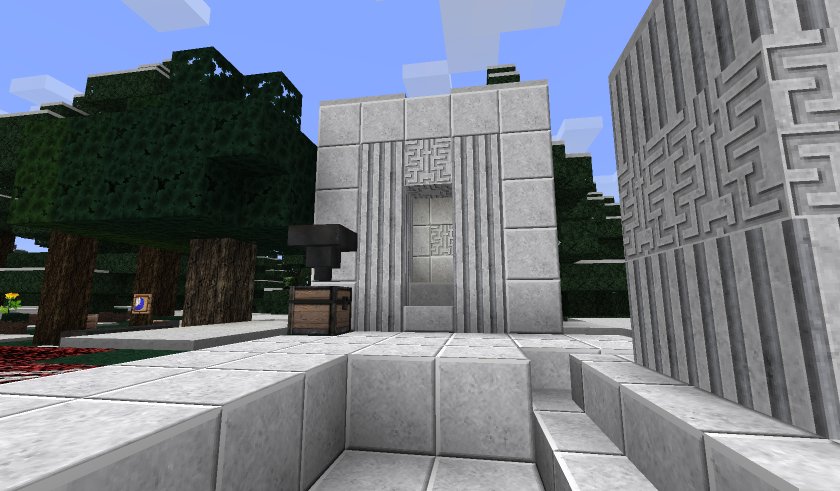
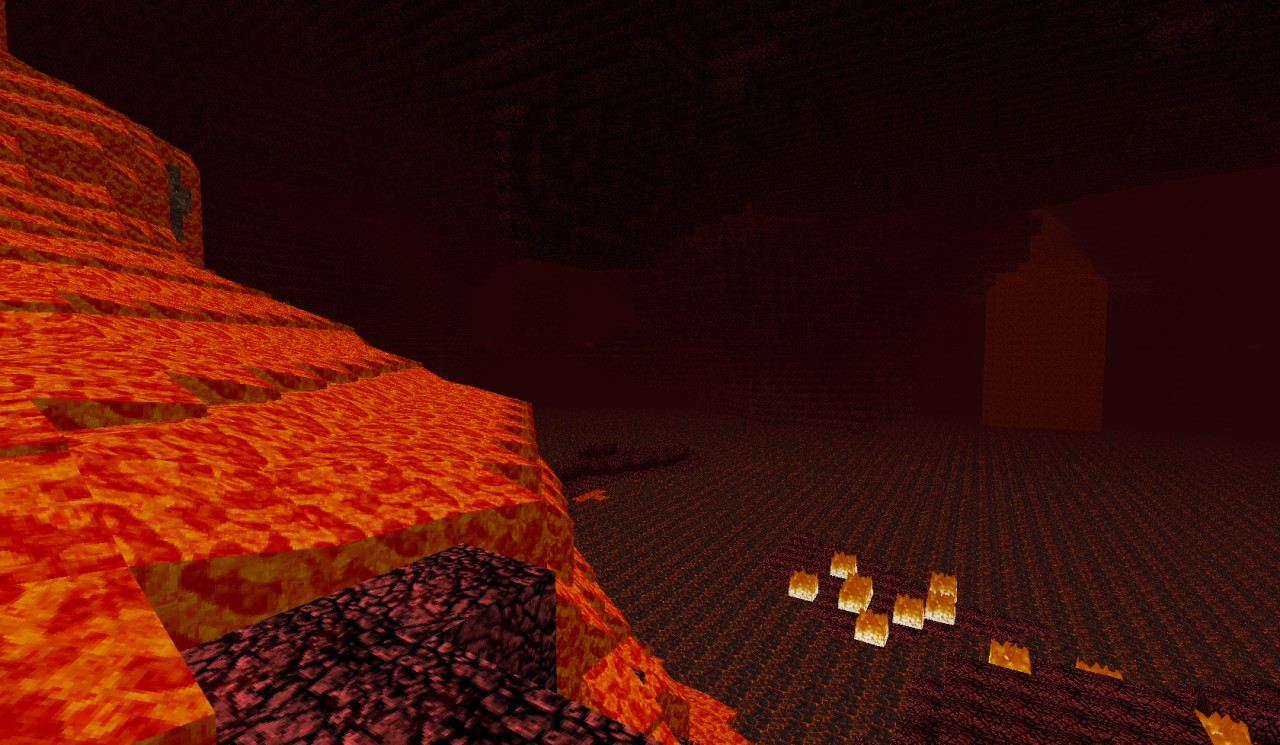
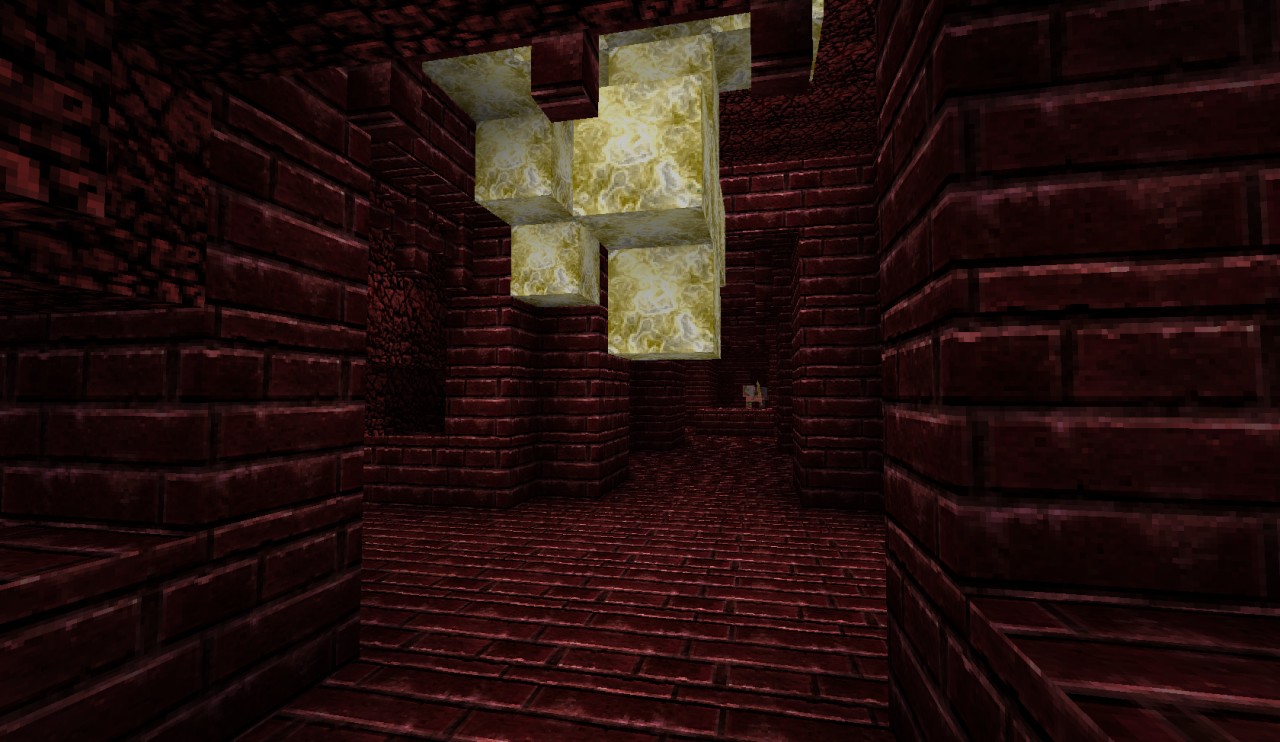
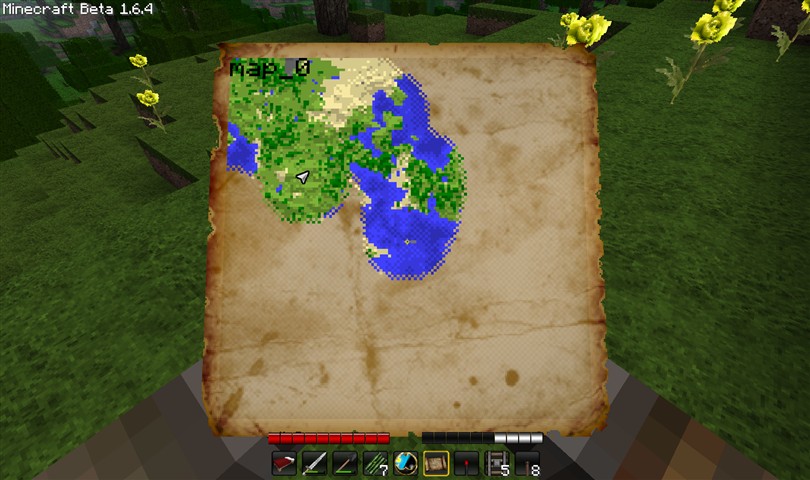
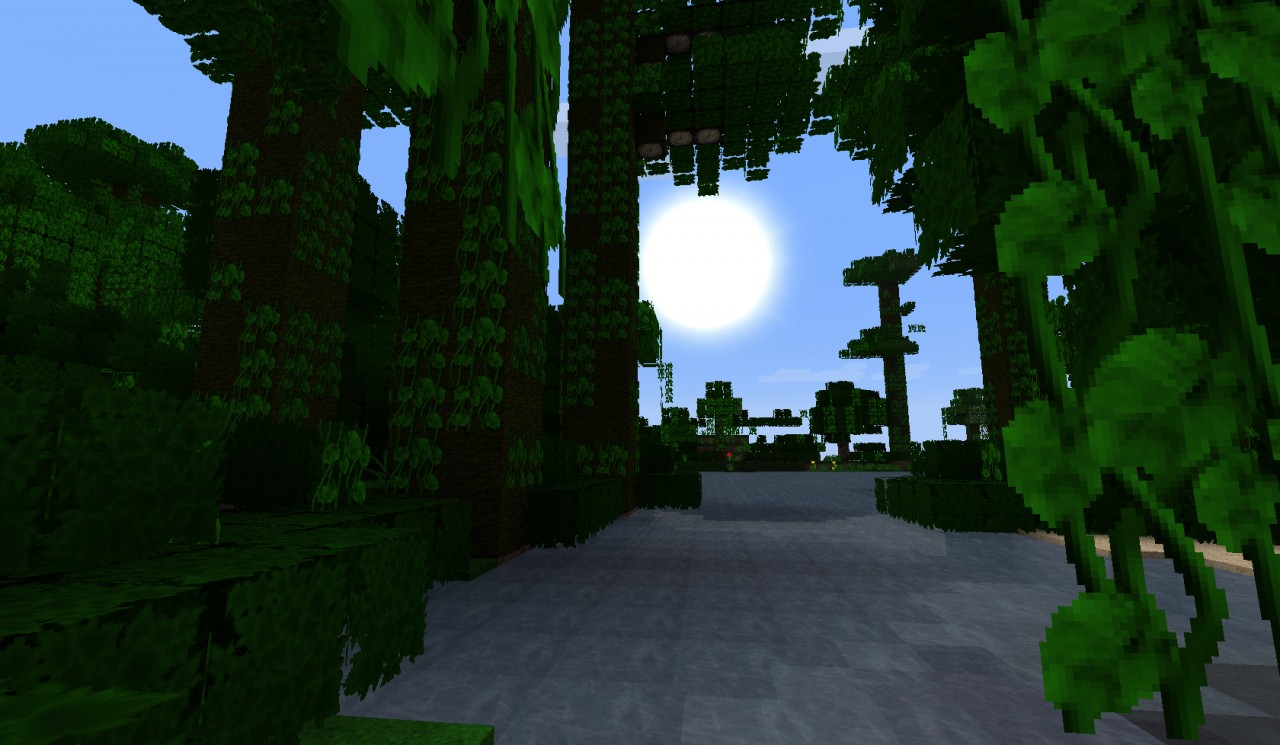
This is my first texture pack created for MineCraft. It's a 64x64 semi-realistic pack. Works with MineCraft Version: 1.9

Custom Armor/Art/Mobs not done, but currently in process. All terrain/items/particles/gui are done, but may be tweaked/modified over time.

Big update this time around for all the new Minecraft 1.8 stuff and some other updates to existing stuff. I downloaded and tested the new textures using the Minecraft 1.8 Pre-Release. Some stuff is place holder, but most of it is final. I'll need to update the screenshots above to reflect some of the new changes.

Recent Updates:
Major Update to include new Minecraft 1.9 content

[Updates To Existing Textures]
- Updated look of Cobble Stone to better match smooth stone
- Updated look of Mossy Cobble Stone (same as above)
- Updated look of spawners

[New Terrain Textures]
- Added Nether Brick
- Added Nether Warts
- Added Water Lily
- Mushroom Biome "grass"


[New Item Textures]
- Added Blaze Rod
- Added Ghast Tear
- Added Nether Wart
- Added Gold Nugget


Installation:
1. Download and run the HD Texture Fix. (make sure you are patched to the latest version of the HD Texture Fix.)

2. Download the T42 texture pack

3. Place the downloaded T42 Texture Pack zip file (The zip file itself, not the contents of the zip) in your Texture Packs folder under the .minecraft folder.

4. Run Minecraft and go to Mods & Texture Packs in the main menu and Select the T42 Texture Pack from the list.

5. Play Minecraft!

Note: If for some reason this doesn't work or crashes your game you can reset back to default by opening options.txt file under the .minecraft folder and changing the line "skin:t42_1.#.zip" to "skin:default". This will make sure Minecraft loaded with the default texture pack.


A 32x32 version of this pack can be found here.


You can still get the 1.7.3 version of the texture pack here.
If you haven't updated Minecraft to 1.7 yet and are looking for the 1.6.6 version of this pack you can get it here
Note: The 1.6.6 version does not include the added mobs/armor.


Additional Details

Progress:
95
Game Version:Minecraft 1.9
Resolution:64x64
  • Armor
  • Environment
  • GUI
  • Items
  • Misc
  • Mobs
  • Particles
  • Terrain
Tags:Realistic, Terrain, Items, GUI, Misc, Particles, Environment, Mobs, Armor

More Texture Packs by tpelham42View All

Version 1.9 : 9/22/119/22/11

[Updates To Existing Textures]
- Updated look of Cobble Stone to better match smooth stone
- Updated look of Mossy Cobble Stone (same as above)
- Updated look of spawners

[New Terrain Textures]
- Added Nether Brick
- Added Nether Warts
- Added Water Lily
- Mushroom Biome "grass"


[New Item Textures]
- Added Blaze Rod
- Added Ghast Tear
- Added Nether Wart
- Added Gold Nugget

Version 1.8 : 9/14/119/14/11

- Added critical hit particle effect
- Minor tweaks to other particle effects

Version 1.8 : 9/10/119/10/11

[Updates To Existing Textures]
- Updated look of Redstone Ore
- Updated look of Diamond Ore
- Updated look of Cocoa beans
- Updated look of Arrows
- Updated look of Lapis Block

[New 1.8 Item Textures]
- Added raw chicken
- Added cooked chicken
- Added raw steak
- Added cooked steak
- Added Melon Slice
- Added Pumpkin Seeds
- Added Melon Seeds
- Added Bow charge states
- Added Fishing Pole Active State
- Added Rotten Flesh
- Added Endermen Pearl

[New 1.8 Terrain Textures]
- Added Stone Brick
- Added Cracked Stone Brick
- Added Mossy Stone Brick
- Added Melon top/sides
- Added melon/pumpkin stems
- Added Red Mushroom Textures 
- Added Brown Mushroom Textures
- Added Vine (Minor modification of vanillia version. Plan to remake)
- Added Glass Pane Edge
- Added Iron Bars

[Other 1.8 Textures]
- Added XP Bar
- Added XP Orb
- Added Poisoned Health Bar Icons
- Added Food Bar Icons
- Added Large Chest
- Added Small Chest

Version 1.7.2 : 8/25/118/25/11

- Updated UI buttons

- Updated look of redstone item

- Updated look of Lapis Item

- Updated look of buckets (empty/water/milk/lava)

- Updated look of Dyes

- Updated look of Bone Meal

- Updated look of SandStone to match better with regular sand

- Updated look of Sand (Less yellow-ish)

- Updated look of Coal Ore Deposit

- Updated look of Iron Ore Deposit

- Updated look of Lapis Block

- Cake sides no longer missing

- Gray line no longer visible on bottom of sandstone

- Added texture for Cobwebs

- Added custom nether portal animated texture

Version 1.7.1 : 7/07/117/07/11

- Added Custom Snow

- Added Custom Rain

- Added Zombie Mob Texture

- Added Ghast Mob Texture

- Added Chicken Mob Texture

- Added Sheep Mob Texture

- Added Squid Mob Texture

- Added Slime Mob Texture

- Added Electric Power Armor Texture

- Updated look of Diamond Block

Version 1.7 : 6/30/116/30/11

Added graphic for Piston/Sticky Piston

Added shears graphic

Added graphics for Iron Armor

Added graphics for Gold Armor

Added graphics for Diamond Armor

Fixed bed graphic so that it aligns correctly on the object

Version 1.6 : 5/26/115/26/11

Added graphic for Hatch

Added graphic for Tall Grass

Added graphics for alive/dead shrubs

Added graphic for Map Background

Added graphic for Map Icons

Added graphic for Map Item

Added graphic for Cow Mob

Added graphic for Pig Mob

Added graphic for Creeper Mob

Added graphics for Leather Armor pieces

Updated Red Flower graphic

Updated Cobblestone graphic (minor tweak to make it more vivid)

Updated pack to be compatible with the latest beta version of the HD Texture Fix Mod.

Version 1.05.1 : 4/19/114/19/11

Fixed issue with redstone wiring in previous release

Version 1.05 : 4/19/114/19/11

Added graphics for particles for wolves. (Heart/water)
Added graphics for powered rail tracks (on/off states)
Added graphic for detector rail tracks
Added graphics for new saplings
Added graphic for new biome specific side grass
Added graphics for Achievements GUI
Added Icon/GUI graphics for Statistics
Updated Wood texture to look a bit more natural
Darkened wood used on rail tracks

Update #2 : 3/31/113/31/11

Updated items.png to include a graphic for the new cookie item added in MineCraft version 1.4

Version 1.01 : 3/15/113/15/11

Fixed look of cooked fish item.

Join us to post comments.

Comments : 89

1 - 50 of 89

BlueIsBlueDeadPool
Level 6
Apprentice Warrior
February 11, 2012, 12:13 pm

1.0.0?

Terpiiee
Level 1
New Miner
January 30, 2012, 8:19 am

Nice texture pack

freestyling
Level 18
Journeyman Artist
December 25, 2011, 12:29 pm

ahh a texture pack that isnt to bright that it hurts your eyes

MrAlienxx1
Level 1
New Miner
December 10, 2011, 1:31 pm

you making this 1.0.0?


Divinos Sigma
Level 17
Journeyman Architect
November 17, 2011, 3:42 am

Lovely RPG-ysh, can I borrow some textures? You'll get credit for this!

diggerjohn99
Level 1
New Miner
November 16, 2011, 4:40 pm

WOW! I didn't expect this to be this amazing! Excellent work!

Megael
Level 1
New Miner
November 14, 2011, 12:20 pm

This is the best Texture Pack ever. You wanna know why? So easy, the colors are fitting to each other. Nothing looks strange or to bright or dark. May some Textures for Mobs are'nt best, but all in all, this TP is homogeneous.

Hope you release a new one with all of the new functions and Textures.

Megabites
Level 3
Apprentice Explorer
October 23, 2011, 10:32 am

SUCKS


Twentyletterusername
Level 1
New Miner
October 22, 2011, 4:37 pm

I liked the pack, but when i saw the ghast is said:

"WTH?"

GrimCreeper
Level 20
Expert Pixel Puncher
October 4, 2011, 9:19 am

This is your fist texture pack? Wow. Good job. :)

creapercrafter
Level 5
Apprentice Artist
September 30, 2011, 10:17 am

good pack but the Asian zombie is abit weird

MinerHuynh
Level 15
Journeyman Unicorn
September 26, 2011, 5:36 pm

Hey what do you use to paint your textures?? because i use paint, and i don't think i should because seeing yours, it looks like you using a different program or a paint skiller

tpelham42
Level 59
Grandmaster Creeper Hugger
September 26, 2011, 5:48 pm

I use Adobe Photoshop to create my textures. I usually start with an actual photo texture for a base and using several layers and different layer effects plus some custom painting get the final result. I'm a 3D graphic artist as a hobby so have background in creating 3d content and texturing for video games.

Matheusultimatex
Level 10
Journeyman Artist
September 26, 2011, 4:58 am

Nice texture pack man, it will add more depth to the game, and by depth i mean awesomeness.


PS: Hope you made changes to enderman as well, i like these mobs a lot and i think they should look scarier.

tpelham42
Level 59
Grandmaster Creeper Hugger
September 26, 2011, 11:58 am

Haven't touched endermen yet, but will have a new version out this week with some updated mobs.

Suicide_Kidder
Level 10
Journeyman Ninja
September 24, 2011, 4:57 am

If the zombie and the ghast were different i would of got this but because of that im not getting it.


P.S. The ghasts face looks like that guy on the TV from the SAW series


tpelham42
Level 59
Grandmaster Creeper Hugger
September 24, 2011, 5:26 am

Different how? What should be different about the zombie and the ghast?

Matheusultimatex
Level 10
Journeyman Artist
September 26, 2011, 4:58 am

Maybe he thinks the ghasts/zombies are scary.
All i can say is Derp.

tpelham42
Level 59
Grandmaster Creeper Hugger
September 26, 2011, 11:57 am

Maybe. If that's the case I'm fine with that. hehe.

Skully256
Level 8
Apprentice Warrior
September 23, 2011, 2:32 pm

Great texture pack. I just dont like the ghast that much

SplarganCraft
Level 1
New Miner
September 23, 2011, 6:47 am

this beast!!!!!!!!!!

sylergcs
Level 26
Expert Dragon
September 22, 2011, 6:41 pm

apart from the lava holy crap!

markster1998
Level 10
Journeyman Engineer
September 17, 2011, 4:02 am

you can look trough some blocks.

you can alse see fire, lava and water in grass blocks

tpelham42
Level 59
Grandmaster Creeper Hugger
September 17, 2011, 6:11 am

Please ensure you have the HD Texture Fix installed per the above instructions as this is an HD texture pack. I've seen this myself on minecraft 1.8 if that is not installed properly.

Gdsamp
Level 12
Journeyman Engineer
September 15, 2011, 12:57 am

Just a comment, but it looks very similar to Inexcraft...

rolk112
Level 1
New Crafter
September 10, 2011, 7:14 pm

i love this texture pack 

geeboy
Level 18
Journeyman Architect
August 16, 2011, 4:15 am

coudl you make this texture pack 256x256 atall?

tpelham42
Level 59
Grandmaster Creeper Hugger
August 18, 2011, 3:02 pm

I doubt it. It would probably just look like a blurry mess at that resolution, but there is a 512x512 version linked in the description.

geeboy
Level 18
Journeyman Architect
August 18, 2011, 8:03 pm

ok thx

little-psycho
Level 35
Artisan Pixel Puncher
August 13, 2011, 12:25 am

so cool!

paddieh
Level 1
New Miner
August 10, 2011, 10:50 am

Best Texture Pack i've ever had

nice work you did thanks

i think i won't use another

tpelham42
Level 59
Grandmaster Creeper Hugger
August 18, 2011, 3:02 pm

Thank you very much. I'm glad you like it. :)

Leobold
Level 1
New Miner
August 10, 2011, 8:05 am

Mine is gray.....all the other HD texture packs work though..... why does this not?


BB_Toohe
Level 1
New Miner
July 19, 2011, 1:54 am

Could you make this so it works whit premium wood =) Awesom texturepack

tpelham42
Level 59
Grandmaster Creeper Hugger
July 20, 2011, 4:30 pm

I don't know what premium wood is.

Adryn123
Level 1
New Miner
July 12, 2011, 4:04 am

Haha Nevermind I Did Not Read The Instructions! Ha ha Silly me! Nice Texture!!

Adryn123
Level 1
New Miner
July 12, 2011, 3:56 am

I Cannot Play Minecraft Because Of This Texture Pack It Goes Black Forever, And Now I Cannot Play It I Tried Deleting The Files And Everything IT DID NOT WORK!!!!! Please Help Me!!!!!!!!!!!!!

dbossie1
Level 1
New Crafter
July 18, 2011, 2:43 pm

in .minecraft delete bin then force update..........i had same prob

Oblivic
Level 1
New Miner
July 10, 2011, 7:47 am

This texturepack shutdown my minecraft EVERYTHING. I can't play online, offline, on a website that fetures it, on a pirated download that works offline. I even deleted the files! even this download! Nothing will load! and when it does load it crashes my browser!

DannySmackaHoe
Level 1
New Architect
July 9, 2011, 8:38 pm

I can't wait to get my new computer so I can run texture packs such as this. This texture pack is really good. I just don't like that zombie. Looks like he had a face lift. Then again that is very minor compared to the beastliness of this Texture pack. Very well done. As most would expect from a 64x64.

shadow0918
Level 11
Journeyman Warrior
July 24, 2011, 3:45 am

hahahahaha lol face lift

shadow0918
Level 11
Journeyman Warrior
July 24, 2011, 3:45 am

hahahahaha lol face lift

paddieh
Level 1
New Miner
July 9, 2011, 6:45 am

best i've ever had but you still got the 1.6 version?


tpelham42
Level 59
Grandmaster Creeper Hugger
July 9, 2011, 8:12 am

Download link for 1.6.6 added to the description above at the bottom.

pipipipiPIPI
Level 36
Artisan Architect
July 8, 2011, 5:13 am

yep...its cool... if it would work and not BLACK SCREEN. YES, i did use the HD tp fix... the latest one...
PLEASE HELP MEH!

tpelham42
Level 59
Grandmaster Creeper Hugger
July 8, 2011, 8:45 am

I'm not sure who Meh is and I'm also unsure why it is not working. Please ensure Meh has installed the HD Texture Fix on a clean install of Minecraft before installing any additional Mods. Also tell Meh to keep in mind the HD Texture fix needs to be re-patched every time MineCraft updates such as the 1.7.3 update today.

I'm not sure how you are getting a Black Screen as you would need to open Minecraft first before selecting my Texture Pack under Mods & Texture Packs on the main screen. Are you copying the Texture Pack zip file to MineCraft's Texture Pack Folder and then selecting the Texture Pack after opening Minecraft? If the black screen appears after running the latest MC Patcher then it's not a problem with my Texture Pack as it hasn't been applied yet.

pipipipiPIPI
Level 36
Artisan Architect
July 9, 2011, 1:27 pm

P.S. Meh and I like your texturepack... =]

pipipipiPIPI
Level 36
Artisan Architect
July 9, 2011, 1:26 pm

Meh did everything you said... and meh also knows what to do... they have installed TP before... meh installed the latest HD TP fix on the 1.7... meh said it was a clean un modded, unchanged version... MEH NEEDS HELP!

IzScoott
Level 19
Journeyman Hunter
July 7, 2011, 11:46 pm

Lol it looks like 


Team
4tress
2

1 - 50 of 89