15

Many Grenades (1.8.1)

15 diamonds

  • 12,975
    Views, 5 today
  • 3,636
    Downloads, 0 today
  • 48
    Comments
  • 5
    Favorites
  • Flag / Report

Get Embed Code

Forum:
HTML:
Link:
avatar Vangoule273
Level 55 : Grandmaster Modder
Posted 09/04/11 7:56:18 am , last updated: 09/19/11 3:25:11 pm
09/04/11

Many Grenades 

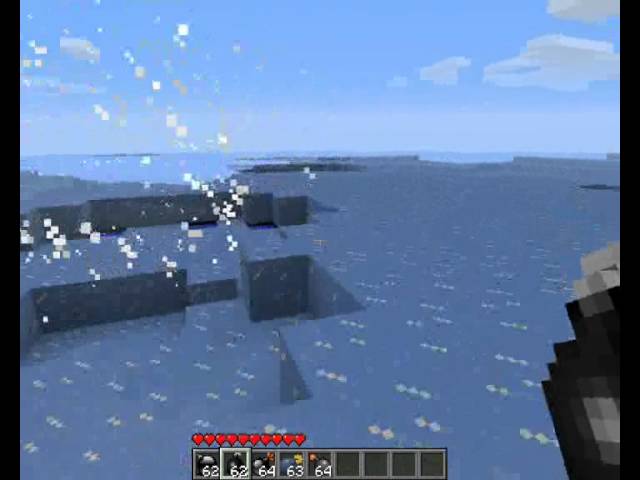
This mod adds 5 grenades to the game. Customize your landscape with complete control over you world!

Normal Grenade -

Smashes blocks and mobs with a high force, Does not destroy drops.

Frost Grenade -

Uses SuperFrost mod to freeze mobs and water. Also has a small blast radius.

Lava Grenade -

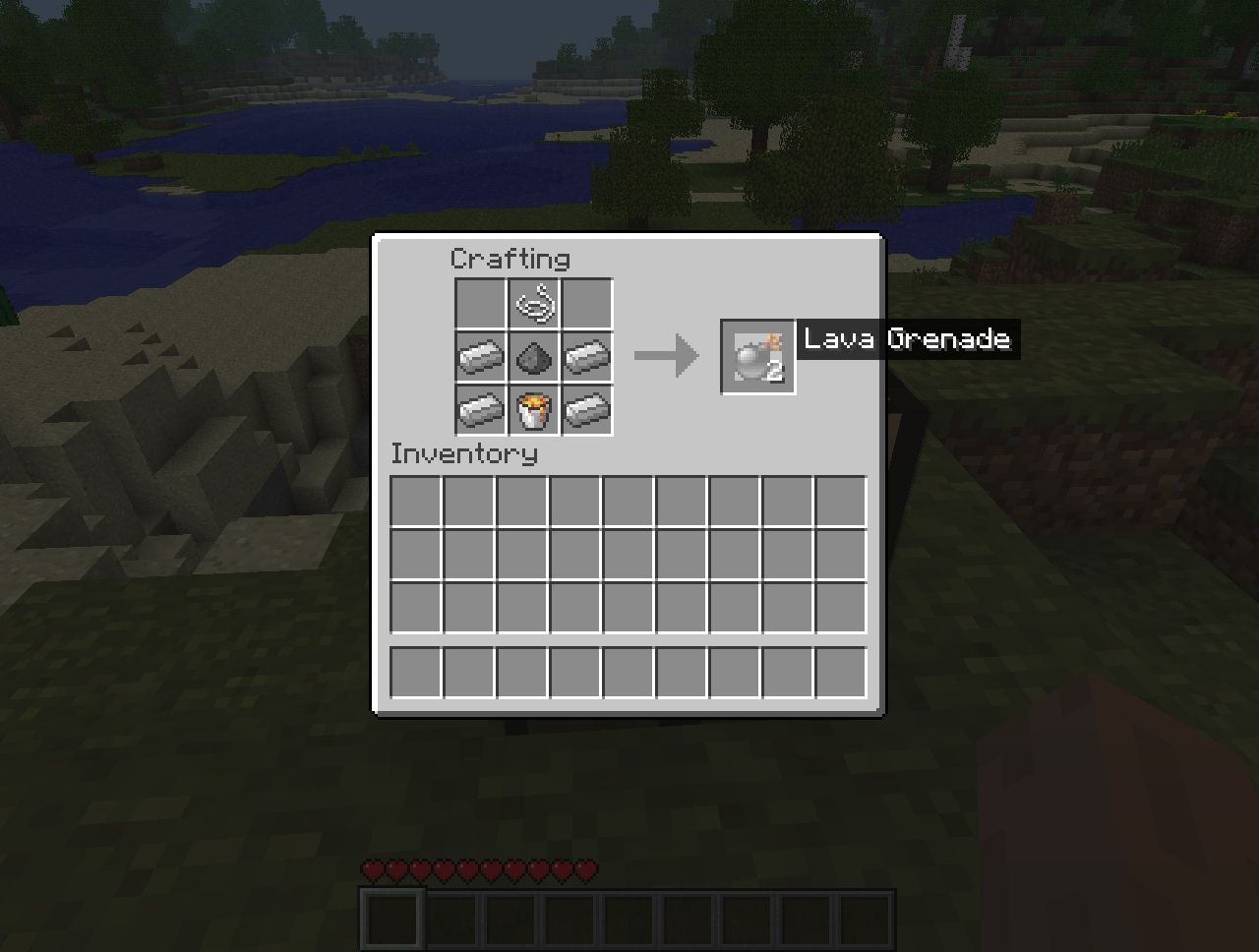
Explodes in a shower of lava which obliterates everything in it's path.

(NEW) Water Grenade -

Showers the area of explosion in water. 

Incendiary Grenade -

Sets everything in fire in a small radius

Nuculear Grenade -

This grenade is TOTAL OBLITERATION, only use this if you have to. Remember to keep running and DON'T LOOK BACK!

This mod require's Mod Loader and MightyPork's SuperFrost Mod!

You can get SuperFrost here http://www.planetminecraft.com/mod/superfrost/

You can get Mod Loader here http://www.minecraftforum.net/topic/75440-v173-risugamis-mods-recipe-book-updated/


Installation Instructions:

1. Startmenu - Run

2. Type in %APPDATA%

3. Go to Roaming/.Minecraft or Just .Minecraft depending on operating system.

4. Navigate to the Bin folder.

5. Open Minecraft.jar with any Zip Archiver.

6. Delete Meta-INF

7. Download Mod Loader and Open it with a Zip Archiver.

8. Drag the files from the Mod Loader zip over to your Jar

9. Download and Open SuperFrost with a Zip Archiver.

10. Drag the files from SuperFrost to you Jar File.

11. Download and Open Many Grenades.

12. Finally Drag the Files over to the Minecraft.jar

13. Run the game and ENJOY!


I also have a post on the Minecraft Forum's with all my mods together so check it out! http://www.minecraftforum.net/topic/599873-173-vangoule273s-mods/

To give support use this forum code:
[url=http://www.minecraftforum.net/topic/599873-173-vangoule273s-mods/][img]http://mag.racked.eu/image/354/Support+Vangoule273/mca.png[/img][/url]
mca.png

Additional Details

Progress:
100
Game Version:Minecraft 1.8 beta
Tags:Minecraft, Mod, Grenades, SuperFrost, MightyPork, Vangoule273, Functional, New Content
Credit:MightyPork - Help with freezing.

Update #2 : 09/19/2011 3:25:11 pm9/19/11

Updated for 1.8.1

Update #1 : 09/07/2011 10:30:45 am9/07/11

New Water Grenades!

Join us to post comments.

Comments : 48

1 - 48 of 48

Benjamater848
Level 14
Journeyman Engineer
June 21, 2012, 11:52 pm

Come on man UPDATE TO 1.2.5!!!!!!!!!!!!

Zaplink
Level 1
New Miner
April 27, 2012, 1:30 pm

UPDATE please

fredbob67bobfred
Level 7
Apprentice Hunter
April 16, 2012, 2:01 am

UPDATE

Aztair_176
Level 1
New Miner
October 15, 2011, 4:41 am


MCModPackMaker
Level 3
Apprentice Crafter
October 12, 2011, 4:35 am

frost grenade didnt works AND I INSTALLED SUPERFROST!

popoca22
Level 5
Apprentice Engineer
September 28, 2011, 9:46 am

love your mods man this things awsome

Branko ProCrafter
Level 43
Master Herobrine
September 25, 2011, 5:56 am

Mega Cool :D

asgerfh
Level 14
Journeyman Dragonborn
September 24, 2011, 8:39 pm

its cool


fishboom
Level 22
Expert Pixel Puncher
September 24, 2011, 8:10 am

cool,im the 5000'st viewer

mysteryman98
Level 1
New Miner
September 23, 2011, 4:10 pm

do i drag the thumbs file in form many grenades????

Neutralite
Level 7
Apprentice Explorer
September 23, 2011, 12:30 pm

pull pin.... Toss it!!! =O........Kabooooooooooooooooooooooooooooooom (jaw drops.. hole kills player... Respawn... fall... respawn (endless loop!!!!!!)

lbirkhold
Level 10
Journeyman Explorer
September 22, 2011, 6:24 am

Um....dude........THIS IS AWESOME!!!  :D

Claszlo123
Level 1
New Miner
September 21, 2011, 7:06 pm

Is it even possible to escape a nuclear grenade? I had diamond armor on and I ran as fast as I could really far away and I still blew up.

Tenguetsu
Level 2
Apprentice Blacksmith
October 15, 2011, 11:53 am

Yeah throw it off a cliff

Vangoule273
Level 55
Grandmaster Modder
September 20, 2011, 1:19 pm

There should be some class files and png's in a zip folder. You don't need an archived to open a zip folder.

mysteryman98
Level 1
New Miner
September 20, 2011, 1:36 pm

is there any way you could make a file mirror for me? you could send it to me by email or you could also copy the things i need into a email as a attachment and i could open it up and copy and paste the thing needed. and 2 questions: 1. does this mod work with TOO MANY ITEMS OR SINGLE PLAYER COMMANDS? 2. What browser do you use and what normally happens when you download the superfrost file??? (like steps of what shows up)

mysteryman98
Level 1
New Miner
September 20, 2011, 1:23 pm

by archived do you mean like WINRAR?

n

EDIT: When i double-click on the file it asks me what i want to open it as like a word document or  word pad and stuff like that... in the folder after i downloaded the superfrost thing like you told me that is the only thing in the folder excet the ".." folder which only brings you back to the main screen for WINRAR

mysteryman98
Level 1
New Miner
September 20, 2011, 1:05 pm

ok well i tried do you have any other suggestions... the way i got yours to work was by using the file mirror is there any posobility he might have one? and does this mod work with single player commands or too many items?

n

EDIT: So how many files are there supposed to be inside of it. and the superfrost file i was talking about earlier i dont exactly know what to open it with it seems i cant open it so if there was file mirror that would be awesome


n


mysteryman98
Level 1
New Miner
September 20, 2011, 11:54 am

Vangoule273 please help me! whenever i download this mod or the freezing one and open it with WINRAR it only shows a file. not a folder but a file the files title is superfrost_1-4_1-8-1_into-mc-jar. and i can't do anything with it plz help me. ok so i have fixed the problem with many grenades but the frost one is making me really mad plz help me im begging you

Vangoule273
Level 55
Grandmaster Modder
September 20, 2011, 12:06 pm

Try downloading from a diferent browser if your using internet explorer.

mysteryman98
Level 1
New Miner
September 20, 2011, 1:01 pm

ok i will try brb


joke9828
Level 30
Artisan Electrician
September 20, 2011, 6:53 am

Can't get modloader to work, it tells me: "modloader has stopped working" and it shuts down minecraft!

joke9828
Level 30
Artisan Electrician
September 20, 2011, 6:50 am

Dosent work:(

CinkCD
Level 1
New Ninja
September 20, 2011, 4:06 am

am I supposed to put the photos in the grenade mod into the minecraf.jar file?

Vangoule273
Level 55
Grandmaster Modder
September 20, 2011, 5:15 am

Yes. They just sit in the main directory of the minecraft.jar

CinkCD
Level 1
New Ninja
September 23, 2011, 7:12 am

thnx:) I actually found it out after writing the comment:P

Tyellow
Level 1
New Crafter
September 10, 2011, 2:31 pm

can someone help me?

Tyellow
Level 1
New Crafter
September 10, 2011, 2:10 pm

ive followed the instructions exactly with a new .minecraft file but it wont work

Tyellow
Level 1
New Crafter
September 10, 2011, 2:07 pm

i cant get this mod to work

Tminator
Level 35
Artisan Crafter
September 6, 2011, 5:18 pm

what are the recipes? EDIT: nvm

xHAWKx
Level 5
Apprentice Pony
September 4, 2011, 7:07 pm

  • This is a bullet, lol it's not
  • You lost the game.
Lol, nice mod. :D

legolover11
Level 37
Artisan Taco
September 4, 2011, 12:11 pm

it seems to be incompatible with modloader when placed in minecraft.jar


Vangoule273
Level 55
Grandmaster Modder
September 4, 2011, 10:15 pm

Umm... This REQUIRES mod loader. You must have the wrong version... Also you must have superfrost otherwise it will blank screen

legolover11
Level 37
Artisan Taco
September 7, 2011, 2:02 am

so... in /mods? i think i tried that, didn't seem to work. i said that because the error screen always said something like "an error occured mods lloaded:modloader 1.7.3, manygrenades etc." and also this: java.lang.UnsupportedClassVersionError: mod_ManyGrenades : Unsupported major.minor version 51.0

Vangoule273
Level 55
Grandmaster Modder
September 7, 2011, 3:13 am

Hmm... Have the lates version of java? Latest version of minecraft?


Vangoule273
Level 55
Grandmaster Modder
September 7, 2011, 3:12 am

Right. Your Minecraft.Jar is in your Bin folder in %APPDATA% .minecraft/bin. Place mod loader inside the jar with a zip archiver and then place my mod in the same jar. My mod does not require you put anything in a mod folder. Just place the whole of my zip contents in the jar


legolover11
Level 37
Artisan Taco
September 7, 2011, 10:22 am

did that, no dice. maybe put the actual zip folder in?

Vangoule273
Level 55
Grandmaster Modder
September 7, 2011, 10:55 am

This was compiled using JDK 7.0 So do you have that installed? Putting the zip in will do nothing.

legolover11
Level 37
Artisan Taco
September 8, 2011, 1:29 pm

whats jdk? and putting contents doesn't work really either... if superfrost won't work would that mess it up?

nn

EDIT: super frost works by itself. would the mod be incompatible with aether or some other of mighty porks mods like backbacks, magic wands? or nanodalts seasons mod? but i am sure TMI works.

Vangoule273
Level 55
Grandmaster Modder
September 9, 2011, 3:23 am

JDK 7.0 is what i compiled using. People with macs apparently can't use JRE/JDK 7 Yet. Are you using a mac? If so i may have to recompile using an earlier version.

gogorox
Level 57
Grandmaster Dragonborn
September 4, 2011, 4:07 am

Why the mod superfrost ?

Vangoule273
Level 55
Grandmaster Modder
September 4, 2011, 4:09 am

The mod SuperFrost was made by MightyPork, It allows you to freeze mobs. I've used this in my latest mod's as i find that it's an amazing ability to add. Try the frost grenades to see what it does.

ryguy0808
Level 37
Artisan Lava Rider
September 4, 2011, 10:49 pm

when i intall this mod do mobs still freeze when i use snowballs? i woudl still use the frost granade i just wanna make sure my animal freezing machine still works with snowballs

Vangoule273
Level 55
Grandmaster Modder
September 5, 2011, 1:06 am

Yeah :D Snowballs still toggle freeze

gogorox
Level 57
Grandmaster Dragonborn
September 4, 2011, 4:09 am

ok
What (.Class) must be changed to change the id of an object ?

Vangoule273
Level 55
Grandmaster Modder
September 4, 2011, 4:24 am

With mod loader mod's it is usually in the mod_NAME class. With other mods it will most likely be in the item class.

MyBrain
Level 1
New Miner
September 4, 2011, 4:03 am

NIce mod (;

gogorox
Level 57
Grandmaster Dragonborn
September 4, 2011, 4:03 am

Like + 1

1 - 48 of 48