78

[Forge][1.5.2]Schematica

78 diamonds

  • 33,919
    Views, 367 today
  • 5,820
    Downloads, 62 today
  • 123
    Comments
  • 52
    Favorites
  • Flag / Report

Get Embed Code

Forum:
HTML:
Link:
avatar Lunatrius
Level 46 : Master Mage
Posted 08/26/12 11:08:59 am , last updated: 06/17/13 12:05:34 pm
08/26/12
About
With this mod you're able to display a ghost image of a schematic file inside Minecraft to rebuild a structure or export any part of your world (or a server's world) into a schematic file.

How to
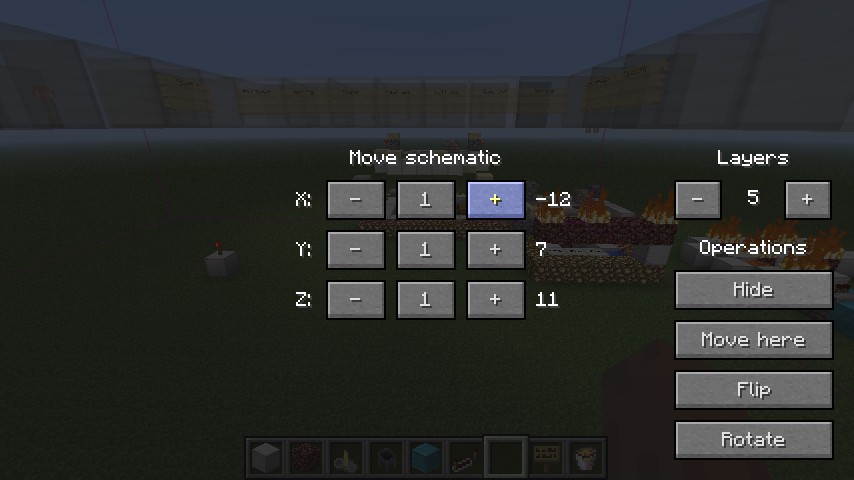
The mod is primarily controlled with 3 GUI's, accessed via the [i]NUM_/[/i] (load), [i]NUM_*[/i] (save) and [i]NUM_-[/i] (navigate loaded schematic) keys. You can change these to anything you want under Options > Controls.
After the initial run the mod will create a schematics folder in your .minecraft folder. Put your schematic files into that folder and launch Minecraft. You are now able to load the schematics into your world using the load key and manipulate them with the manipulate key. Additional you can export parts of your map by using the save key. Witht eh help of this GUI you select 2 points in your world and click enable (you can enable is before, but the default position is at 0,0,0 for both points). When you're happy with the selected area just click write down the name into the textbox and click save.

How to install
Install Forge: http://youtu.be/QtBudlpOXoI
After you have installed Forge just drag and drop the file you download into the .minecraft/mods folder.

Configuration
The config file fill be created after you run Minecraft at least once with the mod installed. The config file is located int the .minecraft/config folder.

Additional Details

Progress:
100
Game Version:Minecraft 1.5
Tags:Functional

Update #21 : 06/17/2013 12:05:34 pm6/17/13

  • Moved some othe the OpenGL related stuff to the new class RenderHelper.
  • Replaced custom vectors with LWJGL's vectors (requires some integer casting though).
  • Added additional rendering options (drawQuads, drawLines).
  • Fix an issue with tile entities that depend on a validate call.
  • Speed up the creation of the texure file by a bit.
  • Added Danish and Polish localisation files (also closes #10).
  • Added the French localisation file.
  • Changed the comment field to contain the localised language name and the language code.
  • Removed the version comment, added comments after tags that require updating instead.
  • Getting rid of a typo caused by my laziness.
  • Drop the old schematic format for blocks above 0xFF and replace it with the MCEdit/WorldEdit format.
  • Added backwards compatibility for old Schematica schematics.
  • Small fix in build.xml.

Update #20 : 05/18/2013 11:04:40 pm5/18/13

  • Printer prints only the selected/shown layer(s).
  • Fixed an issue with the printer (closes #5).
  • Fixes Printer Ignoring Double Slab metadata (closes #6)

Update #19 : 05/02/2013 11:22:16 pm5/02/13

  • Changed the build.xml project name.
  • Reformated the code with IDEA.
  • Converted the localization files from *.properties files to *.xml files, updated updatelang.sh.
  • Added Nederlands localization (author: YourWorstNightmare).
  • Added 简体中文 localization.
  • Updated for Minecraft 1.5.2.
  • Removed build version from mod.properties (jenkins handles that from now on).

Update #18 : 04/08/2013 2:00:25 pm4/08/13

  • Fix issues with textures when there was a tile entity nearby.
  • Added IntelliJ IDEA project file, updated .gitignore.
  • Bumped version number.

Update #17 : 04/06/2013 9:05:11 am4/06/13

  • Removed a big chunk of hardcoded things. Rotation and flip information is now loaded from *.properties files from the /config/ folder (defaults are supplied with the mod).
  • Do not bind a new texture when it's not needed.
  • Updated to latest recommended Forge, bumped version.

Update #16 : 03/24/2013 8:32:49 pm3/24/13

  • Update to Minecraft 1.5.1.

Update #15 : 03/16/2013 10:42:27 pm3/16/13

  • Increase the filename length to 128.
  • Update minecraft/lunatrius/schematica/gui/GuiSchematicSave.java
  • If it's worth doing it's worth over doing.
  • Merge pull request #4 from ShaRose/patch-1
  • Update minecraft/lunatrius/schematica/gui/GuiSchematicSave.java
  • Added German localization (author: Sebastian Schies).
  • Use a local variable for the tile entity.
  • Updated to Minecraft 1.5.
  • Removed alpha textures (temporarily).

Update #14 : 01/17/2013 10:19:45 pm1/17/13

  • Small fix.
  • Updated the Portuguese localization file (author Tiago Muchagato).
  • Removed a few OpenGL calls that should't be there.
  • The printer no longer missplaces blocks.
  • Updated Forge.
  • Fixed a small bug in the printer.
  • Bumped the version number.

Update #13 : 01/08/2013 5:53:37 pm1/08/13

  • Added Portuguese localization (author: Tiago Muchagato).
  • Fixed version number for the language files updated in the previous commit.
  • Added Hungarian localization (author: Gabor Stenzinger).
  • Fixed the license file encoding, removed the old changelog.
  • Server owners can disable the printer by sending a SBC to the client (§0§2§0§0§e§f).
  • Players are no longer required to hold down shift.
  • Changed the required forge build to 471.
  • Bumped the version number.

Update #12 : 12/27/2012 11:26:18 pm12/27/12

  • Added steel door mapping.
  • Added a utility functions to SchematicWorld.
  • Moved all classes from client/ to minecraft/ and updated build.xml accordingly.
  • Added printer functionality.
  • Removed/replaced some debug messages.

Update #11 : 12/21/2012 6:16:50 pm12/21/12

  • Updated to Minecraft 1.4.6.
  • Moved around a few classes.
  • Bumped the version number.

Update #10 : 12/15/2012 1:57:44 pm12/15/12

  • Fixed NPEs when loading schematics that contain blocks that don't exist.
  • Create buffers when they're needed and delete them when they're not (fixes OutOfMemory exceptions when loading large schematic files, lowers overall memory usage).
  • Added a custom Logger.
  • Fixed a bug where the first schematic in a folder could not be loaded.
  • Added dependencies (Forge), bumped version.

Update #9 : 12/06/2012 3:43:05 pm12/06/12

  • Added Italian (it_IT) translations (author: mrTJO).
  • Translation files now include the author name/nickname and version (idea by mrTJO).
  • The stack trace will show up in the console when the schematic fails to load.
  • Use the LanguageRegistry.loadLocalization() instead of manual loading of properties.
  • Fix MCEdit compatibility.
  • Fix another MCEdit incompatibility.
  • Bumped version number.

Update #8 : 11/28/2012 6:08:07 pm11/28/12

  • Fixed a few minor issues.
  • Fixed a NPE when a user moved a schematic without loading it first.
  • Optimized some GUI code.
  • Fixed a bug that would prevent specific schematics to render only partially.
  • Fixed a rendering bug when the schematic had at least one mob spawner.
  • Improved the schematic loading GUI (schematics can have custom icons, folders).
  • Added a material GUI that shows all materials in the currently loaded schematic.
  • Added Lithuanian (lt_LT) translations (author: FANS4ever).
  • Added *.utf8 language files and a shell script to convert them to ascii.
  • Update resources/lunatrius/schematica/assets/lang/es_MX.lang
  • Merge pull request #2 from inpixies/patch-1
  • Update resources/lunatrius/schematica/assets/lang/es_MX.lang
  • Bumped version number.

Update #7 : 11/21/2012 5:17:23 pm11/21/12

  • Updated to Minecraft 1.4.5, bumped version.
  • Added the option to highlight real blocks that don't exist in the schematic (air blocks). By default it's enabled.
  • Chunk updating now uses the sortedWorldRenderers array instead of the worldRenderersToUpdate list.

Update #6 : 11/17/2012 5:17:22 pm11/17/12

  • Rewrote the rendering classes (again). There is now a global renderer that calls schematics' render functions (chunks are 16x16x16). As there is no other way of detecting if a MC chunk was changed thingy have to rely on the WorldRender chunks' dirty flag, so things may not update instantly sometimes (or at all).
  • Bumped the version number.

Update #5 : 11/14/2012 2:01:37 pm11/14/12

  • Updated to Minecraft 1.4.4.
  • Updated Forge.
  • Updated the ANT builder and project.

Update #4 : 11/10/2012 11:32:21 pm11/10/12

  • Improved performance when rendering separate layers of a schematic.
  • Rewrote most render code to use vertex arrays, huge increase in performance.
  • Removed render range from the config (things are fast enough now).
  • Highlight cubes/lines don't render anymore if they're not visible from the outside of the schematic.
  • The GUI backgrounds are now transparent.
  • Bumped the version.

Update #3 : 10/26/2012 10:40:48 am10/26/12

  • updated for minecraft 1.4.2
  • added es_MX translations (submitted by inpixies)
  • added sl_SI translations (submitted by Lunatrius)
  • added skull and anvil rotation

Update #2 : 09/24/2012 2:37:45 pm9/24/12

  • tweaked SchematicWorld's save handler (switched to AnvilSaveHandler, should fix issues with some mods like Mystcraft)
  • tweaked rendering code (on slower computers there should be a good amount of FPS increase)
  • fixed dark spots in rendered schematic files when ambient occlusion was turned on

Update #1 : 09/06/2012 3:52:42 pm9/06/12

  • re-enabled transparent textures again (they're completely disabled by default, change the alpha value and set the alphaEnabled variable)
  • added an option to the config to change the overlay rendering distance (related to the overlay bug)
  • added Frustum into the rendering code (parts not visible on the screen are not rendered anymore)
  • added support for any tile entity special renders, but alpha won't apply to them (except for: sign, chest, ender chest)

Join us to post comments.

Comments : 123

1 - 50 of 123

sheeppuff
Level 22
Expert Unicorn
June 18, 2013, 8:41 am

icons how do you put in icons

Lunatrius
Level 46
Master Mage
June 14, 2013, 4:13 pm

If you want a quick reply, contact me on MCF! It's not my fault PMC doesn't send out emails on new replies!

weter506
Level 1
New Miner
June 8, 2013, 3:52 pm

I use another version of Forge (7.8.0.716) And It says you Manifest is invalid....

weter506
Level 1
New Miner
June 8, 2013, 3:52 pm

And I installed it via Coremods folder...

Lunatrius
Level 46
Master Mage
June 14, 2013, 4:12 pm

You install it into /mods/, not /coremods/...

anything399
Level 5
Apprentice Architect
June 6, 2013, 1:10 pm

How large of a schematic can this make? The biggest i can make is about 200x200 and 60 thick.

Lunatrius
Level 46
Master Mage
June 14, 2013, 4:13 pm

Right now it's limited by the amount of chunks that are currently loaded.

aluis123
Level 1
New Crafter
May 21, 2013, 5:04 pm

does it work with a texture pack

Lunatrius
Level 46
Master Mage
May 23, 2013, 11:10 am

It should.

creeper111246
Level 11
Journeyman Modder
May 19, 2013, 10:22 am

how do to install it

Lunatrius
Level 46
Master Mage
May 20, 2013, 4:54 pm

Just drag it into your .minecraft/mods folder.

gemhunter1
Level 40
Master Engineer
May 13, 2013, 9:28 am

This is very cool mod ! And it will be more cooler when it will work when you play with this mod on server that dont have this mod but still you will be able to build using schematics ! 

TheReduxPL
Level 1
New Explorer
May 13, 2013, 5:45 am

Excellent mod.

NickWinston123
Level 1
New Miner
May 8, 2013, 5:10 am

Please don't ever stop updating this °¬°

Lunatrius
Level 46
Master Mage
May 10, 2013, 9:23 am

Maybe. Maybe not. ;)

LoneWolf11
Level 1
New Explorer
April 8, 2013, 4:44 pm

This looks like a great mod for map makers like me :D Mind if I do a mod showcase?

Lunatrius
Level 46
Master Mage
April 11, 2013, 12:03 pm

No objections on my part.

flowfulfish
Level 23
Expert Archer
April 8, 2013, 3:00 pm

for those of us who dont use forge, how do you manual install?

Lunatrius
Level 46
Master Mage
April 11, 2013, 12:03 pm

Forge is a requirement for the mod.

flowfulfish
Level 23
Expert Archer
April 11, 2013, 4:06 pm

:L
Any chance you'll make it installable without?
I guess I shouldint be complaining, modding is beyond my comprehention, sorry.

Lunatrius
Level 46
Master Mage
April 13, 2013, 6:26 am

Can't be done as it uses a few hooks that only Forge provides (well, it can be done, but it would break a lot of other mods).

xDRedz
Level 1
New Crafter
April 8, 2013, 10:33 am

can you make a Steve mod that help you mining,fishing,kill mobs?

pixelpusher
Level 1
New Miner
April 6, 2013, 2:37 pm

Wow, nicely done. One more reason to get Forge.

kelvinserasi
Level 5
Apprentice Engineer
March 29, 2013, 10:56 pm

any one know how to upload a map

goreae
Level 4
Apprentice Farmer
April 6, 2013, 8:00 pm

what do you mean?

NickWinston123
Level 1
New Miner
March 29, 2013, 10:23 am

Damn :( I use to love this mod now it won't work with 1.5.1 and if I use it with 1.5 it makes everything look like glass when I try to import it! Sigh!

Lunatrius
Level 46
Master Mage
March 29, 2013, 3:26 pm

It should work just fine. Which version of Forge are you using?

juankestein
Level 1
New Miner
March 24, 2013, 11:47 am

When I put the .jar on the mods folder minecraft doesnt work! please, I need this mod :/ 

Lunatrius
Level 46
Master Mage
March 29, 2013, 3:26 pm

Forge version? Any logs?

du5tball
Level 1
New Miner
March 23, 2013, 9:06 am

When can we expect an update to 1.5.1?

agentmark9
Level 22
Expert Dragonborn
March 23, 2013, 1:28 pm

actually 1.5.1 was only a bugfix update with new ways to increase fps so anything that works in 1.5(servers,redstone,mods,etc.)works in 1.5.1 or atleast to my knowledge

goreae
Level 4
Apprentice Farmer
April 6, 2013, 8:03 pm

actually, mods need to update for 1.5.1. Mojang changed some things with hoppers and enchanted books, so they reobsfucated.

du5tball
Level 1
New Miner
March 23, 2013, 1:41 pm

Well, that's the Log: http://pastebin.com/raw.php?i=YPENytaM
Everything except forge and schematica is deactivated. I am not totally sure if it is schematica or forge but as everything else works fine, I'd say something is wrong on schematica's end (and also since it's missing the version file).

jamesisjam2lol
Level 1
New Explorer
March 23, 2013, 2:52 am

I tried launching this mod in multimc it displays the mojang logo for 5-7 seconds then it goes white screen and crashes any help plz?

du5tball
Level 1
New Miner
March 23, 2013, 9:05 am

Please give us a log (copy it to a pastebin and post the link here).

Pacifish
Level 3
Apprentice Engineer
March 21, 2013, 9:41 am

I installed forge 1.5, but nothing happens when I put Schematica into my "Mods" folder.  All my other mods work.  I also tried it without any other mods on.  Forge does not recognize it being in the "Mods" folder.  (Windows 8)

Lunatrius
Level 46
Master Mage
March 24, 2013, 4:08 pm

Do you have any logs?

Pacifish
Level 3
Apprentice Engineer
March 29, 2013, 6:53 am

I don't know what you mean.  There were no crashes, it just doesn't notice that I put the zip folder inot the Mods folder.  Was I supposed to extract it?  Because I havn't.

Lunatrius
Level 46
Master Mage
March 29, 2013, 3:25 pm

There should be Schematica logs in the Minecraft folder, assuming it loaded but failed to initialize.

Pacifish
Level 3
Apprentice Engineer
April 2, 2013, 4:18 am

So I put this .Jar file into the "Mods" folder that Forge created. I did exactly that. After starting up the game I looked in the "Mods" button at the menu, it listed all my other mods (Zan's minimap, Hudini, and Custum NPCs) but not this one. Schematica never made any new folders or did anything.

Edit: It works now on Minecraft 1.5.1

Edit: I can't figure out how to place a schematic.  I know how to do all the other commands you mentioned above.

Lunatrius
Level 46
Master Mage
April 4, 2013, 9:26 am

You place it by enabling the printer. It will place blocks one by one. There's currently no other way of doing it.

Pacifish
Level 3
Apprentice Engineer
April 5, 2013, 10:24 am

I got it working. Thanks. I love this mod! You have no idea how many millions of blocks I've put through this mod in just a short time. Although, I can tell the printer has trouble with Redstone Ore, doors, stairs, beds and anything that attaches to a surface. It also won't place entities such as Minecarts or fill chests for me. But compared to what it can do, that stuff is nothing! I love this mod!

Lunatrius
Level 46
Master Mage
April 6, 2013, 5:07 am

I didn't touch the printer since 1.4 because I'm trying to fix a few other, higher priority bugs first. It will be fixed as soon as possible though (but it still won't be able to place entities or fill chests, because they're not even displayed right now).

NickWinston123
Level 1
New Miner
March 18, 2013, 3:35 pm

How do I use the printer and import schematics? 

Lunatrius
Level 46
Master Mage
March 24, 2013, 4:08 pm

From the management GUI you enable the printer, then it should start placing blocks around you in a radius of 4 blocks if you have enough blocks. It's still and experiemental feature though.

superit23
Level 1
New Miner
May 30, 2013, 6:01 pm

The printer doesn't seem to be working for me. Also, my blueprint is this light blue glob. I'm using the Voltz mod pack. http://i42.tinypic.com/33vhopd.jpg

tyurz
Level 1
New Miner
March 16, 2013, 11:46 pm

I tried to get a schematic from one world to a superflat world, and when i loaded the bluprints, everything was a mixture of white and clear and i couldn't see what the blocks were that i needed to build, they were all just like an white and clear zebra-ish pattern. I had to redo this schematic a couple times because i left out some things and it worked the first couple of times i tested it out, but now it gives me the zebra thing, and all my other schematics are zebra-y, too. The schematic that i think cause the problem was kinda big and had a variety of blocks if that means anything. Help?
Edit: its not really a zebra thing, its just like random mixture of clear and white, point is i cant tell what blocks are what.

Lunatrius
Level 46
Master Mage
March 18, 2013, 1:09 pm

Black and white? Then it most likely can't find the texture file. Do you use a texture pack?

tyurz
Level 1
New Miner
March 19, 2013, 1:15 pm

No its normal, and i can make out chests, but thats the only thing. Everything else is clear and white.

Lunatrius
Level 46
Master Mage
March 24, 2013, 4:06 pm

What goreae said. Also, try the 1.5.1 version.

goreae
Level 4
Apprentice Farmer
March 17, 2013, 6:58 pm

screenshots would help.

xDRedz
Level 1
New Crafter
March 16, 2013, 10:26 pm

Forge 1.5 and optfine not compatible, right?

Lunatrius
Level 46
Master Mage
March 18, 2013, 1:08 pm

Last time I tried they were not. it will take a little while for all mods to be compatible again.

Mimix2048
Level 20
Expert Pixel Painter
March 16, 2013, 11:12 pm

It's compatible with theese mods.

xXLEG1TXx
Level 3
Apprentice Ranger
March 14, 2013, 11:55 pm

Can you plz update this to 1.5

1joachim1
Level 1
New Miner
March 14, 2013, 11:03 am

hi! so far away i'm looking for some mod like that! but i don't know how it works, i've placed the mod (with forge 534 installed with some mods) in mods folder, and placed some schematics (the schematics were created using mceditor and are vanilla structures) in the schematics folder, in my game just pressing "/" key opens the loader gui, i've select one of them (trust me, i've used 4-5 schematics to test) and press done, nothing happened then press "-" key and choose "move here" some coords changed in the middle of the screen and press Esc to close the gui, but nothing changes, if i press "-" key again and press "materials" i can see how many materials i need to create the structure correctly but i can't see any blueprint or nothing... what i'm doing wrong? :(

Statickai
Level 9
Apprentice Skinner
January 31, 2013, 7:24 am

This is awesome, but i wish there was a way to import it, i dont wanna have to build every block, i'd much rather just load it all in.

Lunatrius
Level 46
Master Mage
February 2, 2013, 5:54 am

You can with the printer, the limitation is 4 blocks around you only though (to keep it MP compatible).

Mystic Tower
Level 1
New Crafter
April 6, 2013, 6:06 am

Could you add an option for creative players to do that? It would simplify the process greatly. It could still go at a lower rate than an instant placement, but it would go fast enough that in a few minutes a big build in creative could be inserted.

Lunatrius
Level 46
Master Mage
April 6, 2013, 12:15 pm

It's not a survival/creative limitation, it's a client limitation. The client can only place blocks in a radius of 4 around the player. If that limit wasn't present I could make it import larger chunks at once. Though, I might just write a plugin for that if nothing else won't work.

Mystic Tower
Level 1
New Crafter
April 6, 2013, 12:33 pm

That might work. You don't want to copy MCEdit, but you want to make it better. Make it smoother, try to kill the lag of it..

RavenWalker
Level 1
New Crafter
December 29, 2012, 10:10 pm

Really usefull :)

Welshgamer16
Level 3
Apprentice Modder
December 24, 2012, 5:46 am

Have you got a link to the old downloads to? my server has recently decided to down grade therefore need a download link?


Please :D thanks (1.4.5)

Lunatrius
Level 46
Master Mage
December 24, 2012, 7:22 am

The MCF link contains a link for older versions.

Welshgamer16
Level 3
Apprentice Modder
December 24, 2012, 7:57 am

Thank you <3

Calico
Level 1
New Miner
December 16, 2012, 3:27 am

I have a bit of a problem. Cobblestone and & wooden stairs don't show up. Regardless of it showing in the materials list.

Lunatrius
Level 46
Master Mage
December 16, 2012, 5:47 am

Have you tried other schematic files?

roger35000
Level 1
New Miner
December 15, 2012, 9:27 am

coolest mod ever!!!!!

Ducky Momo
Level 3
Apprentice Engineer
December 13, 2012, 1:20 pm

I have a schematic ready and I click it,click done,and then I have no idea how to make it show up. I only see the blue version of it,where you walk through it and it is nothing. I do not know anything about 'schematics' but are they actually supposed to come 'alive' or show up as an actual object,or are they literally just a blueprint for building?

Lunatrius
Level 46
Master Mage
December 13, 2012, 3:35 pm

At the moment Schematica only displays a blueprint of the schematic, which you can build things in a legit way.

Ducky Momo
Level 3
Apprentice Engineer
December 14, 2012, 6:22 pm

Ah,I see now.I still use this,great mod. I was just a bit confused,but I see it now. It has proven usefull.

nitebradleyhero
Level 1
New Crafter
December 9, 2012, 8:15 pm

this is just a headache waiting to happen lol

1 - 50 of 123