
• 5/5/12 10:26 pm
- 500 views • 0 today
Added CreditAll My Idea! FarGuardian
- 1
- 0
- 10

83
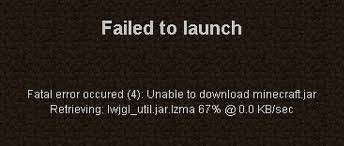
Well IF You Like To Play Around With , Mod, Textures, Clients ETC. And Something Goes Wrong This Is Your Blog , But Maybe Your Just Getting Those Notorious Minecraft Errors.
Here Is What To Do.( If You Need Additional Help Please Write In The Comments And I Will Respond Almost Immediately (1-30 Minutes) Please Read :D
Ok Go Like This First Restart Your Computer, Then (If Windows) Go Into The Start Or Run Or Go Type Section And Type %appdata% Then Delete The .Minecraft Folder. Con:You Will Lose Your Single Player Saves) . Then Delete Any Type Of Minecraft Off Your Computer, Ten Re-Download IT From Minecraft.net . I Hope This Helped :D
Need Anymore Help, Or Is It Something Completely Different? Please Tell Me :D
Here Is What To Do.( If You Need Additional Help Please Write In The Comments And I Will Respond Almost Immediately (1-30 Minutes) Please Read :D
Ok Go Like This First Restart Your Computer, Then (If Windows) Go Into The Start Or Run Or Go Type Section And Type %appdata% Then Delete The .Minecraft Folder. Con:You Will Lose Your Single Player Saves) . Then Delete Any Type Of Minecraft Off Your Computer, Ten Re-Download IT From Minecraft.net . I Hope This Helped :D
Need Anymore Help, Or Is It Something Completely Different? Please Tell Me :D
More like this

 GLFW error 65543: GLX: Failed to create context: GLXBadFBConfig. (SOLUTION)Tutorial Blog
 Nachitus
•8/5/21 10:09
47.9k 2276
Nachitus
•8/5/21 10:09
47.9k 2276


 trons_dc
 Titancraftz
 DanikasTheMan
856222
6









Have something to say?