
• 5/16/21 3:53 pm
- 6.5k views • 3 today
- save_alt 762 downloads
- Compatibility
- Minecraft 1.17
- Changes include
- Functions


830
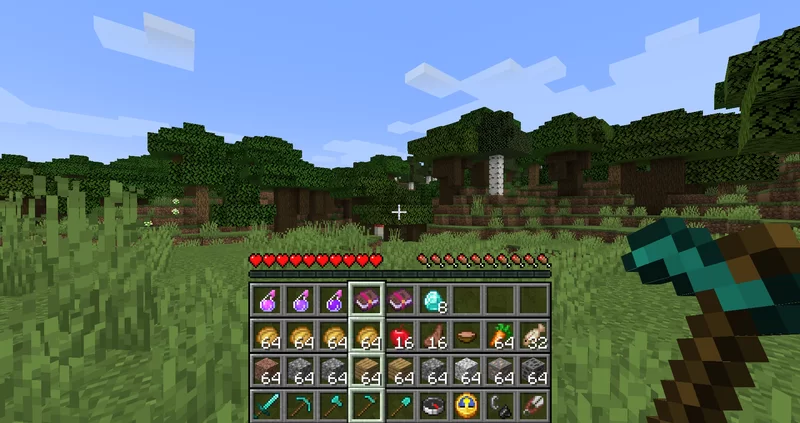
With this data pack, you can sneak + jump to vertically scroll your inventory into the hotbar.
In other words, you will be able to access your entire inventory without opening your inventory!
While scrolling, 4 squares show up above your hotbar that indicate which row is currently selected. So if you remember in which row a certain item was, you can get to it without getting confused.
Install Instructions
This is a datapack, it can easily be used in any world or server without any difficulties.
Simply drop the downloaded zip file in the "datapacks" folder of your world save (<world>/datapacks).
Then open your world and do
/reload
In case the datapack doesn't automatically get enabled, run:
/datapack enable "file/[datapack folder name].zip"
Simply drop the downloaded zip file in the "datapacks" folder of your world save (<world>/datapacks).
Then open your world and do
/reload
In case the datapack doesn't automatically get enabled, run:
/datapack enable "file/[datapack folder name].zip"
I encountered a bug! What do I do now?
I test all my creations, but bugs happen no matter how long you test something. Whenever someone experiences a bug, I do my best to fix the issue. You can help me by providing any useful information. You can never give me enough information, but please send it in a DM instead of placing it in the comments. You can still place a one-liner in the comments stating the issue to make the community aware, but that alone isn't enough to help me fix the issue.
- Checklist: Are you using the right version? Did you do /reload after dropping the datapack in? After /reload, does the datapack show up green in /datapack list?
- What is the issue? Does the datapack not seem to be working at all or is there a specific feature you are having issues with?
- What happened? Please give me all the steps needed to reproduce the issue. The faster I can experience it, the faster I can solve it.
- What did you expect to happen instead? This helps me understand your point of view and determine if the issue described is actually the issue I need to fix. The bug you are experiencing could just be a side effect of something else that doesn't behave as expected.


More like this
![XpStorage [DataPack 1.13.x to 1.16.x] Minecraft Data Pack](https://static.planetminecraft.com/files/resource_media/screenshot/1845/xpstoragelogo-1541395193_thumb.jpg) XpStorage [DataPack 1.13.x to 1.16.x]Minecraft 1.13 - 1.16 Game Mechanic Data Pack
XpStorage [DataPack 1.13.x to 1.16.x]Minecraft 1.13 - 1.16 Game Mechanic Data Pack kikipunk
7/20/20 4:33
• posted 11/5/18 9:01
57.5k 11.6k 19x 26687
kikipunk
7/20/20 4:33
• posted 11/5/18 9:01
57.5k 11.6k 19x 26687 Official Download: The Realistic Inventory Physics Datapack 1.0.1 (No Resource Packs Needed! NOT MULTIPLAYER COMPATIBLE!)Minecraft 1.17 - 1.18 Game Mechanic Data Pack
 That1Rand0mChannel-SBCDev
6/16/21 3:48
• posted 6/15/21 8:09
5.6k 408 1x 21011
That1Rand0mChannel-SBCDev
6/16/21 3:48
• posted 6/15/21 8:09
5.6k 408 1x 21011


 joakox98
 PALKIP
 IJML
IJML5124016
119




 Winter_Mephitidae

 jetterg



 Xenton

 Vent_Puer
 Cret8ceous
 TuniMani
Have something to say?
(But no worries, 1.17 is in the pre-release phase now, the full release should be soon-ish)