



• 10/10/20 5:47 pm
- 2.5k views • 0 today
- save_alt 581 downloads
- Progress
- 100% complete


21
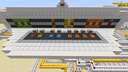
This is a redstone printer that I've been working on. It is able to print with seven colors and two shades such as black, white, red, orange, yellow, lime green, blue, purple, and brown.
The way you operate this printer is to start drawing the image you want to print inside the chest which is located behind the "ink cartridge." You will need to use concrete powder otherwise your image will not print.
Once you have finished your drawing, you will need to print your image. In order to do that, press the "printer on" button.
The printing process should take up to ten minutes before the image is done printing.
Once the image is done printing, press the "printer off" button.
Print any 2D image you want with this color printer! Enjoy!
The way you operate this printer is to start drawing the image you want to print inside the chest which is located behind the "ink cartridge." You will need to use concrete powder otherwise your image will not print.
Once you have finished your drawing, you will need to print your image. In order to do that, press the "printer on" button.
The printing process should take up to ten minutes before the image is done printing.
Once the image is done printing, press the "printer off" button.
Print any 2D image you want with this color printer! Enjoy!
More like this


 TÜRK yapımı printer (Printer by Turkey)Redstone Device Map
 alpgonjustvi
9/12/21 3:32
• posted 8/30/21 9:08
603 29 4x 511
alpgonjustvi
9/12/21 3:32
• posted 8/30/21 9:08
603 29 4x 511
 TheExtremeTNT
 RePeater
 brucewayne3
4791795
2




 loafioloafio




 SzymoQwertyMC

 RicoPico1516

Have something to say?