
• 6/14/14 8:22 pm
- 232 views • 0 today
- save_alt 4 downloads
- Progress
- 100% complete

0
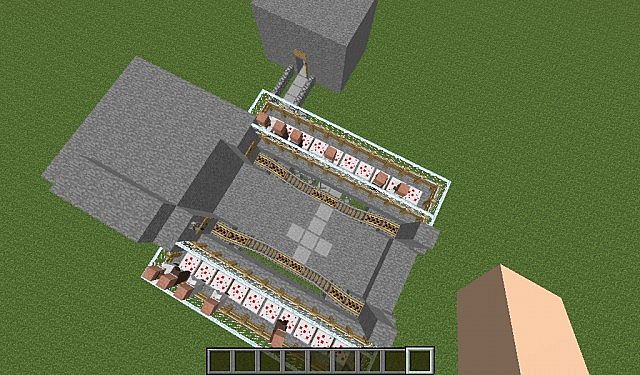
This is a really cool map. Rules for the map are in the map! I have gone back in time and brought back the old jousting days! This map is MEANT I mean MEANT for two players and will only work with two players. Enjoy this map! To play this map you will need to open the file and cilick on one file. Then, on the keyboard press ctrl+a. It will select all files. Then hit ctrl+c. This will copy all the files. Then,on your desktop create a folder called "Jousting In Minecraft". Then open the file you just created and then hit ctrl+v on your keyboard. It will paste the files in there. Close outo the window and then copy the file. Mac users may be dissapointed because this part of the guide is for Linux And Windows only. You may want to watch a video on it, link will be at the end of the description.
Linux: Once you have copied the file, open the file system and go to your home folder. If you have'nt already enabled hidden files, hit ctrl+h on your keyboard. It should enable hidden files. Then scroll down and find .minecraft. Open it and then select the "saves" folder. Once you enter that folder. Hit ctrl+v and it should paste "Jousting In Minecraft" into there. Close the windows and then open Minecraft. My map should be somewhere in your worlds list.
Windows: on the keyboard (assuming you have copied the file) press they windows key and R at the same time. In the little text box that pops up, type in %appdata%. It should open AppData. You should see .minecraft you may need to scroll. Open it and then select the "saves" folder. Once you enter that folder. Hit ctrl+v and it should paste "Jousting In Minecraft" into there. Close the windows and then open Minecraft. My map should be somewhere in your worlds list. :-)
Mac:www.youtube.com/watch?v=Tl0jUO-3BKM
Linux: Once you have copied the file, open the file system and go to your home folder. If you have'nt already enabled hidden files, hit ctrl+h on your keyboard. It should enable hidden files. Then scroll down and find .minecraft. Open it and then select the "saves" folder. Once you enter that folder. Hit ctrl+v and it should paste "Jousting In Minecraft" into there. Close the windows and then open Minecraft. My map should be somewhere in your worlds list.
Windows: on the keyboard (assuming you have copied the file) press they windows key and R at the same time. In the little text box that pops up, type in %appdata%. It should open AppData. You should see .minecraft you may need to scroll. Open it and then select the "saves" folder. Once you enter that folder. Hit ctrl+v and it should paste "Jousting In Minecraft" into there. Close the windows and then open Minecraft. My map should be somewhere in your worlds list. :-)
Mac:www.youtube.com/watch?v=Tl0jUO-3BKM
More like this

 D_A_T_H
 Hiya_kid2
 jbonybee
 Petrij98
2943464
2


 User5600593G



 Sandurs



Have something to say?