



20
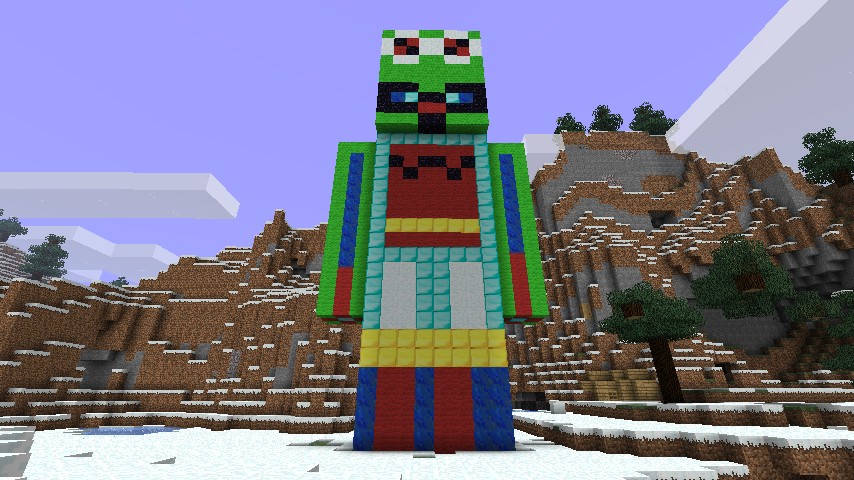
My Skin as a Statue. It was hard. If you don't know how to use Shematics here is how to use then:
1. Download MCedit AKA The world editor.
2. Download this Shematic
3. Run MC edit
4. Click Import
5. Drag this file into there.
6. Select it and place it into your world.
7. Run minecraft and you should see it
Also if you have MCedit you can make Shematics.
PS. This is my first Shematic. Not my first statue but it is my first home made statue (What I mean by that is I always look for a tutorials to make statues but this one was made with no tutorial at all.
PSS. This statue was updated with the arms. I bet your surprised I got the right angel as last time.
1. Download MCedit AKA The world editor.
2. Download this Shematic
3. Run MC edit
4. Click Import
5. Drag this file into there.
6. Select it and place it into your world.
7. Run minecraft and you should see it
Also if you have MCedit you can make Shematics.
PS. This is my first Shematic. Not my first statue but it is my first home made statue (What I mean by that is I always look for a tutorials to make statues but this one was made with no tutorial at all.
PSS. This statue was updated with the arms. I bet your surprised I got the right angel as last time.
1 Update Logs
Update #1 : by Wallyjoecraft 06/04/2011 12:08:19 pmJune 4, 2011 @ 4:08 pm UTC
Better arms.
More like this

 Rockloudly
 MagnaTitan
 Misho_Skywalker
 big-splat
19859
2












 UserEthan090
 Roaring20s
 ScrumpyMcDoo
 guardian1200
![Aspen Springs Retreat --- [ Modded 1.20 SWEM Equestrian Autumn Stables ] Minecraft Map & Project](https://static.planetminecraft.com/files/image/minecraft/project/2026/584/20115222-farthercrossing_s.jpg)
 ScarletSpringsEquestrian
Have something to say?