



• 10/12/21 10:03 pm
- 940 views • 0 today
- save_alt 42 downloads
- Progress
- 100% complete


0
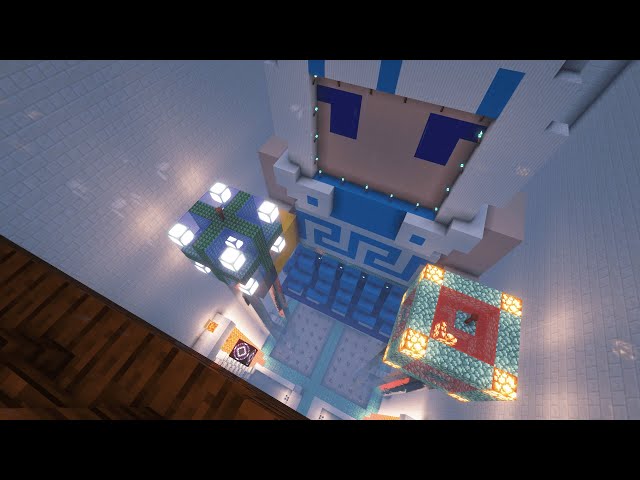
A Greek temple build for Gura
The structure is:
111 blocks long
85 blocks wide
78 blocks tall (including 7 blocks deep into the ground)
Front facing East
Back facing West
*How to load structure into your world:
0.1/navigate to your .minecraft folder
0.2/Go to saves/[yourworldname]/generated/minecraft/structures
(if generated/minecraft/structures do not exist, that is probably because you have not saved any structure in that world. Go ahead and create these new folders in the order above)
0.3/Copy the .nbt files (should be 12 in total) into the structures folder
0.4/Log into MC and go to your world
0.5/Enable cheat
0.6/Set gamemode to creative (In chat type: /gamemode creative)
1/Dig a 7 blocks deep hole
2/In chat type: /give @p minecraft:structure_block
3/Put the structure block into the bottom of the hole
4/Make sure the structure block is in load mode (look at the leftmost button above the Done button)
5/Name the structure block minecraft:templeforshark
6/Click LOAD. You should now see a bounding box showing the first part of the structure
7/Click LOAD again to load the first part of the structure
8/Go to the 7 corners of the bounding box, there should be structure blocks containing the next parts of the structure
9/Repeat step 6 until all 12 parts are loaded
10/Enjoy!
The structure is:
111 blocks long
85 blocks wide
78 blocks tall (including 7 blocks deep into the ground)
Front facing East
Back facing West
*How to load structure into your world:
0.1/navigate to your .minecraft folder
0.2/Go to saves/[yourworldname]/generated/minecraft/structures
(if generated/minecraft/structures do not exist, that is probably because you have not saved any structure in that world. Go ahead and create these new folders in the order above)
0.3/Copy the .nbt files (should be 12 in total) into the structures folder
0.4/Log into MC and go to your world
0.5/Enable cheat
0.6/Set gamemode to creative (In chat type: /gamemode creative)
1/Dig a 7 blocks deep hole
2/In chat type: /give @p minecraft:structure_block
3/Put the structure block into the bottom of the hole
4/Make sure the structure block is in load mode (look at the leftmost button above the Done button)
5/Name the structure block minecraft:templeforshark
6/Click LOAD. You should now see a bounding box showing the first part of the structure
7/Click LOAD again to load the first part of the structure
8/Go to the 7 corners of the bounding box, there should be structure blocks containing the next parts of the structure
9/Repeat step 6 until all 12 parts are loaded
10/Enjoy!
More like this

 Jswizzy84
 BurlyTemple
 Scorpus
 PotSmokingJellyFish
 MaximusCh3zza
5333630
2








 BlueDream710710

 CadofaCraft
 EcoSMP
 StarryWayWishes
Have something to say?