



• 10/5/21 3:22 pm
- 1.9k views • 0 today
- save_alt 157 downloads
- Progress
- 100% complete


11
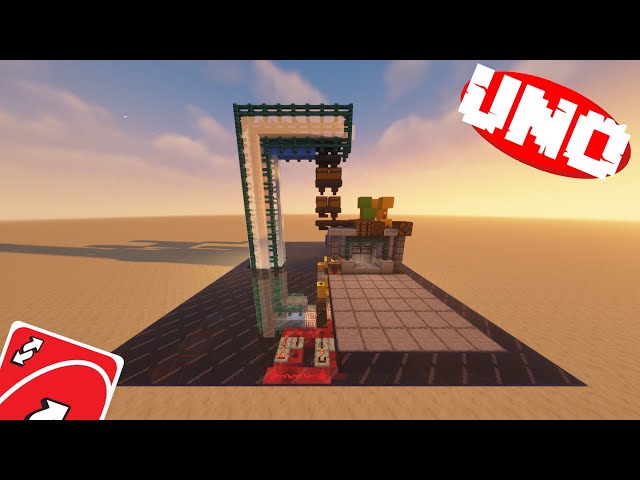
A Working Uno Machine, for you and your Friends to play on! With a fully functional shuffling system, this is a full recreation of UNO in Minecraft!
MADE FOR MINECRAFT JAVA 1.17
HOW TO INSTALL THE WORLD:
1. Download the world file
2. Unzip the file, using a file extraction software of your choice
3. (Windows) Open your file explorer, and navigate to "\AppData\Roaming\.minecraft" and place the world file into the saves folder.
3. (Mac) Open Finder Window. In the top bar select Go -> Go to folder. Type in "~/Library/Application Support/minecraft" and place the world file into the saves folder
4. Launch Minecraft and Enjoy!
HOW TO INSTALL THE SCHEMATIC:
First, you need to download worldedit
There are plenty of tutorials online, on how to download worldedit, so I won't show you how to do this step.
1. Download the Schematic file.
2. Place the schematic file into the schematics folder on your server, or at "\AppData\Roaming\.minecraft\config\worldedit" if you are playing on a singleplayer world
3. Go into your server or world, and type "//schem load uno"
4. Go to where you want to place it, and type"//paste -e" If it is not in the exact spot you want, you can type "//undo" and paste it somewhere else.
5. Restart your server or singleplayer world.
6. Enjoy!
MADE FOR MINECRAFT JAVA 1.17
HOW TO INSTALL THE WORLD:
1. Download the world file
2. Unzip the file, using a file extraction software of your choice
3. (Windows) Open your file explorer, and navigate to "\AppData\Roaming\.minecraft" and place the world file into the saves folder.
3. (Mac) Open Finder Window. In the top bar select Go -> Go to folder. Type in "~/Library/Application Support/minecraft" and place the world file into the saves folder
4. Launch Minecraft and Enjoy!
HOW TO INSTALL THE SCHEMATIC:
First, you need to download worldedit
There are plenty of tutorials online, on how to download worldedit, so I won't show you how to do this step.
1. Download the Schematic file.
2. Place the schematic file into the schematics folder on your server, or at "\AppData\Roaming\.minecraft\config\worldedit" if you are playing on a singleplayer world
3. Go into your server or world, and type "//schem load uno"
4. Go to where you want to place it, and type"//paste -e" If it is not in the exact spot you want, you can type "//undo" and paste it somewhere else.
5. Restart your server or singleplayer world.
6. Enjoy!
More like this


 UNO in Vanilla MinecraftRedstone Device Map
 ZenosyneS
7/7/26 8:44
• posted 11/20/25 7:02
617 56x 331
ZenosyneS
7/7/26 8:44
• posted 11/20/25 7:02
617 56x 331
 UjanRoy2008
 JR-Maps
 GildedSimian
 AdrizzPlays
5323791
2


 Ivyclaw
 FTFHardcore



 Arcantos

 Nayko206
 Kathaythum

Have something to say?