
• 8/3/25 10:56 am
- 657 views • 0 today
- save_alt 130 downloads
- Format
- Java
- Model
- Alex

202
Still posting older skins because I'm about a month behind on PMC. I hope you enjoy :D
This is another skin from the series of summery skins I've being making on The Skindex.
Please do not: Reupload this skin to any website, reupload this skin with only minor edits, sell this skin or put this skin behind a paywall.
You may: Wear this skin in Minecraft! Edit my skins so long as you give ample credit (including mentioning my username) and make meaningful contributions AND follow the guidelines of any website you are using.
I love: Comments discussing skinning and art techniques!
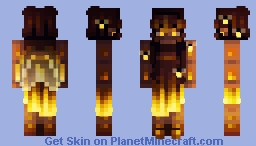
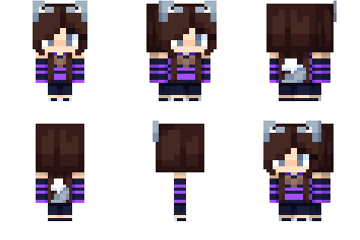
This girl has warm, dark brown skin, glowing amber eyes, long, wavy brunette hair, and pale transparent insect wings.
She is wearing a dark brown, ombre dress with an asymmetrical hemline, that glows golden yellow on the skirt, and brown boots.
This skin on The Skindex: https://www.minecraftskins.com/skin/23385527/firefly/
I do not consent to my work being used or altered for commercial purposes.
Prompt used: Firefly

This is another skin from the series of summery skins I've being making on The Skindex.
Please do not: Reupload this skin to any website, reupload this skin with only minor edits, sell this skin or put this skin behind a paywall.
You may: Wear this skin in Minecraft! Edit my skins so long as you give ample credit (including mentioning my username) and make meaningful contributions AND follow the guidelines of any website you are using.
I love: Comments discussing skinning and art techniques!
This girl has warm, dark brown skin, glowing amber eyes, long, wavy brunette hair, and pale transparent insect wings.
She is wearing a dark brown, ombre dress with an asymmetrical hemline, that glows golden yellow on the skirt, and brown boots.
This skin on The Skindex: https://www.minecraftskins.com/skin/23385527/firefly/
I do not consent to my work being used or altered for commercial purposes.
Prompt used: Firefly
Prompt List !Warning! It's Massive for Some Reason
More like this


 tsunamicbugle27
 Shielay
 mysticdrxgon
 SLJX T3XT
6692939
5







 Fast-Algo



 Stormesials
 Captain Kai
 SourPatch
 Reblok

Have something to say?
It's been a while since I first made this skin, but if my memory serves me correctly, I made the dress first, (either in the Skindex editor of the PMC one I can't remember) using the color wheel to pick the colors.
Then, I adjusted one of my premade skin bases to match the color scheme and contrast levels and put it under the dress using PhotoPea.
After that I color picked some of the colors in the dress to add additional highlights to the skin.
I made the hair normally at first, then added some highlights to the bangs in the PMC editor using a yellow on a low opacity.
I made the wings with some of the dress colors also in PhotoPea.
I finished with the additional directional light sourcing my usual way in PhotoPea, using the overlay and potentially soft light blending modes white adding in the highlights, and the overlay and multiply blending modes for the shadows.
Oof, I wrote that as one long run on sentence then realized it was basically unreadable, lol
I split it up some, so hopefully it makes sense.