
• 6/30/20 11:10 am
- 3k views • 0 today
- save_alt 861 downloads
- Game Version
- Minecraft 1.10
- Resolution
- 16x
- Progress
- 100% complete
- Changes include
- Terrain


1
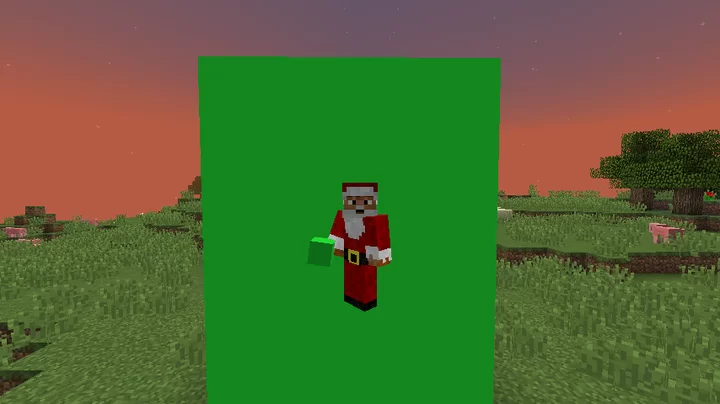
Hi, I posted this for Minecraft 1.10.2 because I didn't find a greenscreen pack for 1.10.2, so there it is.
I changed the glowstone texture but if you want to use glowstone in your world, you can do this locally.
HOW TO APPLY THE GREENSCREEN TEXTURE TO ANOTHER BLOCK ?
1 - Decompress the resourcepack zip file
2 - Rename the glowstone.png file in your resourcepack/assets/minecraft/textures/blocks folder to any other blockname in the folder.
Necessary : The block to replace must be a cubic texture.
3 - Replace the glowstone.png texture in your resourcepack/assets/minecraft/textures/blocks folder by the green_block_texture.png image in the resourcepack folder.
4 - Select all the files and folders in your resourcepack folder and zip them with a 7-zip or WinRar
5 - Put your new compressed texture pack file in your C:\Users\maxim\AppData\Roaming\.minecraft\resourcepacks folder.
6 - Launch Minecraft 1.10.2 or a Minecraft 1.10.2 version with Forge for example, apply your texture pack in the game and enjoy !
I changed the glowstone texture but if you want to use glowstone in your world, you can do this locally.
HOW TO APPLY THE GREENSCREEN TEXTURE TO ANOTHER BLOCK ?
1 - Decompress the resourcepack zip file
2 - Rename the glowstone.png file in your resourcepack/assets/minecraft/textures/blocks folder to any other blockname in the folder.
Necessary : The block to replace must be a cubic texture.
3 - Replace the glowstone.png texture in your resourcepack/assets/minecraft/textures/blocks folder by the green_block_texture.png image in the resourcepack folder.
4 - Select all the files and folders in your resourcepack folder and zip them with a 7-zip or WinRar
5 - Put your new compressed texture pack file in your C:\Users\maxim\AppData\Roaming\.minecraft\resourcepacks folder.
6 - Launch Minecraft 1.10.2 or a Minecraft 1.10.2 version with Forge for example, apply your texture pack in the game and enjoy !
More like this
 Minecraft: GreenScreen TexturePack | New Update | Mc 1.616x Minecraft 1.6 Experimental Texture Pack
 B0725
5/30/13 11:19
• posted 10/25/11 8:03
5.4k 1.7k 14x 822
B0725
5/30/13 11:19
• posted 10/25/11 8:03
5.4k 1.7k 14x 822 Green-Screen Texture Pack16x Minecraft 1.8 beta Experimental Texture Pack
 CMinecrafter1
•11/7/11 6:47
2.6k 525 9x 133
CMinecrafter1
•11/7/11 6:47
2.6k 525 9x 133 Green Screen16x Minecraft 1.4 Experimental Texture Pack
 NathanGraphics
11/4/12 7:12
• posted 11/2/12 3:39
2k 288 9x 13
NathanGraphics
11/4/12 7:12
• posted 11/2/12 3:39
2k 288 9x 13 Green Screen Texture Pack8x Minecraft 1.2.5 Experimental Texture Pack
 MarcasFenix
•4/8/12 12:41
1.8k 298 3x 14
MarcasFenix
•4/8/12 12:41
1.8k 298 3x 14 Green-Screen Texture pack by: MrOply16x Minecraft 1.4.7 Experimental Texture Pack
 MrOply
•2/12/13 12:18
1.7k 363 3x 132
MrOply
•2/12/13 12:18
1.7k 363 3x 132
4656704
4

 CoJeMC





 JermLion
 loafioloafio
 Castle Town
 LIsPixel
 Compy_Compsognathus
Have something to say?