




• 7/19/12 8:23 pm
- 2.9k views • 0 today
- save_alt 208 downloads
- Game Version
- Minecraft 1.2.5
- Resolution
- 128x
- Progress
- 100% complete
- Changes include
- Armor
- Font
- GUI
- Items
- Misc
- Particles
- Terrain
Added Creditbla bla bla


3
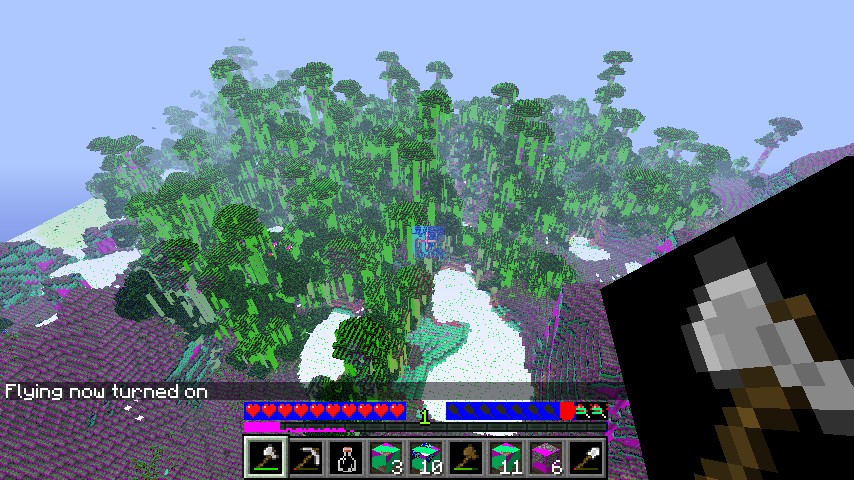
lots of colors and a new skin i used paint to make it this is my 1st one plese download and give it a diamond and don`t worry about the spelling its crazy and its real name is +colours
Additional Notes
if you want a new texturepack like this give a dimond!1 Update Logs
Update #1 : by steve1999 07/19/2012 11:10:31 pmJuly 20, 2012 @ 3:10 am UTC
+ 3 more pictures i have builder mod
More like this
 HellCraft Texture pack16x Minecraft 1.5 Other Texture Pack
 ryan4585
•4/14/13 9:18
6.5k 715 8x 543
ryan4585
•4/14/13 9:18
6.5k 715 8x 543 Lemon-Craft Texture Pack!16x Minecraft 1.8 beta Other Texture Pack
 lemon66
•9/18/11 8:28
3.6k 229 3x 811
lemon66
•9/18/11 8:28
3.6k 229 3x 811 royalhoneydew141's texture pack16x Minecraft 1.3.1 Other Texture Pack
 royalhoneydew141
•8/2/12 1:52
1.3k 289 3x 13
royalhoneydew141
•8/2/12 1:52
1.3k 289 3x 13 Spyro9770's Texture pack16x Minecraft 1.4 Other Texture Pack
 Spyro9770
•12/4/12 10:17
1.2k 182 2x 11
Spyro9770
•12/4/12 10:17
1.2k 182 2x 11 MaikyTV´s Texture Pack16x Minecraft 1.11 Other Texture Pack
 MaikyTV
6/9/17 11:06
• posted 5/23/17 8:04
1.1k 49x 11
MaikyTV
6/9/17 11:06
• posted 5/23/17 8:04
1.1k 49x 11
1171241
4


 cadbane86140
 MwahahaMinecraft




 Super_Jose
 Qovion
 AdamixGaming
 Shobla_41
 RichTrash
Have something to say?
NEVER use paint to make a texture.
You need to use something that can handle the alpha layer like Photoshop.The alpha layer is what tells the program what to leave transparent.Paint on the other hand, just fills the empty space with the background color.In the case of your tools, that would be black.
Once you get a program that can handle transparencies you also need to make sure you save in the correct format for two reasons;
1; Minecraft looks for specific file types and won't find the files unless the extension is correct
2A; Some file types, like .Jpeg, can't save the transparencies.
2B; But .PNG files, for example, can handle it though
i`am only 10