



• • 5/11/23 12:10 pm • 3 logs
- 57.6k views • 9 today
- save_alt 20.2k downloads • 2 today
- Game Version
- Minecraft 1.20
- Resolution
- 16x
- Progress
- 100% complete
- Changes include
- Environment
- Items
- Misc
- Models
- Particles
Added CreditThanks @CrownDeluxe for the idea and Thanks @… info
1,288
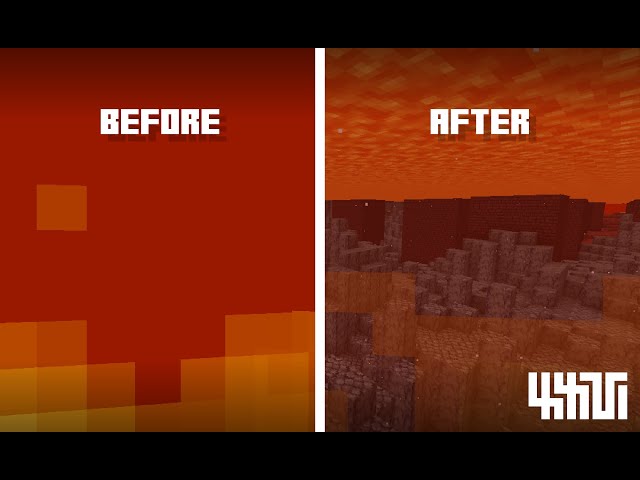
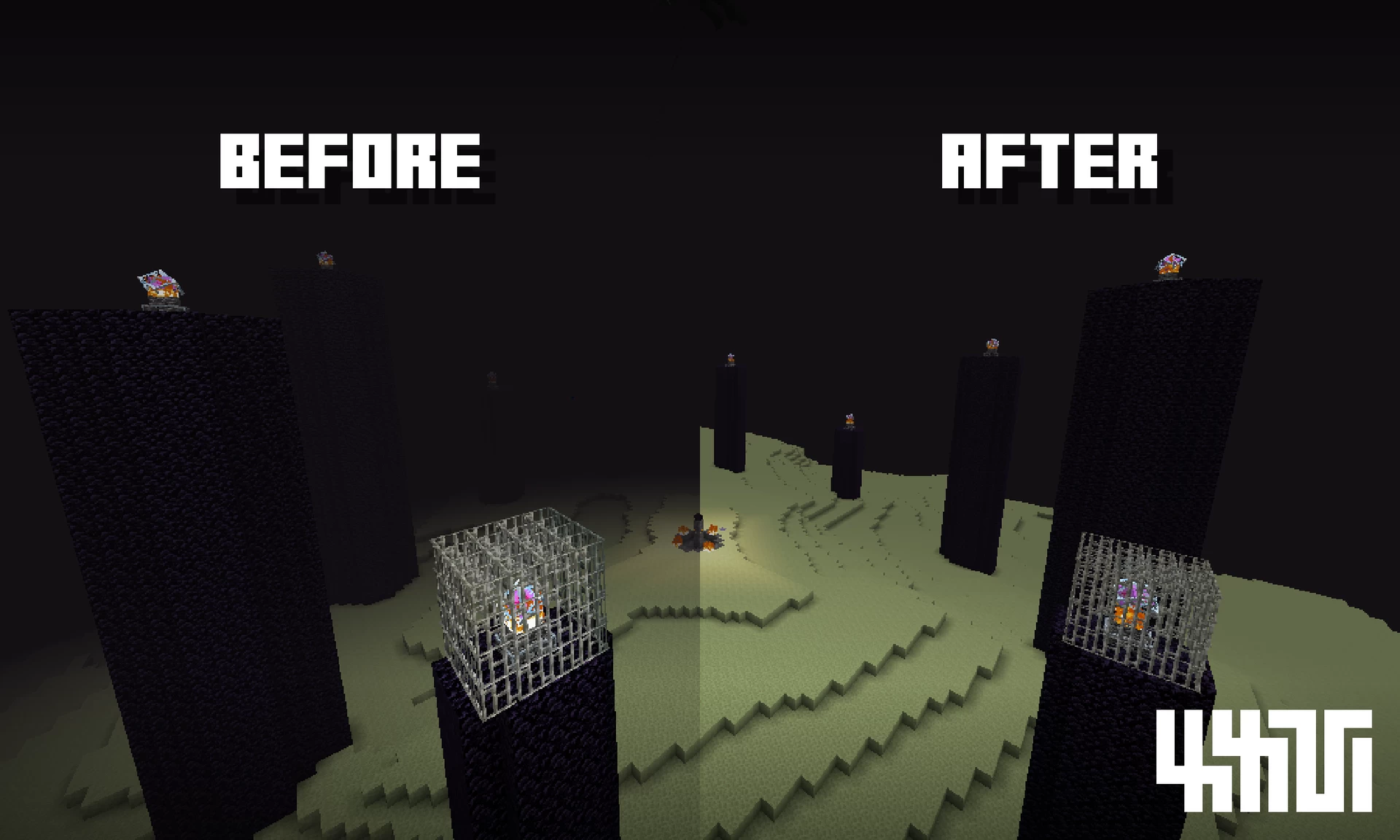
THIS TEXTURE PACK USES VANILLA CORE SHADERS TO REDUCE SOME FOGS AND IMPROVE VISIBILITY!
FEATURES:
- Reduced fog when under lava or powder snow!
- Blindness/Darkness effects are no longer obtrusive!
- The End fog is no longer so obtrusive! (It will be easier to kill the dragon!)
- Decreased fire overlay transparency
- Ideal for finding ores inside lava.
GAME VERSION: Java 1.19.4
OPTIFINE NEEDED? No
OTHER VERSIONS SUPPORTED: 1.19.x
CONFIGURATION:
- In Assets>Minecraft>Shaders>Include you'll find the "FogConfig.glsl" file that will allow you to choose which Fogs are affected by the texture pack.
RELATED TEXTURE PACKS:
- Check out the alternate version (No Fog) HERE!
I HOPE YOU LIKE THIS TEXTURE PACK!
(Once downloaded, you can move it directly to the "Resource Packs" folder)
(Once downloaded, you can move it directly to the "Resource Packs" folder)
Terms Of Use | Bedrock Ports | Extra Info
- If you want to include my content totally or partially in a project (T.Pack, Datapack, Mod, etc.) Please DM me first.
- Usage must be a significant modification or an addition to your project, not a repost.
- I do not allow my content to be uploaded or published on other download platforms without permission.
- The creation and publishing of Bedrock Ports for my Texture Packs is reserved for a limited group of PMC users only.
- Showcase videos are always welcome and I would appreciate a link to the Texture Pack in the description.
- If you want to change the Texture Pack mcmeta to avoid the warning when using it in another game version, you can guide yourself from this page.
3 Update Logs
Update #3 : by manuxxvy 05/11/2023 12:10:36 pmMay 11, 2023 @ 4:10 pm UTC
- Texture Pack Updated to 1.19.4
- Improved and simplified code.
- Added the "FogConfig.glsl" file that allows you to choose which Fogs are affected (reduced) by the texture pack.
- Changed Texture Pack Icon
LOAD MORE LOGS
More like this
 Clear Lava and Water16x Minecraft 1.21.10 Other Texture Pack
 WhiterM
•1/9/23 12:53
299.2k 114.8k 21x 39793
WhiterM
•1/9/23 12:53
299.2k 114.8k 21x 39793 Clear Fog (Vanilla)16x Minecraft 1.20 Simplistic Texture Pack
 manuxxvy
5/11/23 12:10
• posted 1/5/23 12:44
155.5k 68.6k 51x 4169144
manuxxvy
5/11/23 12:10
• posted 1/5/23 12:44
155.5k 68.6k 51x 4169144

 nikinok
 roobley
5818181
4











 Hahchek
 Gutomat64
 Ramses the Fun Philosophy
 TheeRadioStar

Have something to say?