

- 6
- 4

18
Are you making a custom map and you need a compact way to delay commands without using kilometres and kilometres of repeaters? Then this tutorial is what you're looking for!
STEP 1
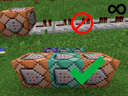
First of all, you need 3 command blocks: the first must be a repeating one and the other two chain, and they all have to be set on "always active". I also suggest you to place these command blocks in the spawn chunk in order to keep them active. Here's the order:
/tag @e[tag=DelayCloud,nbt={Age:-1}] add DelayDone
v
/execute at @e[tag=DelayDone] run data merge block ~ ~ ~ {auto:1b}
v
/execute at @e[tag=DelayDone] run data merge block ~ ~ ~ {auto:0b}
(1.12.2 commands)
STEP 2
Once done this, you can finally proceed to delay the command!
Example: you want to make a dialogue and you need two seconds of delay between the messages. Something like this:
"Hello there!"
two seconds
"General Kenobi! You are a bold one!"
This time we need two type of command blocks: the pulse one (set on "need redstone") and the chain one (set on "always active"). The delayer command must be in the second type. Here's the order:
What the command does is basically creating an area effect cloud with the tag Age which is the equivalent of the time delay expressed in ticks (20 ticks = 1 second). Remember that the number must be negative.
I suggest you to set the commandBlockOutput gamerule to false to avoid the annoying command blocks output messages in chat.
If you want to delay only one command block, then you can do this:
Leave empty
v
/summon area_effect_cloud CoordinatesOfTheNextCommandBlock* {Tags:["DelayCloud"],Age:-20}
v
/tp @p coordinates
CREDITS
I learned this trick thanks to this video by lorgon111 (now it is outdated since the commands shown in the video works for 1.12.2 and older) which was suggested to me by Macapple96 on an old Italian forum which is now closed (if you're interested, here's the archived discussion!).
*: to know the coordinates of the next command block, you can press F3 (not f+3, F3!) and then point at the command block: the coordinates are labeled as "Targeted Block". Alternatively, you can use tildes (ex. ~1 ~ ~ if the next block is +1 on X), which can be typed by pressing alt and 126 on numpad (on mac press option and 5).
P.S.: for Bedrock players, read the logs.
STEP 1
First of all, you need 3 command blocks: the first must be a repeating one and the other two chain, and they all have to be set on "always active". I also suggest you to place these command blocks in the spawn chunk in order to keep them active. Here's the order:
/tag @e[tag=DelayCloud,nbt={Age:-1}] add DelayDone
v
/execute at @e[tag=DelayDone] run data merge block ~ ~ ~ {auto:1b}
v
/execute at @e[tag=DelayDone] run data merge block ~ ~ ~ {auto:0b}
(1.12.2 commands)
STEP 2
Once done this, you can finally proceed to delay the command!
Example: you want to make a dialogue and you need two seconds of delay between the messages. Something like this:
"Hello there!"
two seconds
"General Kenobi! You are a bold one!"
This time we need two type of command blocks: the pulse one (set on "need redstone") and the chain one (set on "always active"). The delayer command must be in the second type. Here's the order:
/tellraw @a {"text":"Hello there!"}
v
/summon area_effect_cloud CoordinatesOfTheNextCommandBlock* {Tags:["DelayCloud"],Age:-40}
(replace -40 with the number you need, see below for more info)
v
/tellraw @a {"text":"General Kenobi! You are a bold one!"}
(If you're using a version older than 1.11, replace area_effect_cloud with AreaEffectCloud)
(For version 26 and later: read the logs)
v
/summon area_effect_cloud CoordinatesOfTheNextCommandBlock* {Tags:["DelayCloud"],Age:-40}
(replace -40 with the number you need, see below for more info)
v
/tellraw @a {"text":"General Kenobi! You are a bold one!"}
(If you're using a version older than 1.11, replace area_effect_cloud with AreaEffectCloud)
(For version 26 and later: read the logs)
What the command does is basically creating an area effect cloud with the tag Age which is the equivalent of the time delay expressed in ticks (20 ticks = 1 second). Remember that the number must be negative.
I suggest you to set the commandBlockOutput gamerule to false to avoid the annoying command blocks output messages in chat.
If you want to delay only one command block, then you can do this:
Leave empty
v
/summon area_effect_cloud CoordinatesOfTheNextCommandBlock* {Tags:["DelayCloud"],Age:-20}
v
/tp @p coordinates
CREDITS
I learned this trick thanks to this video by lorgon111 (now it is outdated since the commands shown in the video works for 1.12.2 and older) which was suggested to me by Macapple96 on an old Italian forum which is now closed (if you're interested, here's the archived discussion!).
*: to know the coordinates of the next command block, you can press F3 (not f+3, F3!) and then point at the command block: the coordinates are labeled as "Targeted Block". Alternatively, you can use tildes (ex. ~1 ~ ~ if the next block is +1 on X), which can be typed by pressing alt and 126 on numpad (on mac press option and 5).
P.S.: for Bedrock players, read the logs.
3 Update Logs
Update for Minecraft Bedrock : by Anakin002 06/01/2026 9:57:08 amJune 1 @ 1:57 pm UTC
These commands don't work on bedrock, but there's another, simpler way: you just put the command you want to delay in a chain command block (always active) and change the "delay in ticks" value!

LOAD MORE LOGS
More like this

 Commands & Command blocks part II: The scoreboardTutorial Blog
 ShelLuser
•9/14/18 2:29
8.6k 2x 195
ShelLuser
•9/14/18 2:29
8.6k 2x 195


 wertcraft
 Ziimon
 EmeraldKillers
 TheCommandsMan
5349620
6










 uzvarua
 KaaXdev
Have something to say?