
• 1/28/14 6:43 am
- 505 views • 0 today
Added CreditEtho, EthosLab
- 1
- 0

0
Hey guys! VKG147 here.
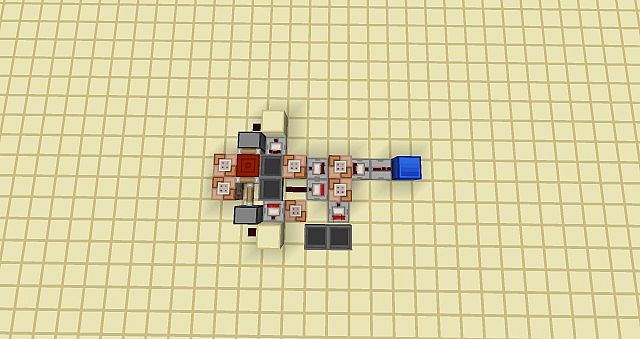
Today I am going to give you a link of a schematic of my INFINITE counter. Yes that means that you can count to whatever number you want (hopefully). Pros and cons:
+ Very precise
- Can count only even numbers
+ Fully modifiable!
- Works only in creative mode! (uses command blocks)
- Is noisy (unless you put it somewhere further away)
So once you actually get the schematic into your world (google that if you don't know how)
you want to enter 2 commands before it will start working.
/scoreboard objectives add counter dummy
/scoreboard objectives add countertrigger dummy
To trigger the timer just activate a command block wich has a fallowing command in it:
/scoreboard players set @p countertrigger 1
To modify to how much the counter should count to, search the contents of the command blocks and find a command block that says:
/testfor @p[score_counter_min=10]
All you need to do is just change the number 10. So if I want the counter to count to 100 then the command would look like this:
/testfor @p[score_counter_min=100]
Now the output of the counter will be the repeater facing a lapis lazulli block!
And that's about it! See you next time!
Download link:
www.mediafire.com/download/4ypcwynz4ioy1fb/Counter.schematic
Thanks to Etho for his hopper timer!
Today I am going to give you a link of a schematic of my INFINITE counter. Yes that means that you can count to whatever number you want (hopefully). Pros and cons:
+ Very precise
- Can count only even numbers
+ Fully modifiable!
- Works only in creative mode! (uses command blocks)
- Is noisy (unless you put it somewhere further away)
So once you actually get the schematic into your world (google that if you don't know how)
you want to enter 2 commands before it will start working.
/scoreboard objectives add counter dummy
/scoreboard objectives add countertrigger dummy
To trigger the timer just activate a command block wich has a fallowing command in it:
/scoreboard players set @p countertrigger 1
To modify to how much the counter should count to, search the contents of the command blocks and find a command block that says:
/testfor @p[score_counter_min=10]
All you need to do is just change the number 10. So if I want the counter to count to 100 then the command would look like this:
/testfor @p[score_counter_min=100]
Now the output of the counter will be the repeater facing a lapis lazulli block!
And that's about it! See you next time!
Download link:
www.mediafire.com/download/4ypcwynz4ioy1fb/Counter.schematic
Thanks to Etho for his hopper timer!
More like this


 LARGE NORDIC HOUSE! (Minecraft Building Tutorial)Tutorial Blog
 Deamon_Hunter
•2/26/20 6:16
1.3kx 144
Deamon_Hunter
•2/26/20 6:16
1.3kx 144
 SaneGamer
 SourC00kie
 sorbet08
2719265
6


 HyperPiraat3555









 LostInMC
 rogue core
 Fantino2011
 uzvarua
Have something to say?