


• • 6/19/22 11:35 pm • 1 logs
- 3.5k views • 0 today
- save_alt 174 downloads
- Compatibility
- Minecraft 1.18
- to version
- Minecraft 1.20
- Changes include
- Advancements
- Functions


3
### Lore Geek By Wiccy###
This is a simple data pack is for adding lore to any item with formatting.
### Usage ###
First you will need a "Book and Quill" as this is where you will format the lore to be added to an item.
Once you have set you lore text in the "Book and Quill" drop the item you want to attach the lore to on the ground within five( 5 ) blocks of yourself.
Make sure there are no other items nearby then have the "Book and Quill" selected in your hotbar and type "/trigger AddLore" into chat without the quotes( " " ) and hit enter.
And that is it pick up the item and hover over the item to see the lore.
**If you see no/partial lore that would mean there is an error in the formatting in the book.**
### Important ###
Every page is a new line for the lore.
Make sure all formatting is within square brackets( [ ] ) on every page used.
### Formatting ###
{"text":"%%%"} = The text itself, replace %%% with the text you want for lore.
Below is the extra formatting and must be places before the closing curly bracket ( } ) yes you need the , at the start.
All these are optional and can be in any order.
,"bold":true = Makes text bold, Default is false
,"italic":false = Makes text italic, Default is true
,"strikethrough":true = Add a line through the text, Default is false
,"underlined":true = Add a line under the text, Default is false
,"obfuscated":true = Make text unreadable and forever shifting, Default is false
,"color":"%%%" = Changes the colour of the text, Default is dark_purple. Replace %%% with a colour name
Minecraft recognises or use a hex value.
### Minecraft Colour Names List ###
black
dark_blue
dark_green
dark_aqua
dark_red
dark_purple
gold
gray
dark_gray
blue
green
aqua
red
light_purple
yellow
white
### Example ###
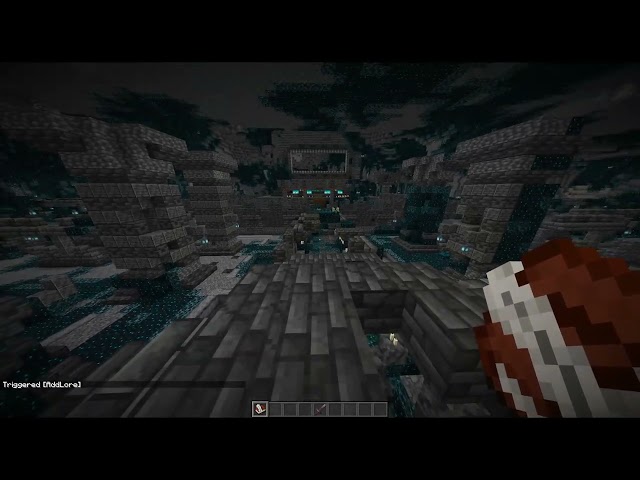
See Images for some examples.
### TIPS ###
#1 - To remove lore user the trigger with an empty "Book and Quill" in hands.
#2 - To have a blank line for spacing put [{"text":""} ] on the page you want the empty line.
This is a simple data pack is for adding lore to any item with formatting.
### Usage ###
First you will need a "Book and Quill" as this is where you will format the lore to be added to an item.
Once you have set you lore text in the "Book and Quill" drop the item you want to attach the lore to on the ground within five( 5 ) blocks of yourself.
Make sure there are no other items nearby then have the "Book and Quill" selected in your hotbar and type "/trigger AddLore" into chat without the quotes( " " ) and hit enter.
And that is it pick up the item and hover over the item to see the lore.
**If you see no/partial lore that would mean there is an error in the formatting in the book.**
### Important ###
Every page is a new line for the lore.
Make sure all formatting is within square brackets( [ ] ) on every page used.
### Formatting ###
{"text":"%%%"} = The text itself, replace %%% with the text you want for lore.
Below is the extra formatting and must be places before the closing curly bracket ( } ) yes you need the , at the start.
All these are optional and can be in any order.
,"bold":true = Makes text bold, Default is false
,"italic":false = Makes text italic, Default is true
,"strikethrough":true = Add a line through the text, Default is false
,"underlined":true = Add a line under the text, Default is false
,"obfuscated":true = Make text unreadable and forever shifting, Default is false
,"color":"%%%" = Changes the colour of the text, Default is dark_purple. Replace %%% with a colour name
Minecraft recognises or use a hex value.
### Minecraft Colour Names List ###
black
dark_blue
dark_green
dark_aqua
dark_red
dark_purple
gold
gray
dark_gray
blue
green
aqua
red
light_purple
yellow
white
### Example ###
See Images for some examples.
### TIPS ###
#1 - To remove lore user the trigger with an empty "Book and Quill" in hands.
#2 - To have a blank line for spacing put [{"text":""} ] on the page you want the empty line.
1 Update Logs
Update #1 : by Wiccy84 06/19/2022 11:35:12 pmJune 20, 2022 @ 3:35 am UTC
Fixed error with not adding players to be able to use the trigger command
More like this
 Armor Stand Customizer v2.2 (1.14+)Minecraft 1.14 - 1.16 Tool Data Pack
 CivetKitty
3/22/20 9:03
• posted 1/16/19 3:59
35.8k 6.3k 11x 74442
CivetKitty
3/22/20 9:03
• posted 1/16/19 3:59
35.8k 6.3k 11x 74442 Redstone Tools! (More tools Pt.1)Minecraft 1.16 - 1.17 Tool Data Pack
 ArtemisNotFound
•5/10/21 1:51
6.6k 1.7k 2x 1106
ArtemisNotFound
•5/10/21 1:51
6.6k 1.7k 2x 1106


 Setryyk
 User4968113D
 SecretFall
5613599
119





 _Dusky_
 Mxtsukii


 AhmedTurysta
Have something to say?