
• 12/17/22 7:48 pm
- 4.8k views • 0 today
- save_alt 759 downloads
- Compatibility
- Minecraft 1.19
- Changes include
- Functions


2
If you want to use this datapack in your videos or projects, please leave a credit
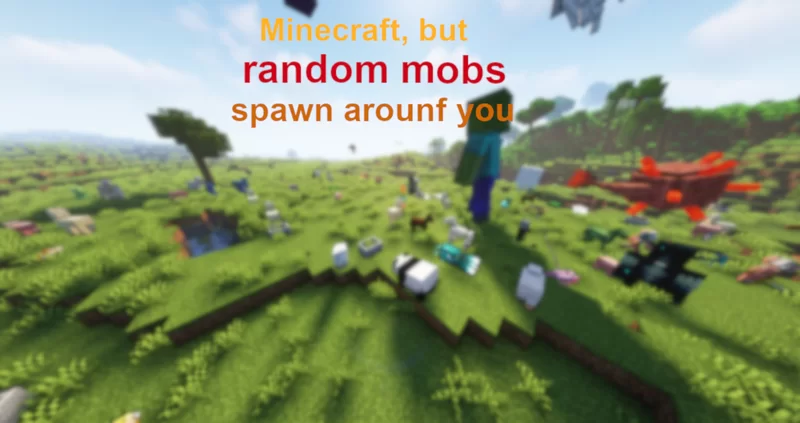
This is pretty simple but well customizable datapack. Random mobs spawn within 50 block.
The amount and time between which they will appear is configurable. If you enjoy this datapack don't forget to leave a diamond!
If you have any suggestions for my future projects then join my discord server. https://discord.gg/WvnNwvWPEW
How to install;
when you make a new world with my datapack:
1. Click 'Data Packs'.
2. Drag and drop the zip file into the window.
3. Activate the data pack in the Minecraft window.
4. Create your world.
5. Type '/reload'.
when you add my datapack to the already existing world:
1. Select your world in the list of worlds.
2. Click 'Edit'.
3. Click 'Open World Folder'.
4. Go to the 'datapacks' folder.
5. Drag and drop the zip file into the window.
6. Enter your world.
7. Type '/reload'.
This is pretty simple but well customizable datapack. Random mobs spawn within 50 block.
The amount and time between which they will appear is configurable. If you enjoy this datapack don't forget to leave a diamond!
If you have any suggestions for my future projects then join my discord server. https://discord.gg/WvnNwvWPEW
How to install;
when you make a new world with my datapack:
1. Click 'Data Packs'.
2. Drag and drop the zip file into the window.
3. Activate the data pack in the Minecraft window.
4. Create your world.
5. Type '/reload'.
when you add my datapack to the already existing world:
1. Select your world in the list of worlds.
2. Click 'Edit'.
3. Click 'Open World Folder'.
4. Go to the 'datapacks' folder.
5. Drag and drop the zip file into the window.
6. Enter your world.
7. Type '/reload'.
More like this
 Killing Mobs Spawn Random MobsMinecraft 1.18 - 1.19 Minecraft, but Data Pack
 Eastonium
4/25/22 9:51
• posted 4/23/22 6:44
5.5k 936x 11014
Eastonium
4/25/22 9:51
• posted 4/23/22 6:44
5.5k 936x 11014 Minecraft but, Every time you kill something, a random mob spawnsMinecraft 1.19 Minecraft, but Data Pack
 SuperZinnn
4/10/22 2:47
• posted 2/28/22 6:03
4.3k 765 4x 158
SuperZinnn
4/10/22 2:47
• posted 2/28/22 6:03
4.3k 765 4x 158 Minecraft but mobs spawn randomMinecraft 1.13 - 1.18 Minecraft, but Data Pack
 EpicBuilderHD
3/1/22 1:20
• posted 2/2/22 11:49
4.2k 603x 11210
EpicBuilderHD
3/1/22 1:20
• posted 2/2/22 11:49
4.2k 603x 11210 Minecraft but hitting mobs gives you random effectsMinecraft 1.13 - 1.18 Minecraft, but Data Pack
 _Neon_Creeper_
•12/10/21 10:44
2.2k 396x 153
_Neon_Creeper_
•12/10/21 10:44
2.2k 396x 153 Minecraft, but sneaking spawns a random mobMinecraft 1.16 - 1.21 Minecraft, but Data Pack
 sniffercraft34
•3/8/26 8:11
939 279 6x 23117
sniffercraft34
•3/8/26 8:11
939 279 6x 23117
5794787
119






 Nayko206
 potato_random
 User5719884G


 AvatarKage

 RoxanneLapin
 MC_SIlver

Have something to say?