
• • 8/17/20 1:27 pm • 1 logs
- 7.5k views • 0 today
- save_alt 212 downloads
- Compatibility
- Minecraft 1.14
- to version
- Minecraft 1.16
- Changes include
- Functions


2
The Problem:
My husband and I have been playing on our Minecraft world for nearly six years. We have all the farms. We've beat all the bosses. We've done all the things. And, now, we are just building our little bit of creative paradise. But, the spawning of hostile mobs in dark places is really putting a cramp in our style. At this end game stage, we really just wanted to build in peace but without losing too much of the game's design.The Solution:
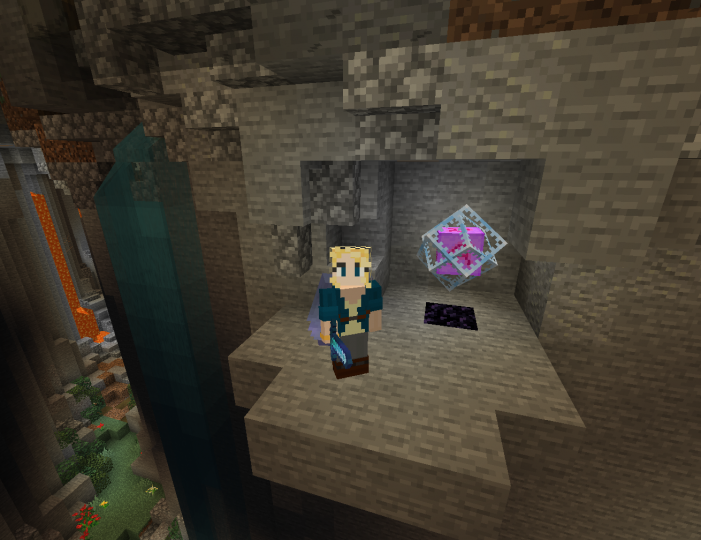
I made a little datapack that adds functionality to end crystals. Basically, when you place down an end crystal it will now send a list of annoying hostile mobs to their doom in the void below the world! Mwhahaha!We chose end crystals for three reasons: (1) They don't have much purpose outside of spawning the ender dragon; (2) They are easy to make in the end game not so easy early game; and (3) They still have some risk as they cannot be moved easily and they explode if touched.
We also wanted to be able to easily manipulate where the effect was placed to allow spawnable areas in a base. So, we made the kill cube relatively small and a cube instead of a sphere (LESS MATH! WOO!).
Lastly, we like to perform experiments and such on unwilling annoying hostile mobs. So, if you nametag a mob and then take it into the kill cube, then it will not be cast into the void until you rename it to it's default name (e.g. Zombie for a zombie).
How it Works:
The Kill Cube:
The kill cube will teleport any of the annoying mobs to the void below the world if they spawn or wander into the kill cube. The kill cube is 64 x 64 x 64 blocks positioned around the end crystal. The end crystal is always at the bottom center of the kill cube. This means that mobs can spawn directly below the end crystal but not above.Annoying Mobs:
These are the annoying mobs that will be flung into the void upon entering the kill cube:- Creeper
- Drowned
- Husk
- Skeleton
- Stray
- Witch
- Zombie
- Zombie Villager
- Spider
- Pillager
- Bat
If you don't like something on the list or want to add something else, just edit the mob_proof_crystals.mcfunction file. It should be super straight-forward to anyone remotely familiar with Minecraft commands.* To add something, just copy the last line, paste it and edit the name and id. To remove something, just delete it's line.
*If you use notepad on Windows as your text editor, be sure to choose "All Files" and UTF-8 on your save window.
That's it.
Please feel free to use, share, modify, etc. Credit is cool. But, I will really only be bummed if I see some big YouTuber or something giving you credit for it. So, please don't be a jerk.1 Update Logs
Update #1 : by ethnographie 08/17/2020 1:27:45 pmAugust 17, 2020 @ 5:27 pm UTC
Updated pack mcmeta file to reflect that it still works in 1.16+.
More like this

 Mobs++Minecraft 1.16 - 1.19 Mob Data Pack
 BeckBroEYTube
2/20/22 1:10
• posted 1/23/22 8:16
7.3k 308 5x 51212
BeckBroEYTube
2/20/22 1:10
• posted 1/23/22 8:16
7.3k 308 5x 51212


 DaNussi
 Greppi
 G1itch
 EandCheckmark
4356904
119













 SLT World
Have something to say?
I made some modifications to your datapack maintaining the main idea of using the end crystal to spawnproof an area.
The tweak I made is the ability of letting hostile mobs to go inside the spawnproof area, therefore only blocking the spawn there.
The function looks now like this:
execute as @e[type=minecraft:creeper] unless score @s spawn matches 2 run scoreboard players add @s spawn 1execute as @e[type=minecraft:drowned] unless score @s spawn matches 2 run scoreboard players add @s spawn 1execute as @e[type=minecraft:husk] unless score @s spawn matches 2 run scoreboard players add @s spawn 1execute as @e[type=minecraft:skeleton] unless score @s spawn matches 2 run scoreboard players add @s spawn 1execute as @e[type=minecraft:stray] unless score @s spawn matches 2 run scoreboard players add @s spawn 1execute as @e[type=minecraft:witch] unless score @s spawn matches 2 run scoreboard players add @s spawn 1execute as @e[type=minecraft:zombie] unless score @s spawn matches 2 run scoreboard players add @s spawn 1execute as @e[type=minecraft:zombie_villager] unless score @s spawn matches 2 run scoreboard players add @s spawn 1execute as @e[type=minecraft:spider] unless score @s spawn matches 2 run scoreboard players add @s spawn 1execute as @e[type=minecraft:pillager] unless score @s spawn matches 2 run scoreboard players add @s spawn 1execute as @e[type=minecraft:enderman] unless score @s spawn matches 2 run scoreboard players add @s spawn 1
execute at @e[type=end_crystal] positioned ~-32 ~ ~-32 as @e[type=minecraft:creeper,dx=64,dy=64,dz=64] unless score @s spawn matches 2 run teleport @s ~ -256 ~execute at @e[type=end_crystal] positioned ~-32 ~ ~-32 as @e[type=minecraft:drowned,dx=64,dy=64,dz=64] unless score @s spawn matches 2 run teleport @s ~ -256 ~execute at @e[type=end_crystal] positioned ~-32 ~ ~-32 as @e[type=minecraft:husk,dx=64,dy=64,dz=64] unless score @s spawn matches 2 run teleport @s ~ -256 ~execute at @e[type=end_crystal] positioned ~-32 ~ ~-32 as @e[type=minecraft:skeleton,dx=64,dy=64,dz=64] unless score @s spawn matches 2 run teleport @s ~ -256 ~execute at @e[type=end_crystal] positioned ~-32 ~ ~-32 as @e[type=minecraft:stray,dx=64,dy=64,dz=64] unless score @s spawn matches 2 run teleport @s ~ -256 ~execute at @e[type=end_crystal] positioned ~-32 ~ ~-32 as @e[type=minecraft:witch,dx=64,dy=64,dz=64] unless score @s spawn matches 2 run teleport @s ~ -256 ~execute at @e[type=end_crystal] positioned ~-32 ~ ~-32 as @e[type=minecraft:zombie,dx=64,dy=64,dz=64] unless score @s spawn matches 2 run teleport @s ~ -256 ~execute at @e[type=end_crystal] positioned ~-32 ~ ~-32 as @e[type=minecraft:zombie_villager,dx=64,dy=64,dz=64] unless score @s spawn matches 2 run teleport @s ~ -256 ~execute at @e[type=end_crystal] positioned ~-32 ~ ~-32 as @e[type=minecraft:spider,dx=64,dy=64,dz=64] unless score @s spawn matches 2 run teleport @s ~ -256 ~execute at @e[type=end_crystal] positioned ~-32 ~ ~-32 as @e[type=minecraft:pillager,dx=64,dy=64,dz=64] unless score @s spawn matches 2 run teleport @s ~ -256 ~execute at @e[type=end_crystal] positioned ~-32 ~ ~-32 as @e[type=minecraft:enderman,dx=64,dy=64,dz=64] unless score @s spawn matches 2 run teleport @s ~ -256 ~
I also removed the bat and added the enderman to the list.
Hope it helps someone!
1. Can it be used underwater?
2. Can you modified the kill cube so that the crystal would be in the middle centre of it?
Thanks!
I have not modified the properties of the end crystal at all--I wanted to stay as vanilla as possible. So, it still needs to follow all of the vanilla mechanics for placing it down and the consequences of touching them, etc. This means it cannot be placed in water. But, you can build a small box for it underwater and it will still cover underwater areas.
As far as moving the location of the crystal in the kill cube, you are welcome to modify the code to do so. But, I found it really broke the usefulness of it to use it that way. As this meant that when using it to protect a building, the crystal needed to be smack in the middle of it. With the crystal at the bottom of the kill cube, you can place it under a house and protect it without needing to make it a feature of the build. To modify it yourself, open the mob_proof_crystals.mcfunction file and then alter the coordinates of each execute command from ~-32 ~ ~-32 to ~-32 ~-32 ~-32.
Best! /Ethno
What if i expand the radius to around 128 blocks? and the crystal is in the middle of it?
Would the codes be
execute at @e[type=end_crystal] positioned ~-64 ~-64 ~-64 run teleport @e[name=Creeper,type=creeper,dx=128,dy=128,dz=128] ~ -256 ~
Thanks!