


• 9/29/26 2:20 pm
- 16 views
- save_alt 2 downloads
- Compatibility
- Minecraft 26.1
- to version
- Minecraft 26.3 snapshot
- Changes include

3
[MULTI SLAB (BETA)]
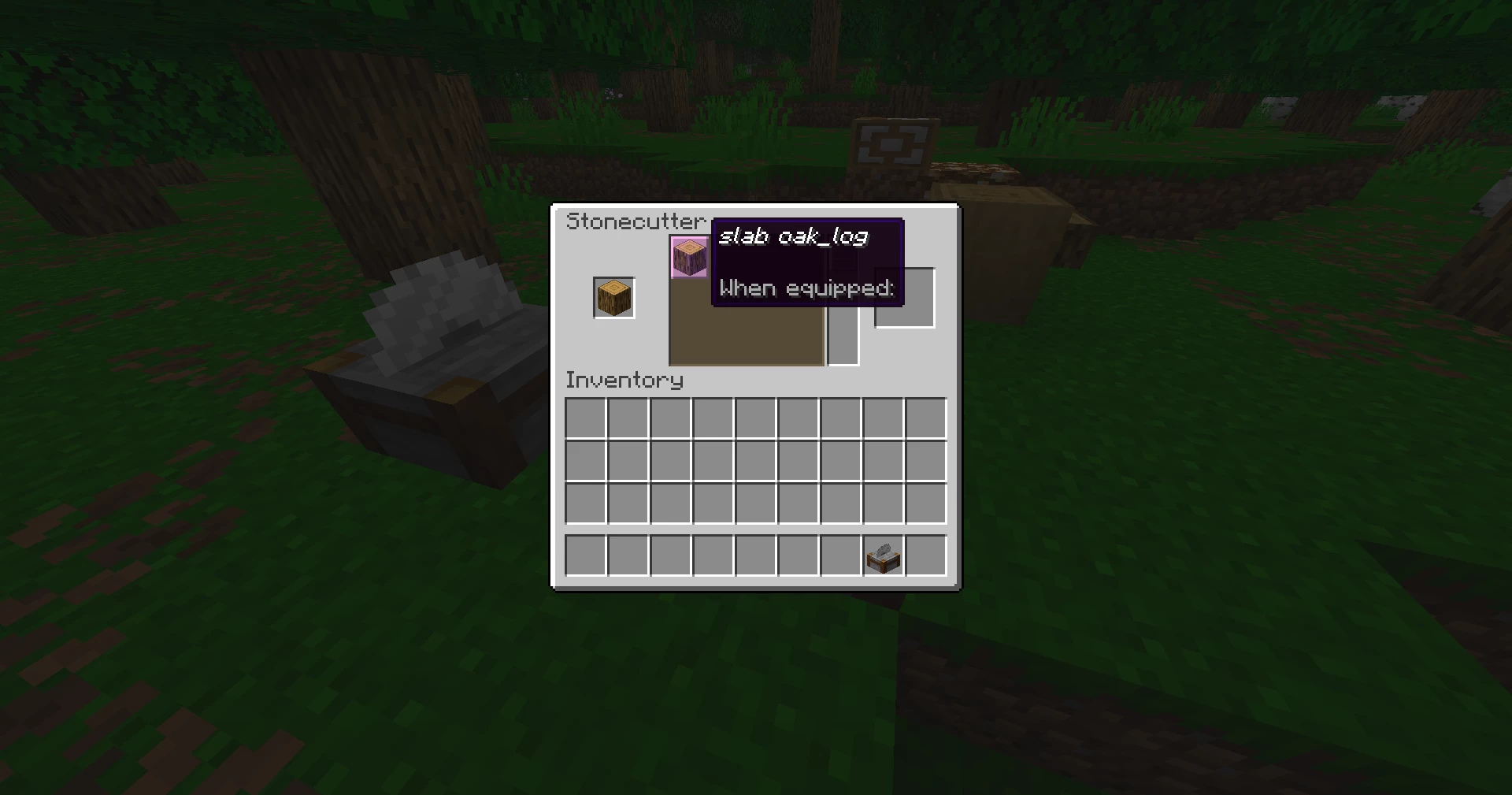
Ever wanted to build with half-slabs made of dirt, diamond, or obsidian? Multi Slab lets you turn almost every full-sized block in Minecraft into a functional slab using the Stonecutter!
Ever wanted to build with half-slabs made of dirt, diamond, or obsidian? Multi Slab lets you turn almost every full-sized block in Minecraft into a functional slab using the Stonecutter!
⚠️ Note: This project is currently in Beta. Please report any possible improvements and keep in mind that you may encounter bugs.
━━━━━━━━━━━━━━━━━━━━━━━━━━━━━━━━━━━━━━━━━━━━━━━━━━
🛠️ HOW IT WORKS
- Crafting: Place any eligible full block into a Stonecutter to craft its slab equivalent.
- Inventory Visual: Slabs appear in your inventory as their base block with an enchanted glint effect.
- Placing Lower Slabs: Place the slab item directly on the ground like a normal lower slab.
- Placing Upper Slabs: To place a slab on the upper half of a block position:
- Place a standard vanilla slab on the bottom half first.
- Target and place your custom slab onto it.
- The custom slab will automatically break the temporary vanilla slab and position itself on the upper half.
- Place a standard vanilla slab on the bottom half first.
━━━━━━━━━━━━━━━━━━━━━━━━━━━━━━━━━━━━━━━━━━━━━━━━━━
💡 WHY DOWNLOAD THIS?
- 🧱 Expanded Building Palette: Add fine architectural details to your builds without needing complex modding frameworks.
- ⚡ Vanilla Compatible: Fully functional through a standard datapack structure, with no resource pack required! Perfect for survival servers or creative worlds.
━━━━━━━━━━━━━━━━━━━━━━━━━━━━━━━━━━━━━━━━━━━━━━━━━━
🇫🇷 Cliquez ici pour la Version Française (Language FR)
Multi Slab (Bêta)
Vous avez toujours voulu fabriquer des demi-dalles de terre, de diamant ou d'obsidienne ? Multi Slab vous permet de transformer la quasi-totalité des blocs complets de Minecraft en dalles fonctionnelles grâce au Tailleur de pierre !
Vous avez toujours voulu fabriquer des demi-dalles de terre, de diamant ou d'obsidienne ? Multi Slab vous permet de transformer la quasi-totalité des blocs complets de Minecraft en dalles fonctionnelles grâce au Tailleur de pierre !
⚠️ Note : Le projet est actuellement en phase Bêta. Merci de signaler toute amélioration possible.
🛠️ Fonctionnement
- Fabrication : Placez n'importe quel bloc compatible dans un Tailleur de pierre pour obtenir sa version en dalle.
- Affichage : Dans l'inventaire, la dalle conserve l'apparence du bloc d'origine avec un effet enchanté.
- Pose en dalle basse : Posez l'item directement comme une dalle classique.
- Pose en dalle haute : Posez d'abord une dalle vanilla classique sur la partie basse, visez-la puis posez votre nouvelle dalle par-dessus pour qu'elle prenne la place en position haute.
💡 Pourquoi le télécharger ?
- 🧱 Palette élargie : Ajoutez de nouveaux détails sans alourdir votre jeu avec des mods.
- ⚡ 100 % Vanilla : Fonctionne via un datapack classique, sans aucun resource pack nécessaire !
━━━━━━━━━━━━━━━━━━━━━━━━━━━━━━━━━━━━━━━━━━━━━━━━━━
📜 LICENSE & USAGE
This project is licensed under CC BY-NC-SA 4.0.
• YouTube / Twitch: You are fully allowed to show this datapack in your content! Just credit Gazein and include a link to this page.
• Redistribution: Re-uploading this datapack to other sites or selling it is strictly forbidden.
6872699
119






 Slimelon






Have something to say?