
• 6/10/23 5:45 pm
- 580 views • 0 today
- save_alt 11 downloads
- Compatibility
- Minecraft 1.19
- to version
- Minecraft 1.20
- Changes include
- Functions


24
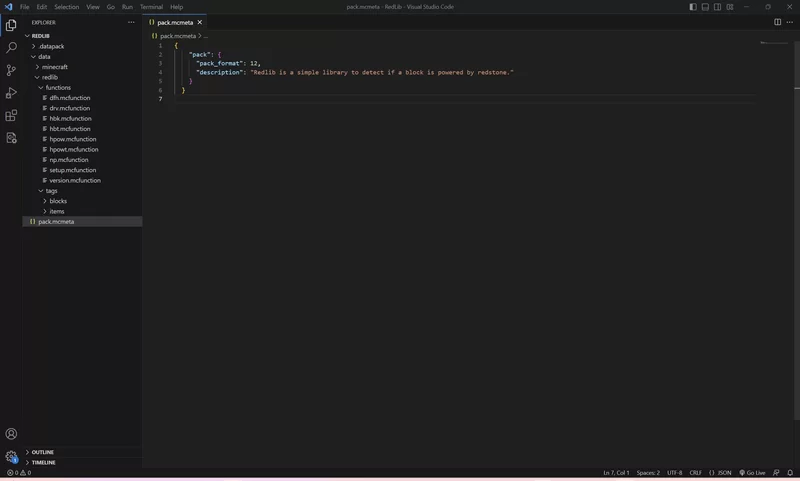
RedLib is a datapack that is designed to make life easier (mainly for me) in working with redstone,
and doubles as a place to put code that may change frequently in newer updates (though it is not a substitute for manually updating code).
This datapack, put simply, allows you to check if a position is being powered by redstone.
This datapack may be a dependency on some of my datapacks.
NOTE: THE FOLLOWING IS FOR DEVELOPERS ONLY, THIS DATAPACK SHOULD ONLY BE INSTALLED AS A DEPENDENCY
Internals:
Just run redlib:drv to check if the current position is being powered by redstone
If it is, you get the redlib_pow tag.
Also adds misc item tags:
#redlib:misc/food Food Items
#redlib:misc/seeds Seeds
And some redstone related tags such as #redlib:air witch includes air and fluids.
VERSIONING SYSTEM:
Run function redlib:setup on load to setup the versioning system.
Then, run redlib:version to get the current RedLib version under the "version" player for objective "redlib_install_info" as a number.
If this command fails, redlib ain't installed, otherwise, check to see if the version number is the required version.
(Version formula=(n-1)*10+1, where n is the pretty-printed version (so version 1.1 is 2, version 1.0 is 1, version 2.2 is 13, etc.))
Also adds a pretty-printed version string under redlib:tmp versionString.
and doubles as a place to put code that may change frequently in newer updates (though it is not a substitute for manually updating code).
This datapack, put simply, allows you to check if a position is being powered by redstone.
This datapack may be a dependency on some of my datapacks.
NOTE: THE FOLLOWING IS FOR DEVELOPERS ONLY, THIS DATAPACK SHOULD ONLY BE INSTALLED AS A DEPENDENCY
Internals:
Just run redlib:drv to check if the current position is being powered by redstone
If it is, you get the redlib_pow tag.
Also adds misc item tags:
#redlib:misc/food Food Items
#redlib:misc/seeds Seeds
And some redstone related tags such as #redlib:air witch includes air and fluids.
VERSIONING SYSTEM:
Run function redlib:setup on load to setup the versioning system.
Then, run redlib:version to get the current RedLib version under the "version" player for objective "redlib_install_info" as a number.
If this command fails, redlib ain't installed, otherwise, check to see if the version number is the required version.
(Version formula=(n-1)*10+1, where n is the pretty-printed version (so version 1.1 is 2, version 1.0 is 1, version 2.2 is 13, etc.))
Also adds a pretty-printed version string under redlib:tmp versionString.
1 Update Logs
V1.1 : by mzxciap 07/22/2023 10:21:45 pmJuly 23, 2023 @ 2:21 am UTC
Updated to version 1.1 (id 2)
REQUIRES 1.20 (sorry)
* Performance improvements via /return
* Minor fixes for some (but not all) bugs
* ???
REQUIRES 1.20 (sorry)
* Performance improvements via /return
* Minor fixes for some (but not all) bugs
* ???
More like this

 Gunivers-LibsMinecraft 1.13 - 1.18 Other Data Pack
 Gunivers
3/22/25 7:20
• posted 12/4/21 6:49
1.9k 48x 42723
Gunivers
3/22/25 7:20
• posted 12/4/21 6:49
1.9k 48x 42723 HeightBoxLibMinecraft 1.20 - 26.3 snapshot Other Data Pack
 I_Cement
9/1/26 3:39
• posted 12/16/24 8:53
862 19x 331
I_Cement
9/1/26 3:39
• posted 12/16/24 8:53
862 19x 331![Sul4urLib [DISCONTINUED] Minecraft Data Pack](https://static.planetminecraft.com/files/image/minecraft/data-pack/2024/180/18231416_s.jpg)

 BluJayy_
 Sul4ur
 Legends11
5967499
119




 Gibbonson




 User6716247G


 GreentheNinja


 Bitu456
Have something to say?