


• 9/29/21 4:19 pm
- 1.8k views • 0 today
- save_alt 129 downloads
- Compatibility
- Minecraft 1.17
- Changes include
- Advancements
- Functions
- Recipes
- 6
- 6
- 2

Required Resource Pack

1

NOTE: RECIPE UNLOCKER DATAPACKS ARE INCOMPATIBLE WITH THIS DATAPACK.
Important: This datapack needs a resourcepack. download it here
Recommendation: Use a invisible item frame datapack along with this datapack
for the best results.

Would you like to add more life into your gardens?
Well with this pack you can craft scarecrows
that you can decorate your gardens with
using item frames.

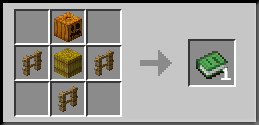
Step 1: First craft a scarecrow.
Recipe:
-------------------------------------------------------------------------
Step 2: Place the scarecrow in a
item frame (on the ground) and rotate
it if you like.
-------------------------------------------------------------------------
Step 3: Place a string on the same
block the item frame is placed.
Prevents you from accidentally
rotating or seeing the name of
the item.
-------------------------------------------------------------------------
Step 4: Hover your cursor over the string
so you can see it's hitbox. After that you
want to place a glass pane on the string.
This makes it seem like the scarecrow
has a actual hitbox, but its just the glass.
-------------------------------------------------------------------------
Enjoy!

For new worlds:
Step 1: Download this datapack and the resource pack
Step 2: Launch minecraft and click on options.
Step 3: Click on "Resource Packs" and then click
"Open Pack Folder".
Step 4: Copy and paste the Resource pack into
the Resource pack folder.
Step 5: Create a new world and click on "Data packs".
Then copy and paste the datapack into the world folder.
You are done!
For existing worlds:
Step 1: Download this datapack and the resource pack
Step 2: Launch minecraft and click on options.
Step 3: Click on "Resource Packs" and then click
"Open Pack Folder".
Step 4: Copy and paste the Resource pack into
the Resource pack folder.
Step 5: Find your minecraft folder and navigate to
"Saves"
Step 6: Open your world folder and click on the "Data packs"
folder. Then simply copy and paste the datapack
into the folder.
You are done!
More like this
 Item DisplaysMinecraft 1.19 - 1.20 Simple Data Pack
 BluJayy_
11/29/23 10:15
• posted 4/1/23 10:18
6.2k 946 2x 52023
BluJayy_
11/29/23 10:15
• posted 4/1/23 10:18
6.2k 946 2x 52023![Simple Life Crystals [1.19 Datapack] Minecraft Data Pack](https://static.planetminecraft.com/files/image/minecraft/data-pack/2022/077/15767826-simplelifecrystals_s.jpg) Simple Life Crystals [1.19 Datapack]Minecraft 1.19 Simple Data Pack
Simple Life Crystals [1.19 Datapack]Minecraft 1.19 Simple Data Pack Thorn_123
•6/11/22 9:52
3.1k 136 2x 166
Thorn_123
•6/11/22 9:52
3.1k 136 2x 166 Amethyst RodsMinecraft 1.18 Simple Data Pack
 Ani150
1/6/22 10:40
• posted 1/5/22 4:24
2.7k 156x 167
Ani150
1/6/22 10:40
• posted 1/5/22 4:24
2.7k 156x 167
 Item Detector DataPackMinecraft 1.17 - 1.20 Simple Data Pack
 JestemLagMC
•2/23/24 12:02
1.3k 80x 267
JestemLagMC
•2/23/24 12:02
1.3k 80x 267
 VoidRunner0
5316787
119











 the der discohund
Have something to say?