


• 8/30/26 9:21 am
- 31 views
- save_alt 7 downloads
- Compatibility
- Minecraft 1.21
- to version
- Minecraft 26.2
- Changes include
- Functions



1
# Teleport Stone
A Minecraft Java Datapack and tested n:
- V 1.21.11
- V 26.1.x
- V 26.2
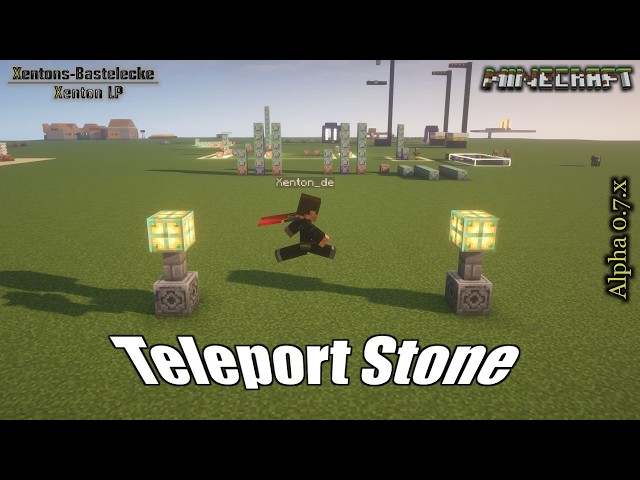
Place with an item a teleport stone in the world, for your Teleport Stone Network
With a right click, you can teleport between the stones.
No knowlage needed over commands. All needed commands are in this description
Note: Release video is comming soon, actual video is from alpha phase
#----------------------# Installation (update) #----------------------#
- Remove the old version from datapack folder
#----------------------# Installation (New) #----------------------#
- Download it from your favorit portal
- - Note to Github, it is possible you have to extract the datapack in your Datapack folder
- Put this datapack in your savegame, in the folder datapacks (here as example local)
- - Example: .minecraft - saves - YourWorld - datapacks - Teleport_Stone_by_Xenton_V26_x_x(.zip)
- After start your world, you can check is the datapack available with the command "/datapack list".
- - When you find in green brackets: [file/Teleport_Stone_by_Xenton_V26_x_x.zip (world)], than the datapack is correct installed.
- You don't need to do anything to initalise this datapack, it will be run automaticly after correct install.
#----------------------# Run #----------------------#
- To get Config/Admin items
- - /function x_ts__teleport_stone:give_items
- Using the Admin Items:
- - Item: "Place Teleportstone", you can with a right click on a block, place the teleport stone over the highest block
- - - When the block is to far away, you get the message in chat "Zu weit weg", and no teleport stone will be set
- - Item: "Edit Teleportstone", you can with a right click on a teleport stone, the open the admin dialog
- - - Button: Set name, here you can change the name from the stone
- - - Button: Delete - Delete this teleport stone, and remove it from the teleporatation list
- - Item: Set Teleportpoint, you can see and set in the near from a Teleport stone the target from teleport
- - - Hold in Mainhand, you can see a cloud on target from teleportpoint, when you in the distance to 10 Block around from Teleport Stone
- - - Rightclick: You can set an new target point, when you in the distance to 10 Block around from Teleport Stone
A Minecraft Java Datapack and tested n:
- V 1.21.11
- V 26.1.x
- V 26.2
Place with an item a teleport stone in the world, for your Teleport Stone Network
With a right click, you can teleport between the stones.
No knowlage needed over commands. All needed commands are in this description
Note: Release video is comming soon, actual video is from alpha phase
#----------------------# Installation (update) #----------------------#
- Remove the old version from datapack folder
#----------------------# Installation (New) #----------------------#
- Download it from your favorit portal
- - Note to Github, it is possible you have to extract the datapack in your Datapack folder
- Put this datapack in your savegame, in the folder datapacks (here as example local)
- - Example: .minecraft - saves - YourWorld - datapacks - Teleport_Stone_by_Xenton_V26_x_x(.zip)
- After start your world, you can check is the datapack available with the command "/datapack list".
- - When you find in green brackets: [file/Teleport_Stone_by_Xenton_V26_x_x.zip (world)], than the datapack is correct installed.
- You don't need to do anything to initalise this datapack, it will be run automaticly after correct install.
#----------------------# Run #----------------------#
- To get Config/Admin items
- - /function x_ts__teleport_stone:give_items
- Using the Admin Items:
- - Item: "Place Teleportstone", you can with a right click on a block, place the teleport stone over the highest block
- - - When the block is to far away, you get the message in chat "Zu weit weg", and no teleport stone will be set
- - Item: "Edit Teleportstone", you can with a right click on a teleport stone, the open the admin dialog
- - - Button: Set name, here you can change the name from the stone
- - - Button: Delete - Delete this teleport stone, and remove it from the teleporatation list
- - Item: Set Teleportpoint, you can see and set in the near from a Teleport stone the target from teleport
- - - Hold in Mainhand, you can see a cloud on target from teleportpoint, when you in the distance to 10 Block around from Teleport Stone
- - - Rightclick: You can set an new target point, when you in the distance to 10 Block around from Teleport Stone
More like this


 Vertical TeleporterMinecraft 1.16 Quality of Life Data Pack
 DaNussi
•8/20/20 12:23
3.6k 341 9x 11511
DaNussi
•8/20/20 12:23
3.6k 341 9x 11511

 Astrune
 mrurl42
 chevalier_nomo
 Sniffer115
7035881
119






 Winter_Mephitidae
 jetterg

Have something to say?