
• 6/15/26 7:11 am
- 276 views • 0 today
- save_alt 4 downloads
- Compatibility
- Minecraft 1.21
- to version
- Minecraft 26.1
- Changes include


10
About Me
Vanilla Viewmodels is a Datapack Library which adds an "animation controller" for your OBJMC rendered viewmodels ingame. To work with the datapack, you must have:
- An Animated (Generic in Blockbench) Model.
- objmc installed locally.
- A Basic Understanding of How Resourcepacks and Datapacks work.
Using Viewmodel?
Pros
- Seamless Item Animations that can be ran per function.
- Thanks to OBJMC, the models can be extremely High-Resolution.
Cons
- The OBJMC shader doesn't work with an IRIS shader on.
- The Resourcepack Size may bloat due to high res textures exported by objmc
Utility:
How it works.
Since objmc only exports model+texture, it should be noted that the datapack adopts certain conventions to make sure that it works as intended. OBJMC, by default, will not "prepare you a datapack/resourcepack" like how plugins like AnimatedJava does. Hence, creating a resourcepack that correctly follows this datapack's convention is CRUCIAL.
Model in Resourcepack
The optional 'id' parameter accepted in the "play-animation" utils command requires a valid item_model component value. Since every objmc animation exports into its own model+texture, you must:
- Create an Item Model JSON that resembles the model.
e.g. 'first_person:weapons/glock' at assets/first_person/items/weapons/glock.json - Animations for the Model MUST be included in this item_model folder, where the "model with animation" is a model toggled when STRING CUSTOM-MODEL-DATA value === ANIMATION-NAME.
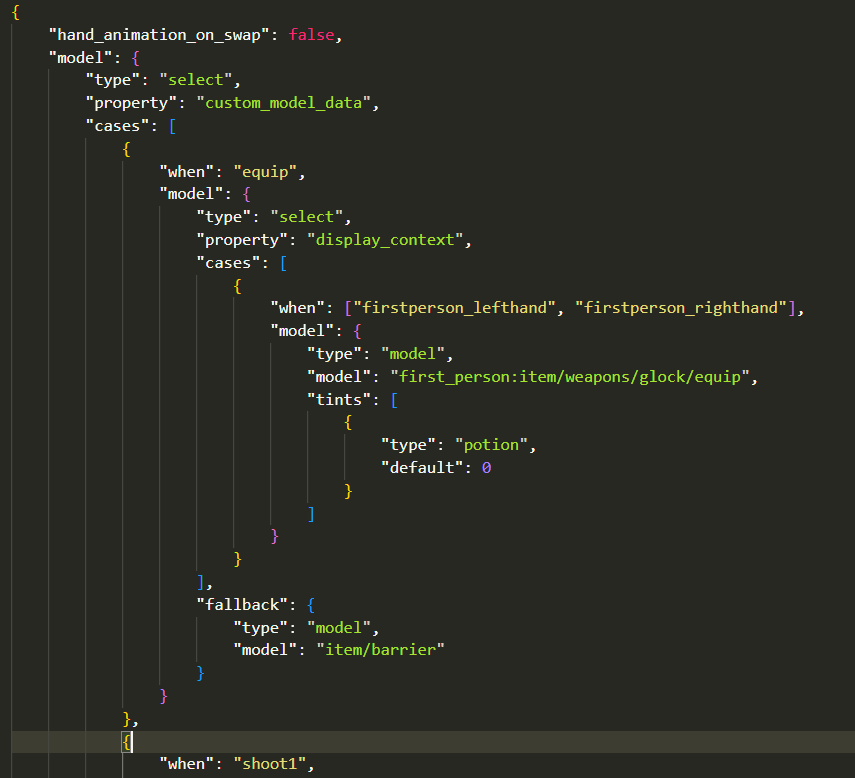 Hence, every animation is a CustomModelData string in the item_model JSON file. Obviously, this implies that adding multiple animations would mean that you'll have to export every animation into its OBJ sequences => put them through OBJMC.py => take the condensed model and mention it in the item_model component.
Registering Models in Datapack.
To Register an OBJMC Animated Model in the datapack, open the function file
vm:global/load and add a registry in the data modify line! 
Here's how a registry entry's structure looks like:
{
  id: "first_person:weapons/glock", // item_model component
  animations: [
      {
          "name":"equip",
          "start": 0,
          "end": 30,
          "duration": 27,
          keyframe_functions: [
            { at: 0, function_file: 'test:equip' },       // Run a function file @ 0th keyframe.
            { at: 30, function_file: 'test:end_animation' },
            { at: 25, function_file: 'test:gun_sfx' }
          ]
      },
      {
          "name": "shoot1",
          "start": 0,
          "end": 8,
          "duration": 6,
          "keyframe_functions": [
              { at: 0, function_file: 'gun:shoot' }
          ]
      }
  ]
}
To register an animation that loops infinitely, set the "end" value to -1
Playing an Animation
to play an Animation, run the command:
function vm:animations/play {args:{}}
the
args:{} field is used to tweak parameters, namely:id: it stores/applies the *item_model* component value
animation: it stores the name of the animation.
frame: the frame at which the animation should start.
an example command:
function vm:animations/play {args:{id:"first_person:weapons/glock", animation: "equip", frame: 10}}
This command will,
- change the item model of the potion item to first_person_weapons/glock
- set the animation-to-be-played to "equip" (this is handled by setting animation name equal to custom_model_data string that changes the model into one with different animation texture data)
- set the starting frame to 0 (potion color is set to 8388608+10)
Stopping an Animation
to stop an animation, simply run the command:
function vm:animations/stopCredits
- Godlander [& the contributors on objmc github repository.] —— For Making OBJMC (and thus, viewmodels) in Minecraft possible!
- GhostScoutW (@ghostscout on discord) —— For making a Guide on how to setup a working viewmodel project with OBJMC!
- pinkiuses (creator of ATMOS: Minecraft Edition) —— For coming up with the idea of using OBJMC as viewmodels!
- And you!
More like this
![[Datapack] Minecraft Utilities for 1.14 Minecraft Data Pack](https://static.planetminecraft.com/files/resource_media/screenshot/1924/mcutilities-title-1560353865_thumb.jpg) [Datapack] Minecraft Utilities for 1.14Minecraft 1.14 Tool Data Pack
[Datapack] Minecraft Utilities for 1.14Minecraft 1.14 Tool Data Pack vultaz
•6/10/19 5:49
12.3k 278 1x 523
vultaz
•6/10/19 5:49
12.3k 278 1x 523
 Whitecat library V0.4 - Datapack libraryMinecraft 1.19 Tool Data Pack
 jkf16m
6/24/22 2:23
• posted 6/21/22 5:27
1.2k 95x 132
jkf16m
6/24/22 2:23
• posted 6/21/22 5:27
1.2k 95x 132
 Explosive ArrowsMinecraft 1.20 - 26.3 snapshot Mini-game Data Pack
 NoxGame1230
9/27/26 11:59
• posted 2/5/26 10:23
955 148x 383
NoxGame1230
9/27/26 11:59
• posted 2/5/26 10:23
955 148x 383
 xokz
xokz HeDeAn
6960224
119



![Death Animations [1.20.2+] Minecraft Data Pack](https://static.planetminecraft.com/files/image/minecraft/data-pack/2025/538/19289019-deathanimations_s.jpg)









 CraftixTR
![[26.3] Lucky Block Battle Royale (by. 2chc2) Minecraft Data Pack](https://static.planetminecraft.com/files/image/minecraft/data-pack/2026/248/20183235_s.jpg)

 JP_gomes123
![279: DP Spyglass of Truth - Concept [Minecraft Datapack Tutorials] Minecraft Data Pack](https://static.planetminecraft.com/files/image/minecraft/data-pack/2026/222/20183150-thumbnail_s.jpg)
 InfernalDevice
 TIBR
TIBR
Have something to say?