


• • 7/19/26 12:17 pm • 1 logs
- 2.2k views • 3 today
- save_alt 279 downloads
- Compatibility
- Minecraft 1.21
- to version
- Minecraft 26.2
- Changes include
- Functions
- 12
- 10
- 4

Required Resource Pack

16
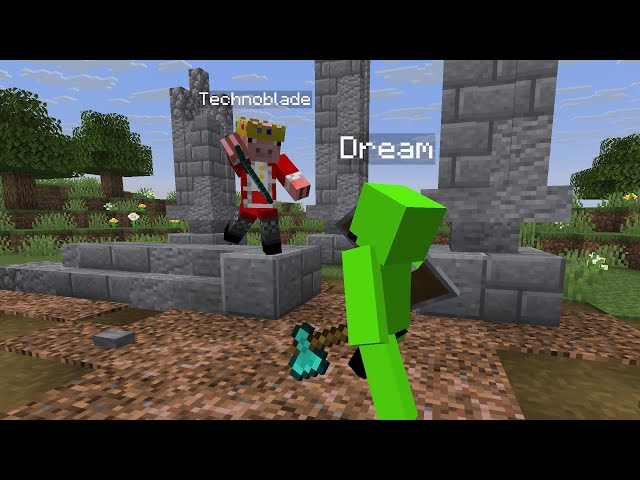
This data pack is all about bringing player avatars into your world!
It expands Minecraft's existing armor stands by player skins in its statues, which can be posed and equipped however you like.
Furthermore, it adds living, breathing NPCs that follow you with their gaze and may even wander around, if you so choose. These, too, can be equipped to your liking.
No matter whether you're working on a new adventure map or just trying to enhance your survival world, this makes E_T_31's Extraterrestrial Avatars the ideal tool for your next project! And it's even more versatile than the new vanilla mannequins!
Basic Commands
You can summon and pose the Technoblade and Dream statues from the images above with the following commands:
NPCs of Steve and Alex, for example, can be summoned with the following commands:
You can equip the nearest avatar with the armor you're wearing & the tools you're holding—no matter if it's a statue or an NPC—with the following command:
If you want to remove the nearest avatar, you can do so with the following command:
A complete, interactive command overview can be accessed in-game via:
A Word on Player Skins
For both statues and NPCs there always exists a second "textured" summon command that allows you to set a custom name for your avatar. The following command, for example, summons a statue called Bob with the skin from the texture path "custom/b".
The way Minecraft currently works, the player skins must still be provided in the associated resource pack, sadly. Currently implemented are the following players and skin textures (the texture path is always denoted in parentheses):
The custom skins are for you to replace with your own textures. If you're in need of more, let me know with a comment below ;^)
The resource pack further includes the skins of the following celebrities:
This, too, is under development. So, if you have any cool ideas, please let me know!
You can also see all currently implemented textures in-game (including a small preview) with the following command:
You can, however, also use the following command to assign any player skin to the nearest avatar's head:
PS: Removing this data pack from your world will keep your created avatars intact. You only need to have the required resource pack enabled to enjoy them in their full glory :D
It expands Minecraft's existing armor stands by player skins in its statues, which can be posed and equipped however you like.
Furthermore, it adds living, breathing NPCs that follow you with their gaze and may even wander around, if you so choose. These, too, can be equipped to your liking.
No matter whether you're working on a new adventure map or just trying to enhance your survival world, this makes E_T_31's Extraterrestrial Avatars the ideal tool for your next project! And it's even more versatile than the new vanilla mannequins!
Basic Commands
You can summon and pose the Technoblade and Dream statues from the images above with the following commands:
 | /function xta_avatars:statue/summon {player:Technoblade, slim:0, fuse_lower_body:0, show_name:1} /function xta_avatars:statue/set_rotation {yaw:-220f} /function xta_avatars:statue/pose {Head:[-340.0f,-10.0f,0.0f], LeftArm:[-40.0f,-10.0f,-20.0f], RightArm:[-70.0f,-5.0f,150.0f], Body:[-0.0f,0.0f,0.0f], LeftLeg:[-345.0f,-5.0f,-10.0f], RightLeg:[-315.0f,-10.0f,20.0f]} |
 | /function xta_avatars:statue/summon {player:Dream, slim:0, fuse_lower_body:0, show_name:1} /function xta_avatars:statue/set_rotation {yaw:-65f} /function xta_avatars:statue/pose {Head:[-25.0f,10.0f,0.0f], LeftArm:[-340.0f,-10.0f,-20.0f], RightArm:[-60.0f,0.0f,30.0f], Body:[-0.0f,0.0f,0.0f], LeftLeg:[-335.0f,-10.0f,-10.0f], RightLeg:[-35.0f,5.0f,10.0f]} |
NPCs of Steve and Alex, for example, can be summoned with the following commands:
 |  | /function xta_avatars:npc/summon_colored {player:Steve, slim:0, wandering:0, show_name:1, chest:44975, legs:4602533, feet:4868682} |
| /function xta_avatars:npc/summon_colored {player:Alex, slim:1, wandering:0, show_name:1, chest:9750674, legs:8148798, feet:6645093} |
You can equip the nearest avatar with the armor you're wearing & the tools you're holding—no matter if it's a statue or an NPC—with the following command:
| /function xta_avatars:npc/equip |
If you want to remove the nearest avatar, you can do so with the following command:
| /function xta_avatars:kill |
A complete, interactive command overview can be accessed in-game via:
| /function xta_avatars:help |
A Word on Player Skins
For both statues and NPCs there always exists a second "textured" summon command that allows you to set a custom name for your avatar. The following command, for example, summons a statue called Bob with the skin from the texture path "custom/b".
 | /function xta_avatars:statue/textured/summon {name:Bob, texture:"custom/b", slim:0, fuse_lower_body:0, show_name:1} |
The way Minecraft currently works, the player skins must still be provided in the associated resource pack, sadly. Currently implemented are the following players and skin textures (the texture path is always denoted in parentheses):
| XTA Crew | Default Skins | Custom Skins |
| E_T_31 (xta/e_t_31) > (xta/e_t_31/dune) > (xta/e_t_31/hologram) njom (xta/njom) BOLE030 (xta/bole030) SuperFabi010 (xta/superfabi010) | Alex (default/alex) Ari (default/ari) Efe (default/efe) Kai (default/kai) Makena (default/makena) Noor (default/noor) Steve (default/steve) Sunny (default/sunny) Zuri (default/zuri) | > (custom/a) > (custom/b) > (custom/c) > (custom/d) > (custom/e) > (custom/f) > (custom/g) > (custom/h) > (custom/i) > (custom/k) |
The resource pack further includes the skins of the following celebrities:
| International YouTubers | German YouTubers |
| Dream (youtube/dream) Grian (youtube/grian) MumboJumbo (youtube/mumbojumbo) Technoblade (youtube/technoblade) | BastiGHG (youtube/bastighg) CastCrafter (youtube/castcrafter) GommeHD (youtube/gommehd) Paluten (youtube/paluten) Stxgi (youtube/stxgi) |
You can also see all currently implemented textures in-game (including a small preview) with the following command:
| /function xta_avatars:textures |
You can, however, also use the following command to assign any player skin to the nearest avatar's head:
| /function xta_avatars:set_skin {player:Notch} |
PS: Removing this data pack from your world will keep your created avatars intact. You only need to have the required resource pack enabled to enjoy them in their full glory :D
1 Update Logs
Updated for 1.21.9 to 26.2 : by E_T_31 07/19/2026 12:17:33 pmJuly 19 @ 4:17 pm UTC
Both files now officially support all versions from 1.21.8 to 26.2!
More like this
 ArmourStatuesV2.1 datapackMinecraft 1.13 Cosmetic Data Pack
 Phssthpok
•8/9/18 11:58
39.3k 6.4k 27x 54939
Phssthpok
•8/9/18 11:58
39.3k 6.4k 27x 54939 Player Heads DropMinecraft 1.16 - 1.19 Cosmetic Data Pack
 Neylz
12/8/22 6:36
• posted 5/13/22 10:17
22.5k 3.1k 2x 42833
Neylz
12/8/22 6:36
• posted 5/13/22 10:17
22.5k 3.1k 2x 42833
 (OUTDATED) HeadChanger - Easily Change Player Heads in 1.14!Minecraft 1.13 Cosmetic Data Pack
 NickTonj
•3/25/19 5:43
8k 433x 165
NickTonj
•3/25/19 5:43
8k 433x 165 Customize Your WolvesMinecraft 1.20 Cosmetic Data Pack
 SilverfishStone
4/10/24 2:17
• posted 3/6/24 5:18
3k 258 9x 51420
SilverfishStone
4/10/24 2:17
• posted 3/6/24 5:18
3k 258 9x 51420
 Ercerus
6711221
119

![XTA Avatars – Custom Player Statues & NPCs for your Adventure Maps [1.21.8 - 26.2] Minecraft Data Pack](https://static.planetminecraft.com/files/image/minecraft/data-pack/2025/221/19153821-dreamvstechnobladeduelxtaavatarsthumbnail_s.jpg)








Have something to say?
Working a week on this only for Mojang to drop their own mannequins a couple days later was kind of a bummer, ngl
However, as far as I've seen, whilst their implementation includes full skin support, duh, it seems to be lacking in some other regards. Therefore, I might introduce "upgraded vanilla mannequins" in a later version.
I'm still a bit unsure about how I'm going to continue this project (or if at all), to be honest, lol