
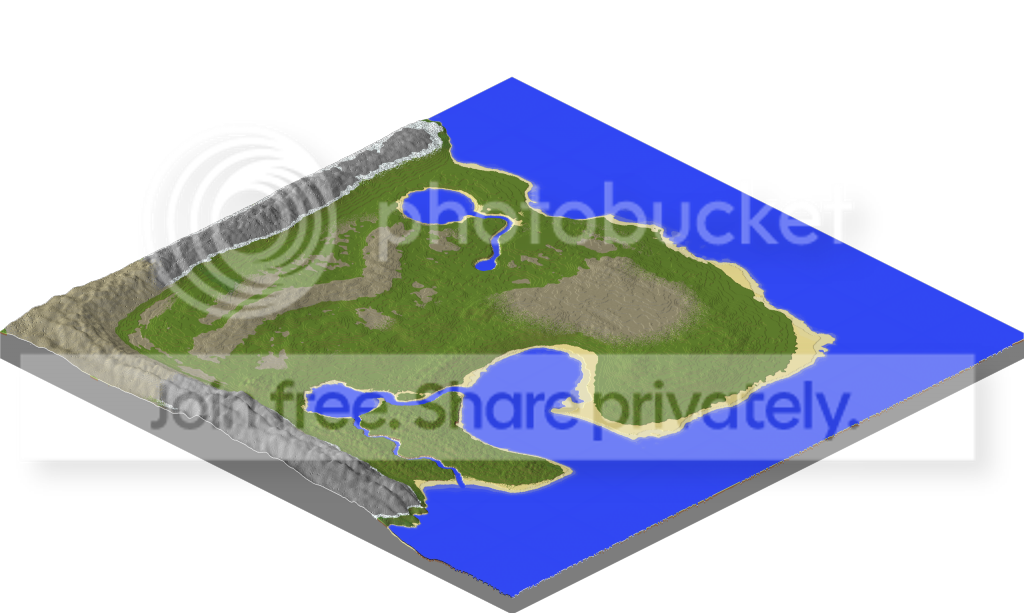
ive been trying to make a custom map for my server its set out how i want it but the land just looks like its been done by a 5yr old can someone help me clean it up please
5

I was going to respond to this thread but I barely need to now. For foliage, I recommend Lentebriesje's tree repositories.

What do you mean done by a five year old?
I'm just going to guess you mean the way the stone is on the terrain and how it looks very symmetrical, so I can help you out with those.
I recommend finding new brushes or making custom ones by yourself, its quite easy especially if you use a program like gimp or photoshop. Also when youre making mountains, don't use all one brush - it makes it look repeated and gross. Make sure you interchange between your many brushes, and use your middle mouse button (Button 3) to change the angle of your brush to give it more detail.
Now for the actual terrain (stone, dirt, grass, etc.), make sure that you absolutely do not ever use the default setup for terrain paint where all the stone starts at one level. Find your water level and, using global commands (found by the globe icon in the top left panel), fill everything above that layer with grass. Next you want to do another global command that fills everything on the map with stone, if it is above a certain angle. I personally prefer 43-47 degrees depending on how I've made the map and what the ratios of stone:grass are on the map... but you will have to fiddle with that yourself.
Foliage is a hard thing to master and I haven't quite done so myself, but make sure the forests arent to dense or arent to sparse, depending on what kind of environment the map is supposed to mimic and what kind of tree schematics you are using. DONT use default MC trees, they look terrible.
I'm just going to guess you mean the way the stone is on the terrain and how it looks very symmetrical, so I can help you out with those.
I recommend finding new brushes or making custom ones by yourself, its quite easy especially if you use a program like gimp or photoshop. Also when youre making mountains, don't use all one brush - it makes it look repeated and gross. Make sure you interchange between your many brushes, and use your middle mouse button (Button 3) to change the angle of your brush to give it more detail.
Now for the actual terrain (stone, dirt, grass, etc.), make sure that you absolutely do not ever use the default setup for terrain paint where all the stone starts at one level. Find your water level and, using global commands (found by the globe icon in the top left panel), fill everything above that layer with grass. Next you want to do another global command that fills everything on the map with stone, if it is above a certain angle. I personally prefer 43-47 degrees depending on how I've made the map and what the ratios of stone:grass are on the map... but you will have to fiddle with that yourself.
Foliage is a hard thing to master and I haven't quite done so myself, but make sure the forests arent to dense or arent to sparse, depending on what kind of environment the map is supposed to mimic and what kind of tree schematics you are using. DONT use default MC trees, they look terrible.

There are multiple vids on youtube that have WorldPainter tips and tricks. It also comes with time.

ive only been using worldpainter for about a hour i really need someone who is good with it to help

Maybe add a bit of elevation?
