
1
Need Help with my Texture pack
 DarthNexxus
Ok so i found the textur pack folder and all that good suff and i went to work on the texture i made it good pretty good so i would like to use it so i saved it then i put the texture pack in a zip folder then i went to run and put in %AppData% went to my minecraft. and put the new minecraft texture pack/zip in to the texture pack folder with all the textures i have got i then went to lode the game and wen i got in i went to see al my textures and its not there can some one please tell me what i need to do thanks
3

Make sure the the ZIP contains the "assets" folder and pack.mcmeta.

did you make the pack.mcmeta?

Well you need everything to be structured right.
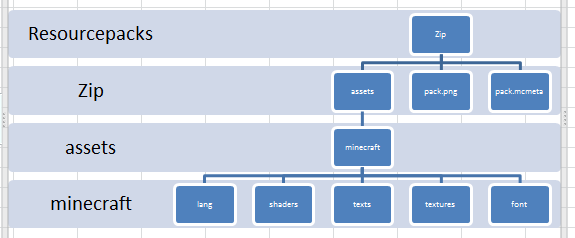
This is the early hierarchy. For most RPs, you will only be working within the textures folder, which will contain subfolders like 'blocks', 'effect', 'models' (for 1.8 RPs) with the textures in them.
If you've gone with this, everything should work fine. Just gotta have that pack.mcmeta present.
If all of this is present, what else could be causing the problem?
This is the early hierarchy. For most RPs, you will only be working within the textures folder, which will contain subfolders like 'blocks', 'effect', 'models' (for 1.8 RPs) with the textures in them.
If you've gone with this, everything should work fine. Just gotta have that pack.mcmeta present.
If all of this is present, what else could be causing the problem?
