
1
My Reourcepack - HELP NEEDED
FIRST THINGS FIRST - I DO NOT OWN ANY OF THE TEXTURES IN THIS PACK!
Ok, now that's out of the way.... here's my problem. I am trying to compile a texture pack. So, I started off with Faithful 32x, and replaced textures as I went. But when I got to the stage of my satisfaction, when I loaded MC, the resourcepack wouldn't show up. When I compared it to Faithful, nothing seemed obviously the cause, and I am quite sure all the files are in the right place. Down below is a link to the zipped version of the resource pack. The unzipped version is what I put into the resource packs folder. Please could someone try and figure out... WHAT IS GOING ON! Thanks for your time... here's the pack
https://www.mediafire.com/?f3lndt8t0jqjm2f
Ok, now that's out of the way.... here's my problem. I am trying to compile a texture pack. So, I started off with Faithful 32x, and replaced textures as I went. But when I got to the stage of my satisfaction, when I loaded MC, the resourcepack wouldn't show up. When I compared it to Faithful, nothing seemed obviously the cause, and I am quite sure all the files are in the right place. Down below is a link to the zipped version of the resource pack. The unzipped version is what I put into the resource packs folder. Please could someone try and figure out... WHAT IS GOING ON! Thanks for your time... here's the pack
https://www.mediafire.com/?f3lndt8t0jqjm2f
6

{
"pack": {
"pack_format": 1,
"description": “Custom Pack”
}
}
That's what's within the mcmeta.... still not working
EDIT: Fixed all problems!!! Just needed to redo some files
"pack": {
"pack_format": 1,
"description": “Custom Pack”
}
}
That's what's within the mcmeta.... still not working
EDIT: Fixed all problems!!! Just needed to redo some files

Make sure that the pack.mcmeta file is in a proper format. You may have to copy and paste another mcmeta file. (I have a mac and I have some issues with editing the mcmeta file when I mix packs.)
*EDIT*
Works fine for me now. However, the pack isnt 1.8 compatible (invisible pixels cause some items to appear "flat")
*EDIT*
Works fine for me now. However, the pack isnt 1.8 compatible (invisible pixels cause some items to appear "flat")
I am doing this on Mac, and don't see the _MACOSX File, when I open the pack, it just goes straight to the Assets, pack.png and pack.mcmeta

That file is junk anyways, if it's not there that's good. It certainly serves no purpose in your pack other than clutter.
Its in issue with sending files, im pretty sure

u probbalbly are doing dis wrong
are u doing like this?
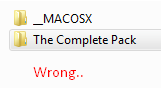
u cant have 2 Packs in 1 pack.
Just Dont Make Folders, Just Leave it open!
Like dis:
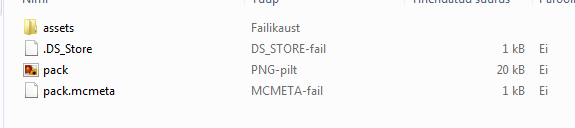
are u doing like this?
u cant have 2 Packs in 1 pack.
Just Dont Make Folders, Just Leave it open!
Like dis:
