
3
Texture Pack Problemssentiment_very_dissatisfied
Hello!
I´ll get straight to the point, so I downloaded a texture pack that I wanted, and then I realized that it was an older version so I went back and downloaded the new version. I have been trying to get the new version onto a specific world that I have been working on for years. I recently found out that the worlds without having the old pack work with the new pack just fine. Can someone please help me as to why the new pack is showing up in all the worlds that don't have the old pack, but the new version will not appear for the worlds with the old pack. Is there a way to fix this?
I´ll get straight to the point, so I downloaded a texture pack that I wanted, and then I realized that it was an older version so I went back and downloaded the new version. I have been trying to get the new version onto a specific world that I have been working on for years. I recently found out that the worlds without having the old pack work with the new pack just fine. Can someone please help me as to why the new pack is showing up in all the worlds that don't have the old pack, but the new version will not appear for the worlds with the old pack. Is there a way to fix this?
9

if you're on bedrock I suggest uninstalling the old version and reinstalling the new one, you can also try to message the creator of the pack. you also may want to try updating your game in the Microsoft store or search updates in the windows search bar. Really that's the only way to fix things that I know of, sometimes it's actually the creators fault as they can accidently leave out files needed to install the pack and then Minecraft won't install it. If there's some sort of error message that comes up when you try to install it click on that and it will sometimes show a report of why it didn't install. Hope this helps!

Hi there, sorry I couldn't respond immediately. My wifi was having a freak-out for a really long time
Alrighty, so yes, I am on bedrock and I play on an Apple iPad. Here's the weird thing about this pack, I can´t delete the old one. I can delete it from the Resource pack menu and my files, but it will not delete itself from the world I originally put it on. Even when it is deactivated, it will not delete from the resource pack tab in that world, making it so that every time I try to apply the new one, it activates the old one. It´s really frustrating cuz this is an equestrian-themed world that I want to turn into a server someday. Bleh.
P.S. - Thanks for the sub!
Alrighty, so yes, I am on bedrock and I play on an Apple iPad. Here's the weird thing about this pack, I can´t delete the old one. I can delete it from the Resource pack menu and my files, but it will not delete itself from the world I originally put it on. Even when it is deactivated, it will not delete from the resource pack tab in that world, making it so that every time I try to apply the new one, it activates the old one. It´s really frustrating cuz this is an equestrian-themed world that I want to turn into a server someday. Bleh.
P.S. - Thanks for the sub!
Have you tried going into storage in settings and deleting the pack there? You can also go to the pack applied to the world by going to the little pencil thing and then click on the check or X next to the pack and there should be a delete button in the window that pops up. If those don't work try going to the bug reports thing for Minecraft PE and see if there's a similar issue reported or solved there.
Yes, I have tried deleting it from storage in settings. I will try the pencil thing as soon as possible and also check bug reports. I will include screenshots if I cannot find the delete button. This will most likely be this afternoon. (I live in the mountain time zone so around 4 o'clock)
Alright!
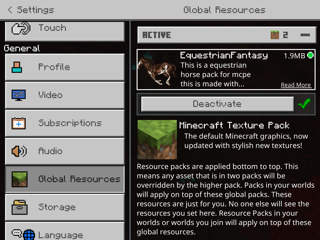
Okay. So this is the correct pack in my overall settings. As you can see it is 1.9 MB
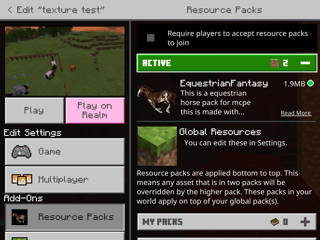
Here is the correct texture pack in a new world that I made to test it. (Still 1.9 MB)
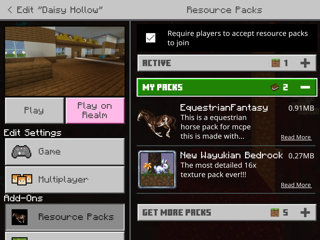
Here is the world that I want the texture pack in. I know this is the old pack cuz it is 0.91 MB. When I click on the pack here the only options are Activate and Deactivate.
View 1 more replies
