
 zippa713
Here you go in 4 easy to follow steps! (v1.4.2+)
1. Find your "server.properties" file (normally found in the root of your server folder)
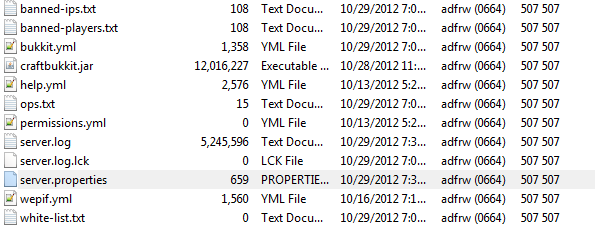
2. Open the file using a text editor (I use Notepad++) and find the "motd=" near or at the bottom of the file.

3. Edit to what you would like it to be.
My exact line of code:
motd=§fJoin us @ §aFakeMC.com §f Running v1.4.2
4. Save the file and restart your server and it should look like this:

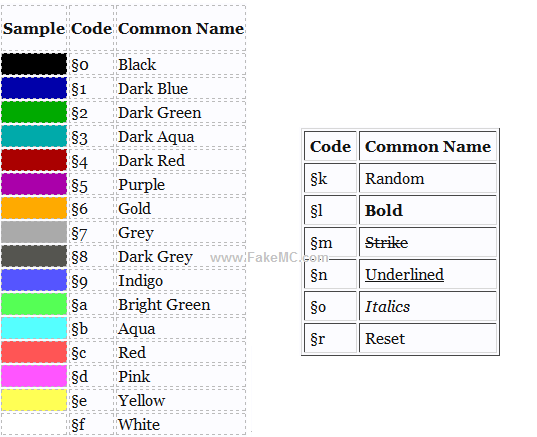
More detailed options below:
(keep in mind you do NOT have to separate the color/format code from the text.)
(to get the § symbol press and hold the alt key then type using your KEYPAD {not number row} 7,8,9 and then release alt; so ALT + 7 - 8 - 9)
1. Find your "server.properties" file (normally found in the root of your server folder)
2. Open the file using a text editor (I use Notepad++) and find the "motd=" near or at the bottom of the file.
3. Edit to what you would like it to be.
My exact line of code:
motd=§fJoin us @ §aFakeMC.com §f Running v1.4.2
4. Save the file and restart your server and it should look like this:
More detailed options below:
(keep in mind you do NOT have to separate the color/format code from the text.)
(to get the § symbol press and hold the alt key then type using your KEYPAD {not number row} 7,8,9 and then release alt; so ALT + 7 - 8 - 9)
