
1
Hello everyone,
Recently my Minecraft has been playing up it started out running as normal with no issues then all of a sudden it crashed. I restarted Minecraft I could play for a little while longer and then it would crash again. This time frame that I could actually play Minecraft has gone down so much I can't even get past halfway on the loading bar for Minecraft.
Also, a worthy mention looking at the Minecraft crash logs it has different problematic frames often as well as taking even longer to prepare to load from the Minecraft launcher.
Attached below is 4 different crash logs so if anybody has the time could someone pick out information and give me a quick little troubleshooting guide I have already tried the following.
1. Restart my computer
2. Reseat RAM
3. Reinstall Minecraft
4. Reinstall Java
5. Run a memory test
6. Assign more RAM to Minecraft
7. Run vanilla Minecraft and not Optifine
8. Install Linux to test and make sure it isn't just Windows being a pain
9. SFC /scannow
10. DISM /Online /Cleanup-Image /RestoreHealth
11. Run Minecraft as administrator
12. Reinstall Windows
Each spoiler contains 1 unique crash log although it may be very similar they were totally separate files sorry if this is tedious to go through but the FAQ for help questions does say crash logs are VERY helpful so why not have 4 of them.
https://pastebin.com/88ybM55M
https://pastebin.com/4E1MHfmr
https://pastebin.com/J569Mz3g
https://pastebin.com/JCGjWRrR
HiJackThis Scan Report: https://paste.ubuntu.com/p/yW5kpk6mVF/
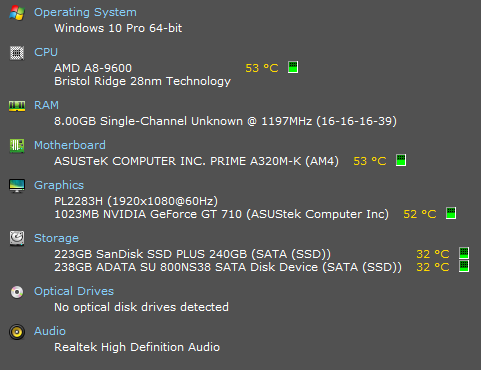
Specs: This PC is New btw
Java Version:
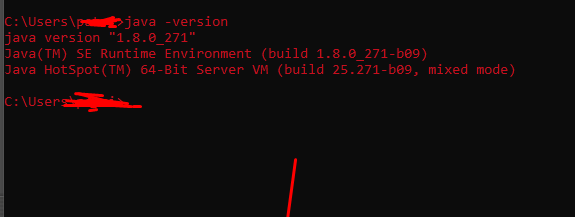
NOTE: My java is a 64-Bit install as i don't have 32-Bit java installed this may be the issue but i personally dont see this being the fix
Faithful texuture pack was causing the issue somehow
Recently my Minecraft has been playing up it started out running as normal with no issues then all of a sudden it crashed. I restarted Minecraft I could play for a little while longer and then it would crash again. This time frame that I could actually play Minecraft has gone down so much I can't even get past halfway on the loading bar for Minecraft.
Also, a worthy mention looking at the Minecraft crash logs it has different problematic frames often as well as taking even longer to prepare to load from the Minecraft launcher.
Attached below is 4 different crash logs so if anybody has the time could someone pick out information and give me a quick little troubleshooting guide I have already tried the following.
1. Restart my computer
2. Reseat RAM
3. Reinstall Minecraft
4. Reinstall Java
5. Run a memory test
6. Assign more RAM to Minecraft
7. Run vanilla Minecraft and not Optifine
8. Install Linux to test and make sure it isn't just Windows being a pain
9. SFC /scannow
10. DISM /Online /Cleanup-Image /RestoreHealth
11. Run Minecraft as administrator
12. Reinstall Windows
Each spoiler contains 1 unique crash log although it may be very similar they were totally separate files sorry if this is tedious to go through but the FAQ for help questions does say crash logs are VERY helpful so why not have 4 of them.
https://pastebin.com/88ybM55M
https://pastebin.com/4E1MHfmr
https://pastebin.com/J569Mz3g
https://pastebin.com/JCGjWRrR
HiJackThis Scan Report: https://paste.ubuntu.com/p/yW5kpk6mVF/
Specs: This PC is New btw
Java Version:
NOTE: My java is a 64-Bit install as i don't have 32-Bit java installed this may be the issue but i personally dont see this being the fix
Faithful texuture pack was causing the issue somehow
4

HijackThis is a utility that is used to collect diagnostic reports of your computer to help narrow down the cause of any issues you may be having. (<https://en.wikipedia.org/wiki/HijackThis>) Download: https://github.com/dragokas/hijackthis/raw/devel/binary/HiJackThis.exe Left click the tool and click "yes" when the administrator prompt appears. Click "Do a system scan and save a log file". After a while a text file will open. Copy everything, put the log on https://paste.ubuntu.com and give us the link. |

https://paste.ubuntu.com/p/yW5kpk6mVF/ here is the scan from a quick look nothing out of the ordinary is goin on also a quick note even though ive reinstalled windows the issue is still happening i think it's hardware at this point
Today I Reinstalled Windows so all traces of any dodgy files or broken ones should be removed but ill do a scan anyway see if something pops up.
Thanks in advance for the help
