
2
Recently I updated my Minecraft single player survival world from 1.15.1 to 1.15.2. The first time I played I didn't have any issues, but the second time the game started to lag, but not FPS lag. I had issues where blocks would reappear for a second after breaking them, mobs would stutter and have jerky movements, and the sky started to stutter. I heard that these are common problems in servers, but for some reason I'm experiencing this on a single player world. How do I fix this?
Here's the debug screen.
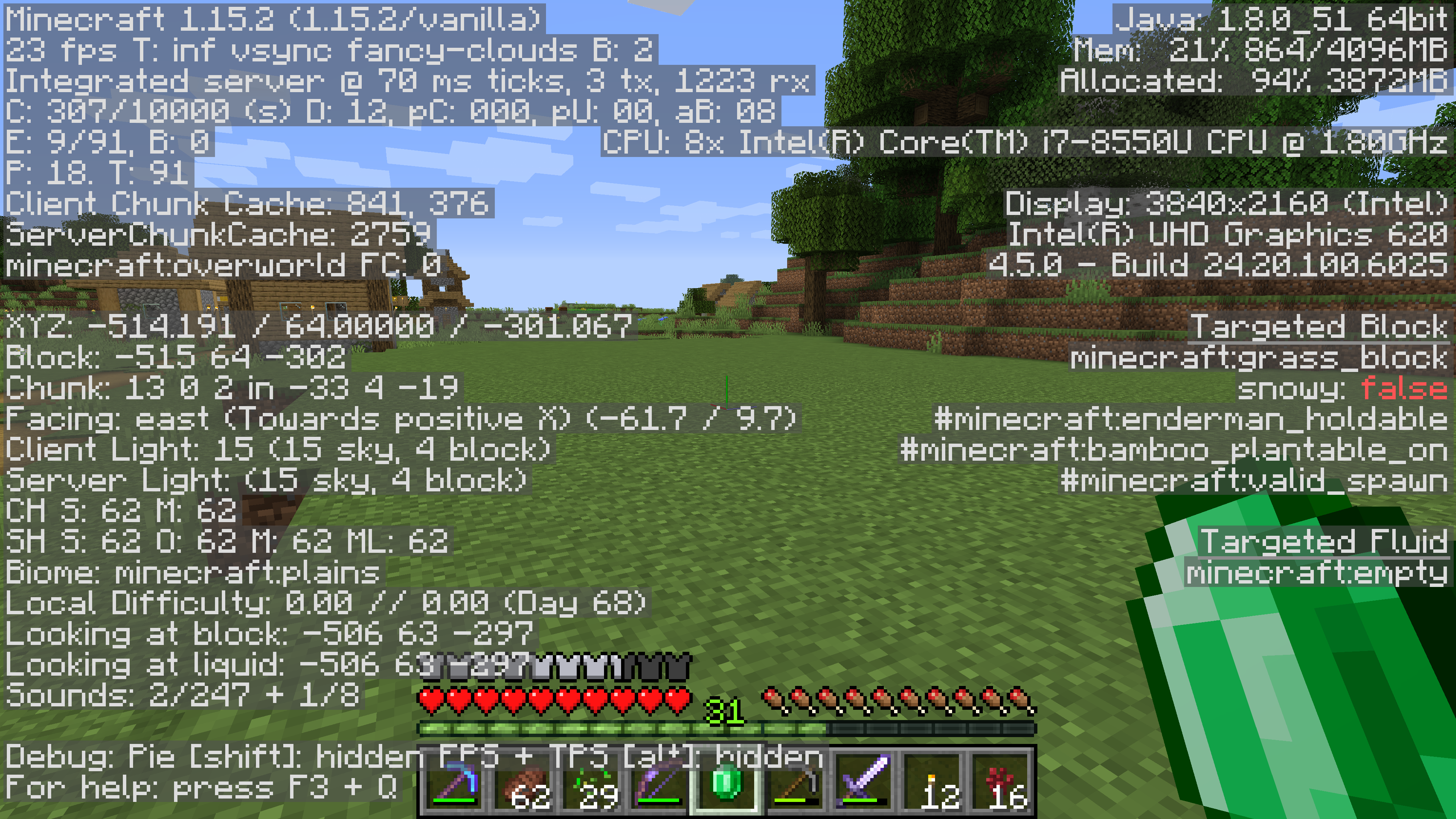
Here's the debug screen.
6

It is FPS lag. 23 frames.

Do you have a graphics card, or do you use your integrated graphics?

I use integrated.

A few quick questions...
1) Does the lag get better if you reduce video options/render distance/ simple clouds/etc. ?
2) How much ram does your computer actually have?
3) Are you playing near a bunch of entities (i.e., villagers, mob farms, complex redstone, etc?
4) Are there any other programs running in the background while you play?
The type of lag you're describing is skipped ticks. The program tries to maintain a processing rate of 20 ticks per second, but if the computer can't keep up with everything and it gets to far behind it starts just skipping ticks to catch up. For instance, the game may hve queued up "destroy block" for one tick, but that tick got dropped so it looks like you broke the block but then it's still there.
The fact that the lag showed up after you'd been playing a while tends to indicate that it may be related to an increase in the number of entities the game is trying to calculate in a given second.
Looking at your debug screen, it seems Minecraft is running out of RAM (94% Allocated out of about 4 gigs available). The current screen shows that you're only rendering 9 out of 91 entities, but that's completely dependent on where you are and what direction you're facing when you took the screen shot, so it's hard to tell much from that.
If you're computer has a lot more than 4 gigs of ram, I'd recommend changing your JAVA options to make more available to minecraft, but if not, you may need to track down if some other program is eating up your RAM while you're trying to play, or just greatly reduce your render distance.
1) Does the lag get better if you reduce video options/render distance/ simple clouds/etc. ?
2) How much ram does your computer actually have?
3) Are you playing near a bunch of entities (i.e., villagers, mob farms, complex redstone, etc?
4) Are there any other programs running in the background while you play?
The type of lag you're describing is skipped ticks. The program tries to maintain a processing rate of 20 ticks per second, but if the computer can't keep up with everything and it gets to far behind it starts just skipping ticks to catch up. For instance, the game may hve queued up "destroy block" for one tick, but that tick got dropped so it looks like you broke the block but then it's still there.
The fact that the lag showed up after you'd been playing a while tends to indicate that it may be related to an increase in the number of entities the game is trying to calculate in a given second.
Looking at your debug screen, it seems Minecraft is running out of RAM (94% Allocated out of about 4 gigs available). The current screen shows that you're only rendering 9 out of 91 entities, but that's completely dependent on where you are and what direction you're facing when you took the screen shot, so it's hard to tell much from that.
If you're computer has a lot more than 4 gigs of ram, I'd recommend changing your JAVA options to make more available to minecraft, but if not, you may need to track down if some other program is eating up your RAM while you're trying to play, or just greatly reduce your render distance.
1) Changing the graphics options and clouds to fast doesn't change anything. However, lowering the render distance to 10 or 11 chunks does seem to help a bit, but not by much.
2) 16 GB
3) I'm usually near a village and a cow and sheep farm so that could be a reason why, but I never had any skipped ticks before the 1.15.2 update.
4) No, Minecraft is the only app open.
Also, how do you add more ram to Minecraft?
2) 16 GB
3) I'm usually near a village and a cow and sheep farm so that could be a reason why, but I never had any skipped ticks before the 1.15.2 update.
4) No, Minecraft is the only app open.
Also, how do you add more ram to Minecraft?
I think the new villager behavior is more taxing than the old version. I also have a growing village next to my base, and I've noticed quite a bit of lag when I'm near there. Boosting your RAM would probably help. At least it shouldn't hurt.
If your using the default launcher, open that up and at the top there will be an "installations" tab. Click that.
On that page, you'll see the different versions you have. The top one should say "latest version". When you mouse over a version, to the right of it there will be a "Play" button, and then three dots, "..." Hover your mouse over the version you're using, and click the three dots to get a pop up menu, and select "edit".
That will open a new page that says "Edit Installation" at the top. At the bottom right of that page is a "More Options" button. Click on that one, and it will open the "Java Executable" and "Java Arguments" options. I would leave the executable alone for now, but in the options, delete everything in there, and replace it with the code you see below. That will allow Minecraft to use up to 12 gigs of your ram, which should be a big help to you.
-XX:+UseG1GC -Xmx12G -Xms12G -Dsun.rmi.dgc.server.gcInterval=2147483646 -XX:+UnlockExperimentalVMOptions -XX:G1NewSizePercent=20 -XX:G1ReservePercent=20 -XX:MaxGCPauseMillis=50 -XX:G1HeapRegionSize=32M
If your using the default launcher, open that up and at the top there will be an "installations" tab. Click that.
On that page, you'll see the different versions you have. The top one should say "latest version". When you mouse over a version, to the right of it there will be a "Play" button, and then three dots, "..." Hover your mouse over the version you're using, and click the three dots to get a pop up menu, and select "edit".
That will open a new page that says "Edit Installation" at the top. At the bottom right of that page is a "More Options" button. Click on that one, and it will open the "Java Executable" and "Java Arguments" options. I would leave the executable alone for now, but in the options, delete everything in there, and replace it with the code you see below. That will allow Minecraft to use up to 12 gigs of your ram, which should be a big help to you.
-XX:+UseG1GC -Xmx12G -Xms12G -Dsun.rmi.dgc.server.gcInterval=2147483646 -XX:+UnlockExperimentalVMOptions -XX:G1NewSizePercent=20 -XX:G1ReservePercent=20 -XX:MaxGCPauseMillis=50 -XX:G1HeapRegionSize=32M
