
3
SOS (Exit Code -1)priority_high
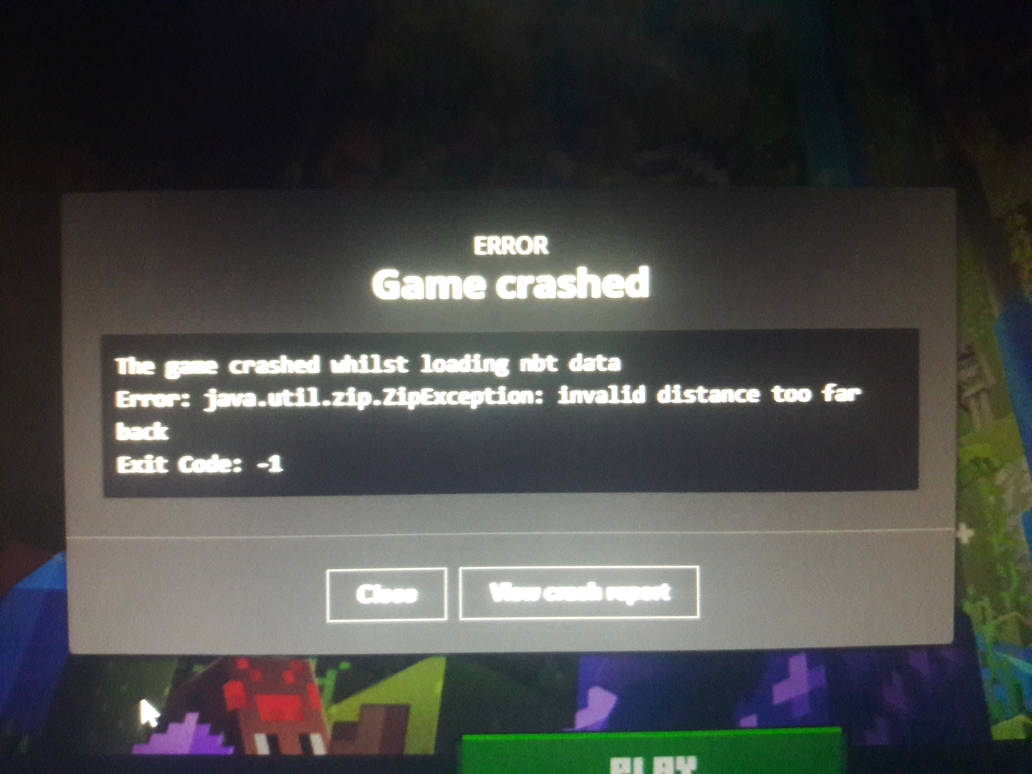
Anyone know how to fix this? (Sorry if the picture's a little blurry, my phone's camera isn't that good.) Not sure if this is related, but I still use the old launcher because I don't trust the new one after seeing nothing but 1-star reviews on the download page.
I forgot to mention yesterday that this is 1.17.1.
If anyone can't read the picture, the error says:
The game crashed whilst loading nbt data
Error: java.util.zip.ZipException: invalid distance too far back
Exit Code: -1
And here's the crash report which I probably should've also posted yesterday:
---- Minecraft Crash Report ----
// Hey, that tickles! Hehehe!
Time: 1/27/22, 8:57 PM
Description: Loading NBT data
java.util.zip.ZipException: invalid distance too far back
at java.base/java.util.zip.InflaterInputStream.read(InflaterInputStream.java:164)
at java.base/java.util.zip.GZIPInputStream.read(GZIPInputStream.java:117)
at java.base/java.io.BufferedInputStream.fill(BufferedInputStream.java:244)
at java.base/java.io.BufferedInputStream.read1(BufferedInputStream.java:284)
at java.base/java.io.BufferedInputStream.read(BufferedInputStream.java:343)
at java.base/java.io.DataInputStream.readFully(DataInputStream.java:201)
at java.base/java.io.DataInputStream.readUTF(DataInputStream.java:615)
at java.base/java.io.DataInputStream.readUTF(DataInputStream.java:570)
at na.b(SourceFile:423)
at na$1.a(SourceFile:68)
at na$1.b(SourceFile:57)
at na.a(SourceFile:428)
at na$1.a(SourceFile:71)
at na$1.b(SourceFile:57)
at na.a(SourceFile:428)
at na$1.a(SourceFile:71)
at na$1.b(SourceFile:57)
at nk.a(SourceFile:108)
at nk.a(SourceFile:75)
at nk.a(SourceFile:32)
at nk.a(SourceFile:26)
at dib$a.a(SourceFile:439)
at eeg.h(SourceFile:163)
at eeg.b(SourceFile:128)
at dxa.c(SourceFile:40)
at dwu.a(SourceFile:16)
at dwy.a(SourceFile:121)
at dxx.a(SourceFile:27)
at dvq.b(SourceFile:94)
at eaq.a(SourceFile:490)
at dvq.a(SourceFile:94)
at dvq.c(SourceFile:165)
at aqv.execute(SourceFile:101)
at dvq.b(SourceFile:165)
at org.lwjgl.glfw.GLFWMouseButtonCallbackI.callback(GLFWMouseButtonCallbackI.java:36)
at org.lwjgl.system.JNI.invokeV(Native Method)
at org.lwjgl.glfw.GLFW.glfwWaitEventsTimeout(GLFW.java:3174)
at com.mojang.blaze3d.systems.RenderSystem.limitDisplayFPS(SourceFile:190)
at dvp.f(SourceFile:1140)
at dvp.e(SourceFile:728)
at net.minecraft.client.main.Main.main(SourceFile:217)
A detailed walkthrough of the error, its code path and all known details is as follows:
---------------------------------------------------------------------------------------
-- Head --
Thread: Render thread
Stacktrace:
at java.base/java.util.zip.InflaterInputStream.read(InflaterInputStream.java:164)
at java.base/java.util.zip.GZIPInputStream.read(GZIPInputStream.java:117)
at java.base/java.io.BufferedInputStream.fill(BufferedInputStream.java:244)
at java.base/java.io.BufferedInputStream.read1(BufferedInputStream.java:284)
at java.base/java.io.BufferedInputStream.read(BufferedInputStream.java:343)
at java.base/java.io.DataInputStream.readFully(DataInputStream.java:201)
at java.base/java.io.DataInputStream.readUTF(DataInputStream.java:615)
at java.base/java.io.DataInputStream.readUTF(DataInputStream.java:570)
at na.b(SourceFile:423)
at na$1.a(SourceFile:68)
at na$1.b(SourceFile:57)
-- NBT Tag --
Details:
Tag name: DragonFight
Tag type: COMPOUND
Stacktrace:
at na.a(SourceFile:428)
at na$1.a(SourceFile:71)
at na$1.b(SourceFile:57)
at na.a(SourceFile:428)
at na$1.a(SourceFile:71)
at na$1.b(SourceFile:57)
at nk.a(SourceFile:108)
at nk.a(SourceFile:75)
at nk.a(SourceFile:32)
at nk.a(SourceFile:26)
at dib$a.a(SourceFile:439)
at eeg.h(SourceFile:163)
at eeg.b(SourceFile:128)
at dxa.c(SourceFile:40)
at dwu.a(SourceFile:16)
at dwy.a(SourceFile:121)
at dxx.a(SourceFile:27)
at dvq.b(SourceFile:94)
-- Affected screen --
Details:
Screen name: eeg
Stacktrace:
at eaq.a(SourceFile:490)
at dvq.a(SourceFile:94)
at dvq.c(SourceFile:165)
at aqv.execute(SourceFile:101)
at dvq.b(SourceFile:165)
at org.lwjgl.glfw.GLFWMouseButtonCallbackI.callback(GLFWMouseButtonCallbackI.java:36)
at org.lwjgl.system.JNI.invokeV(Native Method)
at org.lwjgl.glfw.GLFW.glfwWaitEventsTimeout(GLFW.java:3174)
-- Last reload --
Details:
Reload number: 1
Reload reason: initial
Finished: Yes
Packs: Default, Seamless Terrain, Better Glass, Better Iron bars, h4unt3dg71tch's Party Pack (That last one's a music disc pack)
Stacktrace:
at dvx.a(SourceFile:49)
at dvp.c(SourceFile:2406)
at dvp.e(SourceFile:747)
at net.minecraft.client.main.Main.main(SourceFile:217)
-- System Details --
Details:
Minecraft Version: 1.17.1
Minecraft Version ID: 1.17.1
Operating System: Windows 10 (amd64) version 10.0
Java Version: 16.0.1, Microsoft
Java VM Version: OpenJDK 64-Bit Server VM (mixed mode), Microsoft
Memory: 420724216 bytes (401 MiB) / 1476395008 bytes (1408 MiB) up to 2147483648 bytes (2048 MiB)
CPUs: 4
Processor Vendor: GenuineIntel
Processor Name: Intel(R) Core(TM) i5-4590T CPU @ 2.00GHz
Identifier: Intel64 Family 6 Model 60 Stepping 3
Microarchitecture: Haswell (Client)
Frequency (GHz): 2.00
Number of physical packages: 1
Number of physical CPUs: 4
Number of logical CPUs: 4
Graphics card #0 name: Intel(R) HD Graphics 4600
Graphics card #0 vendor: Intel Corporation (0x8086)
Graphics card #0 VRAM (MB): 1024.00
Graphics card #0 deviceId: 0x0412
Graphics card #0 versionInfo: DriverVersion=20.19.15.4835
Memory slot #0 capacity (MB): 4096.00
Memory slot #0 clockSpeed (GHz): 1.60
Memory slot #0 type: DDR3
Virtual memory max (MB): 8877.50
Virtual memory used (MB): 6485.49
Swap memory total (MB): 4864.00
Swap memory used (MB): 0.00
JVM Flags: 9 total; -XX:HeapDumpPath=MojangTricksIntelDriversForPerformance_javaw.exe_minecraft.exe.heapdump -Xss1M -Xmx2G -XX:+UnlockExperimentalVMOptions -XX:+UseG1GC -XX:G1NewSizePercent=20 -XX:G1ReservePercent=20 -XX:MaxGCPauseMillis=50 -XX:G1HeapRegionSize=32M
Launched Version: 1.17.1
Backend library: LWJGL version 3.2.2 build 10
Backend API: Intel(R) HD Graphics 4600 GL version 3.2.0 - Build 20.19.15.4835, Intel
Window size: 1920x1080
GL Caps: Using framebuffer using OpenGL 3.2
GL debug messages:
Using VBOs: Yes
Is Modded: Probably not. Jar signature remains and client brand is untouched.
Type: Client (map_client.txt)
Graphics mode: fast
Resource Packs: vanilla, file/Seamless Terrain, file/Better Glass, file/Better Iron bars, file/h4unt3dg71tch's Party Pack
Current Language: English (US)
CPU: 4x Intel(R) Core(TM) i5-4590T CPU @ 2.00GHz
Time: 1/27/22, 8:57 PM
Description: Loading NBT data
java.util.zip.ZipException: invalid distance too far back
at java.base/java.util.zip.InflaterInputStream.read(InflaterInputStream.java:164)
at java.base/java.util.zip.GZIPInputStream.read(GZIPInputStream.java:117)
at java.base/java.io.BufferedInputStream.fill(BufferedInputStream.java:244)
at java.base/java.io.BufferedInputStream.read1(BufferedInputStream.java:284)
at java.base/java.io.BufferedInputStream.read(BufferedInputStream.java:343)
at java.base/java.io.DataInputStream.readFully(DataInputStream.java:201)
at java.base/java.io.DataInputStream.readUTF(DataInputStream.java:615)
at java.base/java.io.DataInputStream.readUTF(DataInputStream.java:570)
at na.b(SourceFile:423)
at na$1.a(SourceFile:68)
at na$1.b(SourceFile:57)
at na.a(SourceFile:428)
at na$1.a(SourceFile:71)
at na$1.b(SourceFile:57)
at na.a(SourceFile:428)
at na$1.a(SourceFile:71)
at na$1.b(SourceFile:57)
at nk.a(SourceFile:108)
at nk.a(SourceFile:75)
at nk.a(SourceFile:32)
at nk.a(SourceFile:26)
at dib$a.a(SourceFile:439)
at eeg.h(SourceFile:163)
at eeg.b(SourceFile:128)
at dxa.c(SourceFile:40)
at dwu.a(SourceFile:16)
at dwy.a(SourceFile:121)
at dxx.a(SourceFile:27)
at dvq.b(SourceFile:94)
at eaq.a(SourceFile:490)
at dvq.a(SourceFile:94)
at dvq.c(SourceFile:165)
at aqv.execute(SourceFile:101)
at dvq.b(SourceFile:165)
at org.lwjgl.glfw.GLFWMouseButtonCallbackI.callback(GLFWMouseButtonCallbackI.java:36)
at org.lwjgl.system.JNI.invokeV(Native Method)
at org.lwjgl.glfw.GLFW.glfwWaitEventsTimeout(GLFW.java:3174)
at com.mojang.blaze3d.systems.RenderSystem.limitDisplayFPS(SourceFile:190)
at dvp.f(SourceFile:1140)
at dvp.e(SourceFile:728)
at net.minecraft.client.main.Main.main(SourceFile:217)
A detailed walkthrough of the error, its code path and all known details is as follows:
---------------------------------------------------------------------------------------
-- Head --
Thread: Render thread
Stacktrace:
at java.base/java.util.zip.InflaterInputStream.read(InflaterInputStream.java:164)
at java.base/java.util.zip.GZIPInputStream.read(GZIPInputStream.java:117)
at java.base/java.io.BufferedInputStream.fill(BufferedInputStream.java:244)
at java.base/java.io.BufferedInputStream.read1(BufferedInputStream.java:284)
at java.base/java.io.BufferedInputStream.read(BufferedInputStream.java:343)
at java.base/java.io.DataInputStream.readFully(DataInputStream.java:201)
at java.base/java.io.DataInputStream.readUTF(DataInputStream.java:615)
at java.base/java.io.DataInputStream.readUTF(DataInputStream.java:570)
at na.b(SourceFile:423)
at na$1.a(SourceFile:68)
at na$1.b(SourceFile:57)
-- NBT Tag --
Details:
Tag name: DragonFight
Tag type: COMPOUND
Stacktrace:
at na.a(SourceFile:428)
at na$1.a(SourceFile:71)
at na$1.b(SourceFile:57)
at na.a(SourceFile:428)
at na$1.a(SourceFile:71)
at na$1.b(SourceFile:57)
at nk.a(SourceFile:108)
at nk.a(SourceFile:75)
at nk.a(SourceFile:32)
at nk.a(SourceFile:26)
at dib$a.a(SourceFile:439)
at eeg.h(SourceFile:163)
at eeg.b(SourceFile:128)
at dxa.c(SourceFile:40)
at dwu.a(SourceFile:16)
at dwy.a(SourceFile:121)
at dxx.a(SourceFile:27)
at dvq.b(SourceFile:94)
-- Affected screen --
Details:
Screen name: eeg
Stacktrace:
at eaq.a(SourceFile:490)
at dvq.a(SourceFile:94)
at dvq.c(SourceFile:165)
at aqv.execute(SourceFile:101)
at dvq.b(SourceFile:165)
at org.lwjgl.glfw.GLFWMouseButtonCallbackI.callback(GLFWMouseButtonCallbackI.java:36)
at org.lwjgl.system.JNI.invokeV(Native Method)
at org.lwjgl.glfw.GLFW.glfwWaitEventsTimeout(GLFW.java:3174)
-- Last reload --
Details:
Reload number: 1
Reload reason: initial
Finished: Yes
Packs: Default, Seamless Terrain, Better Glass, Better Iron bars, h4unt3dg71tch's Party Pack (That last one's a music disc pack)
Stacktrace:
at dvx.a(SourceFile:49)
at dvp.c(SourceFile:2406)
at dvp.e(SourceFile:747)
at net.minecraft.client.main.Main.main(SourceFile:217)
-- System Details --
Details:
Minecraft Version: 1.17.1
Minecraft Version ID: 1.17.1
Operating System: Windows 10 (amd64) version 10.0
Java Version: 16.0.1, Microsoft
Java VM Version: OpenJDK 64-Bit Server VM (mixed mode), Microsoft
Memory: 420724216 bytes (401 MiB) / 1476395008 bytes (1408 MiB) up to 2147483648 bytes (2048 MiB)
CPUs: 4
Processor Vendor: GenuineIntel
Processor Name: Intel(R) Core(TM) i5-4590T CPU @ 2.00GHz
Identifier: Intel64 Family 6 Model 60 Stepping 3
Microarchitecture: Haswell (Client)
Frequency (GHz): 2.00
Number of physical packages: 1
Number of physical CPUs: 4
Number of logical CPUs: 4
Graphics card #0 name: Intel(R) HD Graphics 4600
Graphics card #0 vendor: Intel Corporation (0x8086)
Graphics card #0 VRAM (MB): 1024.00
Graphics card #0 deviceId: 0x0412
Graphics card #0 versionInfo: DriverVersion=20.19.15.4835
Memory slot #0 capacity (MB): 4096.00
Memory slot #0 clockSpeed (GHz): 1.60
Memory slot #0 type: DDR3
Virtual memory max (MB): 8877.50
Virtual memory used (MB): 6485.49
Swap memory total (MB): 4864.00
Swap memory used (MB): 0.00
JVM Flags: 9 total; -XX:HeapDumpPath=MojangTricksIntelDriversForPerformance_javaw.exe_minecraft.exe.heapdump -Xss1M -Xmx2G -XX:+UnlockExperimentalVMOptions -XX:+UseG1GC -XX:G1NewSizePercent=20 -XX:G1ReservePercent=20 -XX:MaxGCPauseMillis=50 -XX:G1HeapRegionSize=32M
Launched Version: 1.17.1
Backend library: LWJGL version 3.2.2 build 10
Backend API: Intel(R) HD Graphics 4600 GL version 3.2.0 - Build 20.19.15.4835, Intel
Window size: 1920x1080
GL Caps: Using framebuffer using OpenGL 3.2
GL debug messages:
Using VBOs: Yes
Is Modded: Probably not. Jar signature remains and client brand is untouched.
Type: Client (map_client.txt)
Graphics mode: fast
Resource Packs: vanilla, file/Seamless Terrain, file/Better Glass, file/Better Iron bars, file/h4unt3dg71tch's Party Pack
Current Language: English (US)
CPU: 4x Intel(R) Core(TM) i5-4590T CPU @ 2.00GHz
11

If you haven't modified your installation or anything, just try reinstalling Minecraft. Also, the new launcher is perfectly usable. It's basically the same as the old one. I think it had an issue on release which reset people's list of installations, which would have been a minor annoyance, but that's not been an issue for me for ages.

And how do I reinstall? I really don't want to have to pay for it again.
As long as you have your account login, you'll be fine. From the launcher, you can click Installations at the top to manage your various installations (if you want to install multiple versions, uninstall one, etc.).

https://support.microsoft.com/en-us/windows/use-snipping-tool-to-capture-screenshots-00246869-1843-655f-f220-97299b865f6b#:~:text=Press%20Ctrl%20%2B%20PrtScn%20keys.,that%20you%20want%20to%20capture.
and for the love of god dont use dark fonts people who use dark mode have to highlight it to read
also post the log
and for the love of god dont use dark fonts people who use dark mode have to highlight it to read
also post the log
OK, I posted the log.

Delete the mod and try again
Um, I don't have any mods, unless my music disc pack counts.

Try going into the game files and deleting the hotbar.nbt file. ONLY DO THIS IF YOU BACK THE hotbar.nbt FILE UP SOMEWHERE SAFE!!!
If you fail to back the file up, it could result in loss of your "Saved Hotbars" you have made.
Uh, how do I reach that file? I couldn't find it.
I don't have any hotbars saved anyway so that won't be a problem.
