
1
[UPD] Automatic public server, no port forwarding required!
Moved to: http://www.planetminecraft.com/mod/fully-automatic-public-server---no-portforwarding-needed/
Old post:
Old post:
Click to reveal
UPD meaning updated, I couldn't fit it on the title, oops.
Updated to include better support for the official Minecraft server and Spigot now that Bukkit has partially died.
I've seen a few topics on the Server Help forum of people having issues with port forwarding, and static IPs and all that stuff.
So here's a script I've made, that's honestly 100% automatic aside from you having to download the server jarfile.
I really mean 100% automatic. You download the script, download the server file and rename the file to minecraft_server.jar, put it in the same directory and when you run the script, it will find your internal IP (so you don't need a static *INTERNAL* IP), and then open port 25565 to that IP, and run the server. Obviously, this uses UPnP, which many programs you have probably use. Skype? That uses UPnP for incoming calls. Bittorrent? That uses it to connect to peers, and well you get the point.
Features:
- Create public servers without port forwarding.
- Support for a wide range of routers.
- Fully automatic, you simply run the script and it does the work.
- Change the port to open instead of 25565 (open settings.bat)
- Very configurable, open settings.bat with notepad and you can change anything from the name of the server file, to using a static IP address!
- Easy to use.
- Supports Spigot (How to get Spigot/CraftBukkit 1.8)
Notes:
So far it's been tested on wireless connections and it worked correctly, however, not tested on Ethernet connections, although it should work.
It's got a configuration too, if you choose to disable it finding your IP address, and have you define it manually.
The official Minecraft server jarfile can be downloaded from https://minecraft.net/download Make sure to click the file ending in .jar! Not the executable (.exe)
Copying any code from the script or cristoph's PortMapper is not allowed.
Downloads:
Dropbox (ad supported link, wait 6 seconds, then click in the top right)
Direct download (no ads)
VirusTotal results for the ZIP file: https://www.virustotal.com/en/url/1d1c45be24c1e3119a1b32de6777f0e1f2d5a262155bc67274018726b5ce1eb1/analysis/1421267033/
Latest update features:
- Set PermGen size in settings.bat, useful for servers with a lot of plugins.
- Made code make sense.
- Simpler support for official server software.
- Fixed download links which were dead for quite a while.
Setup:
1. Download the ZIP file above, and extract it to a folder. This folder will have all of your server files. Make sure you extract "Run Server.bat", "PortMapper.jar" and "settings.bat", these are the three files required to run.
2. Download Spigot, the official Minecraft server jarfile, or Bukkit, save it in the same directory as the script.
3. Rename the server jarfile to "minecraft_server.jar" without quotes. If you choose, you can edit the configuration to use a differently named jarfile.
4. Start the "Start Server.bat" file, and if everything worked, you should have your server running. Set it up like any other server, plugins, mods, anything. And it will be public via your external IP address.
5. Goto https://www.google.com/search?q=what+is+my+ip and copy your external IP. You and whoever you choose to give the IP to will be able to join the server with that address.
Video Tutorial:
This tutorial is made by _Polar_, here, on the PMC forums!
https://www.youtube.com/watch?v=FkDL2C8oIhg
Slightly outdated, but it's literally the same, not much difference.
Issues:
None so far!
If you find any please say so in this thread.
If you're interested in using this practically, I'd suggest setting a static internal IP and editing the configuration to stop it auto finding the internal IP, just for that little more stability .
If you have any issues, PLEASE tell me as I'll try to get them fixed.
Thanks to: cristoph on sourceforge.net for letting me use his PortMapper!
Updated to include better support for the official Minecraft server and Spigot now that Bukkit has partially died.
I've seen a few topics on the Server Help forum of people having issues with port forwarding, and static IPs and all that stuff.
So here's a script I've made, that's honestly 100% automatic aside from you having to download the server jarfile.
I really mean 100% automatic. You download the script, download the server file and rename the file to minecraft_server.jar, put it in the same directory and when you run the script, it will find your internal IP (so you don't need a static *INTERNAL* IP), and then open port 25565 to that IP, and run the server. Obviously, this uses UPnP, which many programs you have probably use. Skype? That uses UPnP for incoming calls. Bittorrent? That uses it to connect to peers, and well you get the point.
Features:
- Create public servers without port forwarding.
- Support for a wide range of routers.
- Fully automatic, you simply run the script and it does the work.
- Change the port to open instead of 25565 (open settings.bat)
- Very configurable, open settings.bat with notepad and you can change anything from the name of the server file, to using a static IP address!
- Easy to use.
- Supports Spigot (How to get Spigot/CraftBukkit 1.8)
Notes:
So far it's been tested on wireless connections and it worked correctly, however, not tested on Ethernet connections, although it should work.
It's got a configuration too, if you choose to disable it finding your IP address, and have you define it manually.
The official Minecraft server jarfile can be downloaded from https://minecraft.net/download Make sure to click the file ending in .jar! Not the executable (.exe)
Copying any code from the script or cristoph's PortMapper is not allowed.
Downloads:
Dropbox (ad supported link, wait 6 seconds, then click in the top right)
Direct download (no ads)
VirusTotal results for the ZIP file: https://www.virustotal.com/en/url/1d1c45be24c1e3119a1b32de6777f0e1f2d5a262155bc67274018726b5ce1eb1/analysis/1421267033/
Latest update features:
- Set PermGen size in settings.bat, useful for servers with a lot of plugins.
- Made code make sense.
- Simpler support for official server software.
- Fixed download links which were dead for quite a while.
Setup:
1. Download the ZIP file above, and extract it to a folder. This folder will have all of your server files. Make sure you extract "Run Server.bat", "PortMapper.jar" and "settings.bat", these are the three files required to run.
2. Download Spigot, the official Minecraft server jarfile, or Bukkit, save it in the same directory as the script.
3. Rename the server jarfile to "minecraft_server.jar" without quotes. If you choose, you can edit the configuration to use a differently named jarfile.
4. Start the "Start Server.bat" file, and if everything worked, you should have your server running. Set it up like any other server, plugins, mods, anything. And it will be public via your external IP address.
5. Goto https://www.google.com/search?q=what+is+my+ip and copy your external IP. You and whoever you choose to give the IP to will be able to join the server with that address.
Video Tutorial:
This tutorial is made by _Polar_, here, on the PMC forums!
https://www.youtube.com/watch?v=FkDL2C8oIhg
Slightly outdated, but it's literally the same, not much difference.
Issues:
None so far!
If you find any please say so in this thread.
If you're interested in using this practically, I'd suggest setting a static internal IP and editing the configuration to stop it auto finding the internal IP, just for that little more stability .
If you have any issues, PLEASE tell me as I'll try to get them fixed.
Thanks to: cristoph on sourceforge.net for letting me use his PortMapper!
109

This is now outdated and this script is oolllld. I've made a new one that's much better. It doesn't involve batch files, or the console in anyway (except for the server itself), and it can reliably get the internal IP, unlike this version.
http://www.planetminecraft.com/mod/fully-automatic-public-server---no-portforwarding-needed/
http://www.planetminecraft.com/mod/fully-automatic-public-server---no-portforwarding-needed/
My friend can't join even i used those D:
Bumping this old thing in case it helps other people set up servers!

bump
bump
Bump
Bump!
Bump
Bump
bUMP
bump

sort of, I never got an error
Spigot still exists, it never died.
Will it work for Bukkit servers
Sorry for the late reply, but yes it will work for Bukkit servers, as long as when you download Bukkit, you rename it to minecraft_server
Updated (slightly!)

bump
bumps
bumpet
Bump
bump
Works and Is amazing
Bumping because I am evillllll >:D

I'm no expert on Batch, but shouldn't these two match for the command argument to work properly? The script is telling people to use --closeport, when it appears they should be using --closeports.
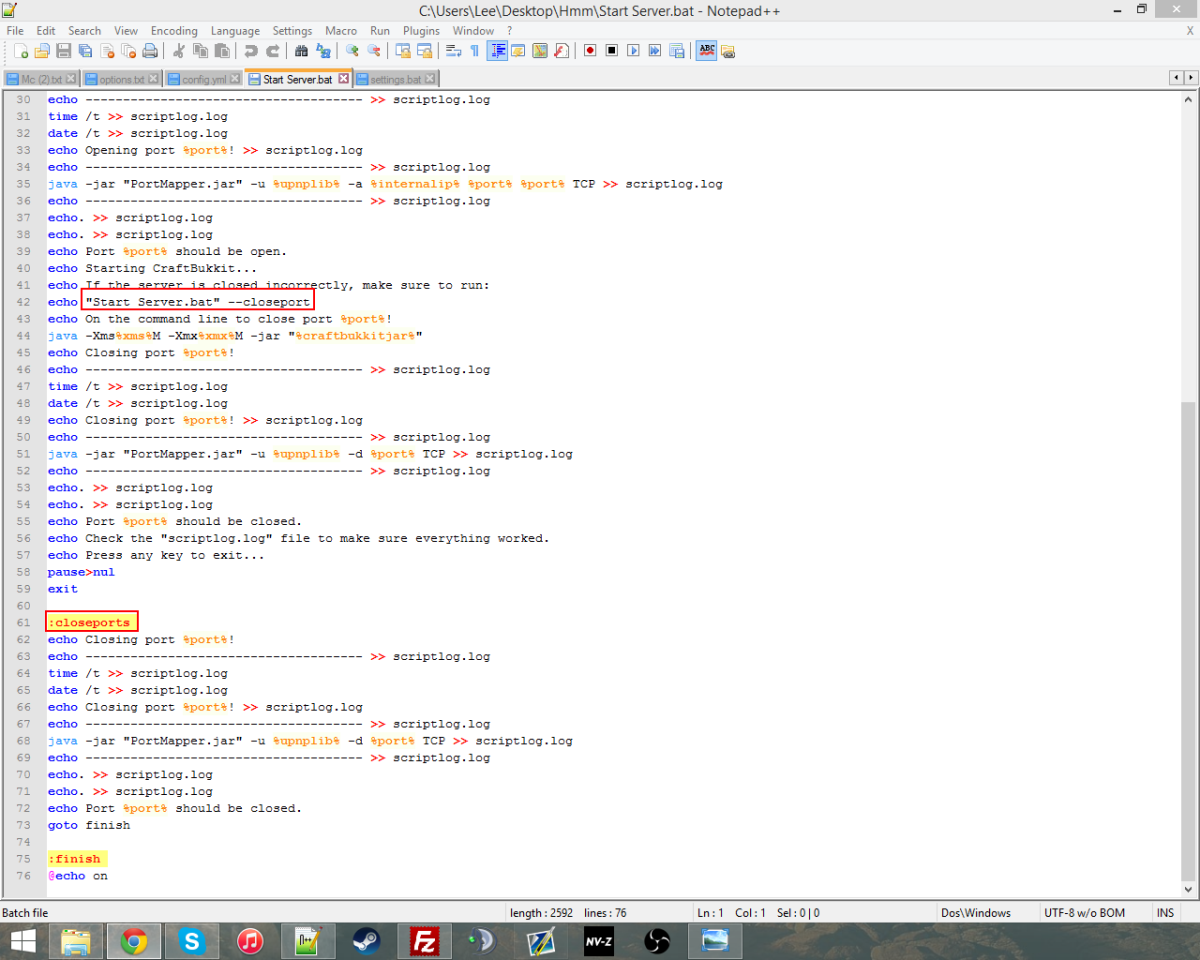
Thanks for pointing this out! However if you look near the top you'll see the part where the argument is processed, and as you can see it looks for --closeport but still uses goto closeports. So the script still runs as intended, just I made it a bit messy, oops.
Still, thanks for pointing this out, I'll try clean up the script in the next update.
EDIT: Has now been updated! Code makes mores sense and you can now set PermGen size in settings.bat.
Still, thanks for pointing this out, I'll try clean up the script in the next update.
EDIT: Has now been updated! Code makes mores sense and you can now set PermGen size in settings.bat.

How does it configure port forwarding. Is it VPN or proxy. UtnP is disabled on most routers since its security risk. My router had a third party firmware that name is DD-WRT
witch it basically Linux and UTnp is disabled on my router. Do I need to enable UTnP to make this script work?
witch it basically Linux and UTnp is disabled on my router. Do I need to enable UTnP to make this script work?
It's not a VPN nor a proxy. It's UPnP, and it's actually enabled on most routers which is how things like Skype and P2P software works, except in this case, it's using UPnP to map a port for Minecraft.
It's not too much of a security risk as the script closes the port when the server is stopped.
It's not too much of a security risk as the script closes the port when the server is stopped.
Bumping again
This is really cool, only problem is when I tried to put a mod pack into it it everything is ok, apart from the fact that I have to increase the PermGen size and that is not in the settings .bat file. Could you try and update the program or if know of a fix may you tell me?
~T3ctonic
~T3ctonic
Quite simple fix.
Find "Start Server.bat", right click and Edit it. Then look for (or use CTRL+F) the line that has "java -Xms%xms%M -Xmx%xmx%M -jar "%craftbukkitjar%"" and before the -Xms part add "-XX:MaxPermSize=[Size in megabytes]m" and it should run fine. In the next update I'll add this to the settings.bat.
Find "Start Server.bat", right click and Edit it. Then look for (or use CTRL+F) the line that has "java -Xms%xms%M -Xmx%xmx%M -jar "%craftbukkitjar%"" and before the -Xms part add "-XX:MaxPermSize=[Size in megabytes]m" and it should run fine. In the next update I'll add this to the settings.bat.
Bump, forgot about this for awhile.

Woah,this is actually nice. Respect to you man, all the 11 don't have to whine about portfowardimg yay
(Bookmarked)
(Bookmarked)
Bumping
Too late,when I saw your last post I already went to find one. When I opened it,I saw that it needs some expanding.Too bad iits read-only.Can you tell me the website you made this at?Aslo this is a indirect bump.
I didn't use a website, I used Help N' Doc for Windows. I do have the HTML Help Workshop (the "official" software Microsoft lets you use to make CHMs) but that ended up taking too long, so I just went with the easy route.
Aw crap.Well this is a bump,people don't seem to notice this anymore.aslo post this on Minecraft Forums too
It now lives on the MC Forums. http://www.minecraftforum.net/forums/ma ... forwarding
Thanks for suggesting that!
Also bumping.
Thanks for suggesting that!
Also bumping.
Can you convert the readme into .txt ?That way everyone can read it.For me its a assorted files of 0 1 2 3 4 5 6 7 8 9 A B C D E F (hexive decimals).
Sorry about that. It's a .chm (compiled HTML) file, readable only by Windows. It'd be hard to convert to .txt, but I'll Google a CHM reader for Linux .
Boom! CHM Viewer for Ubuntu: https://apps.ubuntu.com/cat/applications/gnochm/
Hope this helps
Boom! CHM Viewer for Ubuntu: https://apps.ubuntu.com/cat/applications/gnochm/
Hope this helps

Works with the latest craftbukkit 1.7.10 developer release.
INFO:
Windows 7 Home Premium 64 Bit
Ethernet Connection
Bell ISP
Actiontech router
Everything is working fine, only hitch was agreeing to the new EULA which was solved by going into the EULA.txt file it generated and changing "false" to "true". NIce work.
INFO:
Windows 7 Home Premium 64 Bit
Ethernet Connection
Bell ISP
Actiontech router
Everything is working fine, only hitch was agreeing to the new EULA which was solved by going into the EULA.txt file it generated and changing "false" to "true". NIce work.
Good to know it works over Ethernet!

thanks so much my parents dont want me hosting a server and they wont let me go on the router signin so now im saved.
[UPDATE]Now not dead,dinnerbone is updating it.
Bukkit shutdown,now you lost your main audience(came at the right time.. http://forums.bukkit.org/threads/bukkit ... ye.305106/ R.I.P now to make support for other server modders.
If Bukkit dies its easily compatible with other servers.
Just right click, edit settings.bat, find "craftbukkitjar=craftbukkit.jar" and change it to "craftbukkitjar=[any server jar file name].jar" and boom. It'll work with Vanilla, and should work with anything.
Just not for Linux/Mac yet :c
Just right click, edit settings.bat, find "craftbukkitjar=craftbukkit.jar" and change it to "craftbukkitjar=[any server jar file name].jar" and boom. It'll work with Vanilla, and should work with anything.
Just not for Linux/Mac yet :c

Not lying.
Bump and..hmmm
Not working(from extrenal IP anyway).Or is it that if someone wants to connect to my server they use my internal IP?
If someone wants to connect from outside your network, then they have to use the external IP.
However I'm not quite sure why it didn't work for you.
Maybe it just doesn't run for Linux, but it seemed like it did though.
Hmm...
However I'm not quite sure why it didn't work for you.
Maybe it just doesn't run for Linux, but it seemed like it did though.
Hmm...
View 31 more replies
