Member
Level 61
High Grandmaster System
116

Forum Posts

361 - 380 of 1,041

    ShelLuser
    11/30/2018 10:52 am
    Level 61 : High Grandmaster System
    That's incorrect. @s already existed on 1.12 as well and its use hasn't changed.
    2
    ShelLuser
    11/30/2018 10:45 am
    Level 61 : High Grandmaster System
    This is why I don't rely on generators.

    Alas: you do run version 1.13+, right? Because the datapack location is only a thing on the current version. Second: did you actually make a datapack? What happens if you use /datapack list?

    My guess is that you put the advancement files in the right place but forgot to define the actual datapack. So within the folder "custom_crating" you'd need a file called pack.mcmeta which contains something like this:


    {
    "pack":{
    "pack_format": 1,
    "description": "A collection of stuff for snapshot testing"
    }
    }

    Of course you'd have to make your own description ;) Add this file, use /reload and then your advancements should also start working.

    Be sure to double check your stuff using the /advacement command though. So: "it doesn't show them" could also be caused by setting up an incorrect trigger. You can verify this by using the advancement command to try and grant yourself a custom advancement. If it also doesn't show here then there's something wrong with the advancement itself.
    1
    ShelLuser
    11/25/2018 6:44 pm
    Level 61 : High Grandmaster System
    There is a reason why snapshots are called that way: because it's a snapshot within the development cycle and anything can change at a developers whim. And Mojang usually don't release much detailed information about certain events.

    Basically: it's way too early to start making strategies. Wait with that when we hit the RC period, then you can be fairly sure that the game you're playing will be the same as the official release.

    See; this reminds me of the snapshot periods when the observer was introduced. Many people took it "as is" and starting building massive contraptions around it (with the idea that the signal output would be 1). Then Mojang made the output 15 and many "professional" (cough, cough, cough) Minecraft players had a fit because they had to redesign everything again.

    Snapshots are just that and should be taken for what they are.
    2
    ShelLuser
    11/25/2018 6:39 pm
    Level 61 : High Grandmaster System
    I don't understand the vs approach in the first place. Why always "versus" instead of simply "as well"?

    Not to mention that I think you raise some poor arguments. So a higher render distance automatically accounts for a better gaming experience? I beg to differ; the real gaming experience isn't so much made by how far you can look into the distance but more so how well you can play the game, which is usually something that happens within the direct surroundings of the player. Hostile mobs normally don't attack you from large(r) distances....

    Next: "you shouldn't have to mod your games to optimize your game"? Define "optimize" please? You make it sound as if you can't play the vanilla Java edition without modding which is of course plain out nonsense. That only happened once during the 1.8 release, and Mojang sure learned their lesson from that experience.

    And well.. risking malware infection? Sorry, but that's a silly argument considering that most mods ship their work as .jar files. Good luck catching a malware infection from a jarfile which you're normally not supposed to run directly in the first place. And even if you do run a jarfile 'out of the box' then there's a ton of failsaves within the Java runtime which will prevent a program from getting out of control, at the very least the user will be warned about such exploitation attempts.

    Alas, I cannot answer the question about advantages yet because my new Win10 power pc will ship next year, but solely basing myself on my experiences with the PS3 version of Minecraft I really don't see any advantages. Only obstacles which limit my gaming experience.

    The recipe book in the Java edition feels like a true addition, it's use is optional and you can basically use it as you deem fit. On PS3 edition you can't craft anything other than using that silly recipe book.

    Which is my main issue: does Bedrock edition have some advantages? I'm sure it has, packed together with tons of disadvantages.

    But seriously, who cares? This isn't a competition, you're not a better player by (dis)liking one over the other, that's plain out dumb. Some prefer Java, some prefer Bedrock, some prefer both. End of story.

    5
    ShelLuser
    11/24/2018 9:21 pm
    Level 61 : High Grandmaster System
    I think they planned for this already. See: for reasons unknown (to me at least) all existing dimensions were put within the minecraft namespace. Meaning: if you want to refer to the nether within an /execute command (on 1.13) you'd refer to that as: minecraft:the_nether. Making me believe that this opens up options for new stuff as well.

    But I agree... One of the things I'm really looking forward to for next year is when I got my new PC and can actually enjoy some of the crazy dimensions which you can create using RFDimensions (mod, related to RFTools).
    3
    ShelLuser
    11/23/2018 12:05 pm
    Level 61 : High Grandmaster System
    It's not that hard. Start with the official website https://java.com. At the bottom it'll have a link "developers" which eventually links you to the "new to Java" website here:

    https://www.oracle.com/technetwork/topics/newtojava/overview/index.html

    I can recommend the official Java tutorials as well:

    https://docs.oracle.com/javase/tutorial/

    All in all, there's tons of information out there, just use a few search engines and you should be good to go.
    2
    ShelLuser
    11/23/2018 11:31 am
    Level 61 : High Grandmaster System
    What command are you trying in chat? This entire command line or just a part of it? Also: what output does the command block show you?
    1
    ShelLuser
    11/21/2018 8:28 pm
    Level 61 : High Grandmaster System
    There are tons of server providers, I suggest just using Google to search for "minecraft server hosting" and you should find plenty of options. Server.pro even provides servers free of charge, the only caveat is that when there's no activity for 5 - 10 minutes (not sure from mind) it'll automatically shut down. Of course that is probably not very usable with custom maps.

    When all else fails get a realm. Around 10 bucks per month but you'll be in full control over what gets hosted, and it has minigames too.
    3
    ShelLuser
    11/21/2018 4:40 pm
    Level 61 : High Grandmaster System
    Trying 1.12.2 might be safest for now. There are still a lot of problems with 1.13 in combination with mods, and 1.12.2 has been around for quite some time now.

    Just make sure that you grab the right (updated) versions for both your server and the mods its using.
    1
    ShelLuser
    11/21/2018 4:36 pm
    Level 61 : High Grandmaster System
    history
    No, best option that I can come up with is to ask a friend to connect to your server. Use a website such as: https://whatismyipaddress.com/ to check, then sent that address to your friend and ask them to connect.

    I'd definitely double check because some ISP's also don't hand out static ('never changing') IP addresses but often change yours.
    1
    ShelLuser
    11/21/2018 4:32 pm
    Level 61 : High Grandmaster System
    You might be able to find something related in your BIOS or computer settings, if you can access those.
    2
    ShelLuser
    11/21/2018 4:32 pm
    Level 61 : High Grandmaster System
    True. See, depending on the OPs specs it is possible that the video card (most likely cause for problems) won't be able to cope, which means that the Java runtime will have to do a lot of extra work in in order to keep up and thus process quite some data. And that data has to go somewhere. And once your OS starts handling all of that then you're looking at more (delaying) overhead.

    But I agree: it's definitely not perfect.
    2
    ShelLuser
    11/20/2018 11:51 pm
    Level 61 : High Grandmaster System
    Depending on the router all you have to do is set up port forwarding, don't mess with the firewall. The only place where you might need to adjust the firewall is on the server itself; obviously you'll need to keep the Minecraft port open (25565 by default).

    Keep in mind that not all ISP's will allow for this, it is possible that either the new router or your ISP doesn't support this anymore.
    2
    ShelLuser
    11/20/2018 11:32 am
    Level 61 : High Grandmaster System
    With modern versions this shouldn't happen but if you play with an older Minecraft version then this is definitely an issue and unfortunately there isn't much you can do there other than contacting the server staff or better: sticking to modern Minecraft versions.
    1
    ShelLuser
    11/20/2018 11:25 am
    Level 61 : High Grandmaster System
    Good question!

    First: if you're using Windows then you don't have to worry too much about installing Java because that won't make much of a difference. Minecraft provides its own Java runtime, so unless you start messing with profile settings then you don't even need to have Java installed at all in order to run Minecraft.

    There are several things which you can do, but the most important parts are your graphics and memory. If your video card isn't all that great then Minecraft will have a much harder time running. So whatever you do: step one is to make sure that your operating system fully supports your hardware. In other words: make sure that you have installed all the right drivers, and grabbed the latest versions.

    Next: Once you start Minecraft (the launcher) you can edit some JVM arguments in your profile. Edit it and find this option: -Xmx1G. This is the default. Since you have 8Gb you should raise that value to 6 or 7. This will make sure that Java can use much more memory than the default.

    Now start Minecraft but don't enter a world just yet: check your options. Go to options => video settings, and change these settings:
    • Set the 'render distance' to 10 chunks.

    • Set the 'Max framerate' to unlimited.

    • Set smooth lightning to minimum.

    • Set 'Clouds' to fast.

    • Set particles to decreased or maybe even off.

    • Finally: vsync & vbo's: set to on.

    This should help out a lot and make things better playable. If it's still not enough then start by decreasing the render distance even more to check if that helps.
    3
    ShelLuser
    11/20/2018 6:20 am
    Level 61 : High Grandmaster System
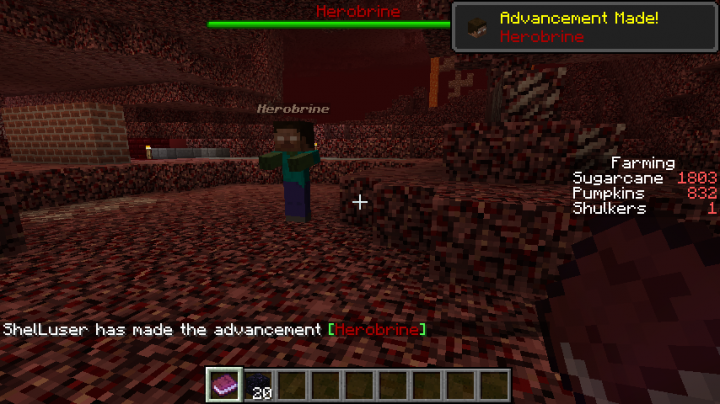
    Herobrine is real, and I have proof:


    See? Proof :)

    Of course I may have had something to do with this, something like a datapack or such, and I suppose I have to admit that he looks like a zombie wearing a player head, but that's just details :)
    11
    ShelLuser
    11/19/2018 11:39 am
    Level 61 : High Grandmaster System
    I seriously doubt that. Current versions can use plugins such as WorldGuard which can handle that for you, but I doubt that these were already available for 1.3.2.

    Why not play using a current version though?
    1
    ShelLuser
    11/19/2018 11:37 am
    Level 61 : High Grandmaster System
    Normally you'd also use a Count property when checking for an inventory item. So if you set Count to 0 you'd check if no items are present in the players inventory.
    1
    ShelLuser
    11/19/2018 11:36 am
    Level 61 : High Grandmaster System
    The only way to negate the sound would be to add a resourcepack which
    overrules that particular sound. As far as I know there are no in-game
    commands to fully block a pistons sound. Unfortunately I have no idea if
    resource packs were supported back in those days.
    1
    ShelLuser
    11/19/2018 11:28 am
    Level 61 : High Grandmaster System
    history
    What on earth gave you that idea? /fill is a valid supported command in 1.13.2 and it has been ever since 1.7.10 at least.

    (edit) Whoopsie ;) I assumed the OP made a typo and meant 1.13.2 and removed the excess 1. Now I see it could be valid considering pistons are existed in 1.3.x
    1

361 - 380 of 1,041

Welcome