

• 12/1/19 10:08 pm
- 5k views • 0 today
- save_alt 282 downloads
- Game Version
- Minecraft 1.7 beta
- Progress
- 100% complete


25
Classes Edited: nb.class (NetClientHandler.java)
Compatibility: Anything that doesn't edit nb.class
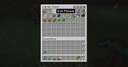
Description: A quasi-port (made by me) of the modern system which Minecraft uses where it outputs the things said in chat into the Minecraft logs. Matches the same format of the modern game, that being what is seen in the attached screenshot.
The § symbol is a normally invisible character in the chat that denotes what color to display the character as to the client. It is not a bug.
This is great for archiving conversations that you have while playing the game. You don't need to worry about losing track of a conversation forever if you don't take a screenshot of it in time.
Installation: Add files to Minecraft.jar
For
MultiMC, this means creating a Beta 1.7.3 Instance, clicking the "Add
to Minecraft.jar" button within the Version Window, and selecting the
zip for this mod
For the Vanilla launcher, this means cramming the edited class files from this mod into your Beta 1.7.3 Jar.
Compatibility: Anything that doesn't edit nb.class
Description: A quasi-port (made by me) of the modern system which Minecraft uses where it outputs the things said in chat into the Minecraft logs. Matches the same format of the modern game, that being what is seen in the attached screenshot.
The § symbol is a normally invisible character in the chat that denotes what color to display the character as to the client. It is not a bug.
This is great for archiving conversations that you have while playing the game. You don't need to worry about losing track of a conversation forever if you don't take a screenshot of it in time.
Installation: Add files to Minecraft.jar
For
MultiMC, this means creating a Beta 1.7.3 Instance, clicking the "Add
to Minecraft.jar" button within the Version Window, and selecting the
zip for this mod
For the Vanilla launcher, this means cramming the edited class files from this mod into your Beta 1.7.3 Jar.
More like this
![[Gliby's Voice Chat Mod] - Voice Chat in Minecraft?! [JUST UPDATED] Minecraft Mod](https://static.planetminecraft.com/files/resource_media/screenshot/1514/voicechatlogo8799900_thumb.jpg) [Gliby's Voice Chat Mod] - Voice Chat in Minecraft?! [JUST UPDATED]Minecraft 1.8 Functional Mod
[Gliby's Voice Chat Mod] - Voice Chat in Minecraft?! [JUST UPDATED]Minecraft 1.8 Functional Mod theGliby
•4/4/15 8:36
45.2k 3.9k 39x 16141
theGliby
•4/4/15 8:36
45.2k 3.9k 39x 16141![[1.6.4] TabbyChat - SMP Chat Overhaul Minecraft Mod](https://static.planetminecraft.com/files/resource_media/screenshot/1317/tabbychat_full_5311655_thumb.jpg) [1.6.4] TabbyChat - SMP Chat OverhaulMinecraft 1.6.4 Functional Mod
[1.6.4] TabbyChat - SMP Chat OverhaulMinecraft 1.6.4 Functional Mod RocketMan10404
12/24/13 6:39
• posted 4/17/13 10:36
42.8k 5.2k 67x 88047
RocketMan10404
12/24/13 6:39
• posted 4/17/13 10:36
42.8k 5.2k 67x 88047
 Brains Mod (Mod Loader)Minecraft 1.4.7 Functional Mod
 Alecan
2/22/13 2:59
• posted 2/17/13 4:01
11.7k 360 18x 573
Alecan
2/22/13 2:59
• posted 2/17/13 4:01
11.7k 360 18x 573
 narakos
 MRX2077
4446570
7








 Hardmuscle



Have something to say?
And where is it stored?
I recommend using this mod with MultiMC though as MultiMC is just overall orders of magnitude a better launcher than the official Mojang one for playing Beta. You can accomplish the task of getting it into a text file by either clicking the copy button and pasting it into a text file, or clicking the upload button to put it on paste.ee, which you can then download to your computer.
Overall, it's a neat idea, but it's not a feature that is currently included in this mod.