


• • 1/15/16 7:21 am • 2 logs
- 5.6k views • 0 today
- save_alt 148 downloads
- Game Version
- Minecraft 1.8.1
- Progress
- 100% complete
17
CommandBlockScript is a powerful scripting language for command blocks.
CBS provides a simple syntax and no limitations.
In order to use CBS you need nothing more as a simple texteditor,
CBS will then parse a valid text file into a .schematic file.
You then can easily export the created .schematic file into Minecraft.
A full documentation can be found here:
CBS also provides a debug mode, it allows an even easier bugtracking:
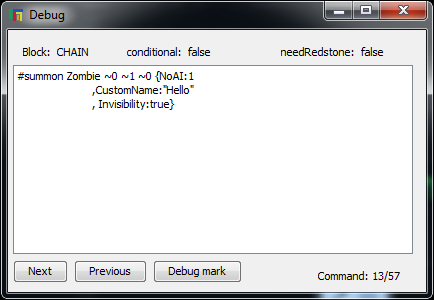
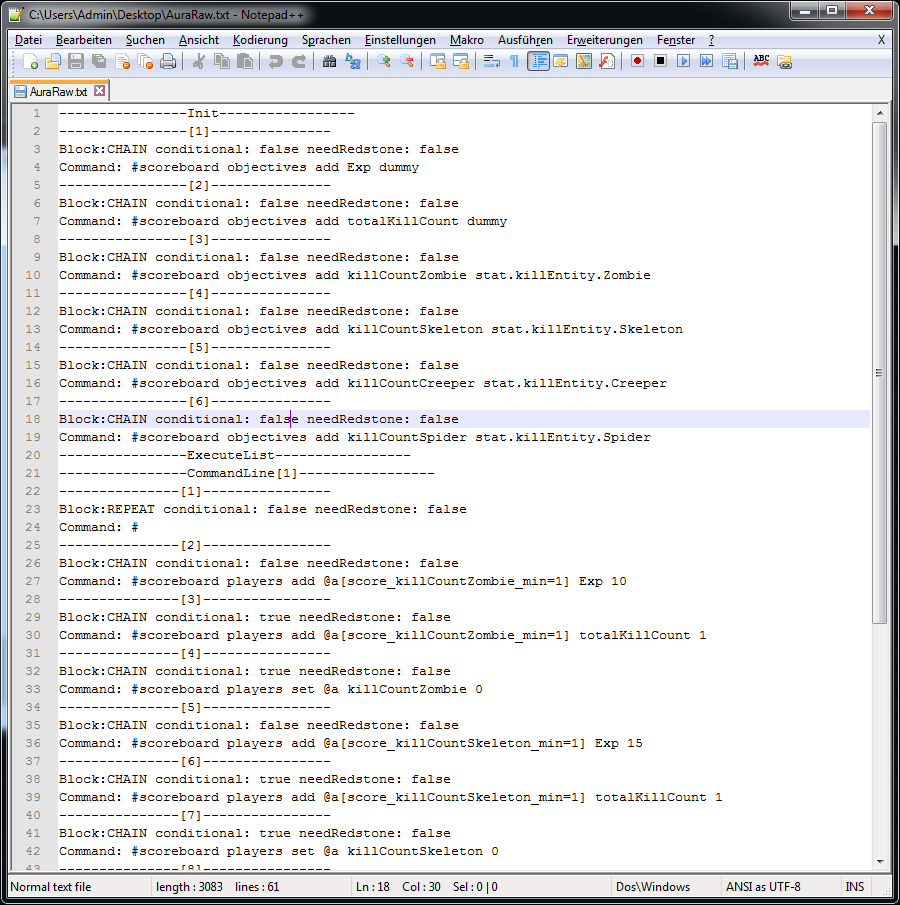
In order to get an even better overview, cbs now implements a "RawData" creater.
The "RawData" creator creates a simple .txt file with informations about alle commands:
CBS provides a simple syntax and no limitations.
In order to use CBS you need nothing more as a simple texteditor,
CBS will then parse a valid text file into a .schematic file.
You then can easily export the created .schematic file into Minecraft.
A full documentation can be found here:
Spoiler - click to reveal
CBS's syntax consists out of 5 key words and a 4 symbols:
Key words:
"init:"
"execute:#"
"repeat"
"var"
"func"
A detailed explanation:
init:
execute:#:
repeat:var:
func:Parameters:
Key words:
"init:"
"execute:#"
"repeat"
"var"
"func"
A detailed explanation:
init:
Spoiler - click to reveal
"init:" determinds, that the following code, will be "initiation" code.
As such it will be called at the very beginning of the programm:
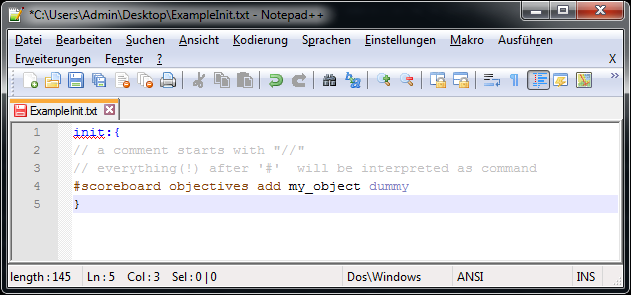
The above code will create a command block, which then will execute the command "/scoreboard objectives add my_object dummy"
As such it will be called at the very beginning of the programm:
The above code will create a command block, which then will execute the command "/scoreboard objectives add my_object dummy"
Spoiler - click to reveal
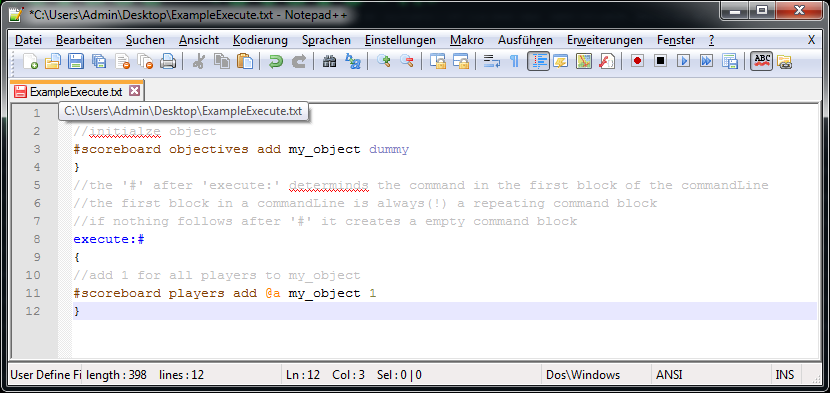
"execute:#" determinds the beginning of a new commandLine.
A commandLine can contain up to 3840 command blocks.
All commands in a commandLine (excpect determind otherwise) are chain_command_blocks.
Note: All commandLines get called parallel.
A commandLine can contain up to 3840 command blocks.
All commands in a commandLine (excpect determind otherwise) are chain_command_blocks.
Note: All commandLines get called parallel.
Spoiler - click to reveal
"repeat"
followed by "(Nx)", for N ∈ ℕ \ {0} and x = any character or character
sequenz, determinds, that the following code will be repeated N times (startign at 0), x
is a count variable, which allows access to the actuel loop.
repeat has to be in init: or execute:#:
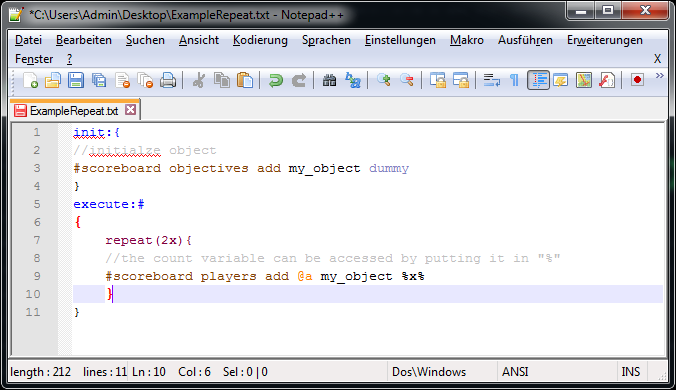
The above code will create 2 command blocks with the command "/scoreboard players add @a my_object 0" and
"/scoreboard players add @a my_object 1"
followed by "(Nx)", for N ∈ ℕ \ {0} and x = any character or character
sequenz, determinds, that the following code will be repeated N times (startign at 0), x
is a count variable, which allows access to the actuel loop.
repeat has to be in init: or execute:#:
The above code will create 2 command blocks with the command "/scoreboard players add @a my_object 0" and
"/scoreboard players add @a my_object 1"
Spoiler - click to reveal
"var"
determinds the declaration of a variable, once declared a variable can
be accessed anywhere by putting the name in "%". A variable also need
to be initialized directly:
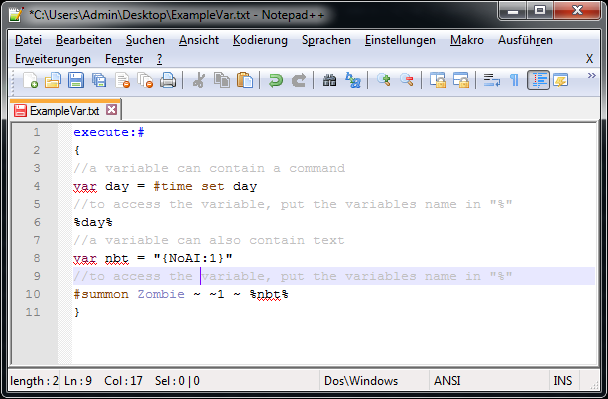
The above code creates two command blocks with the commands "/time set day" and "/summon Zombie ~ ~1 ~ {NoAI:1}"
In CBS you can also create arrays:
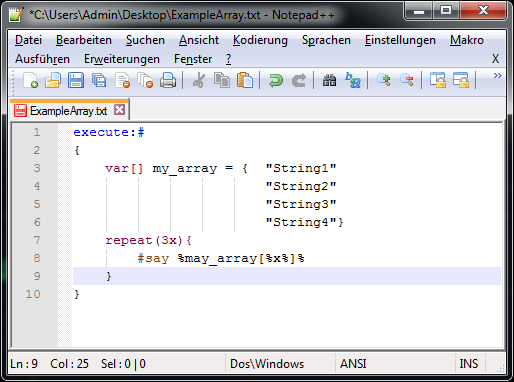
Every row represents 1 value of the array.
To access a array just write the name in "%" and put in the value you want to acces (starting at 0).
"#say %my_array[1]%"
determinds the declaration of a variable, once declared a variable can
be accessed anywhere by putting the name in "%". A variable also need
to be initialized directly:
The above code creates two command blocks with the commands "/time set day" and "/summon Zombie ~ ~1 ~ {NoAI:1}"
In CBS you can also create arrays:
Every row represents 1 value of the array.
To access a array just write the name in "%" and put in the value you want to acces (starting at 0).
"#say %my_array[1]%"
Spoiler - click to reveal
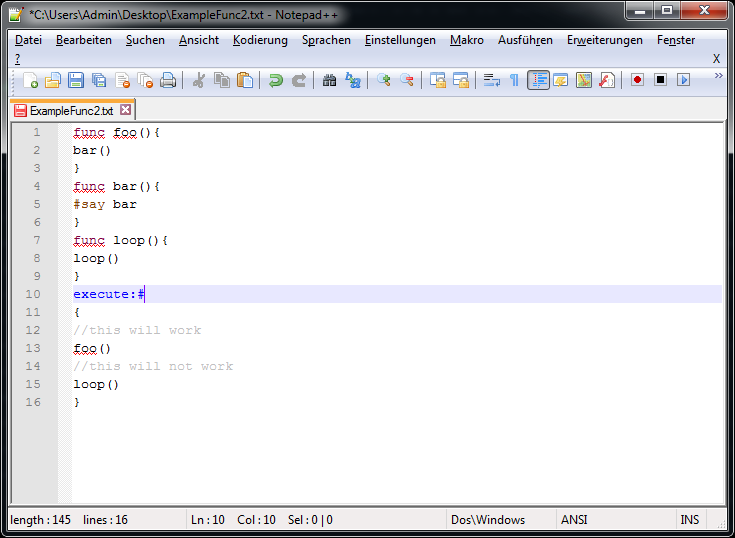
In CBS you can also declare functions, the following code shows a simple function:
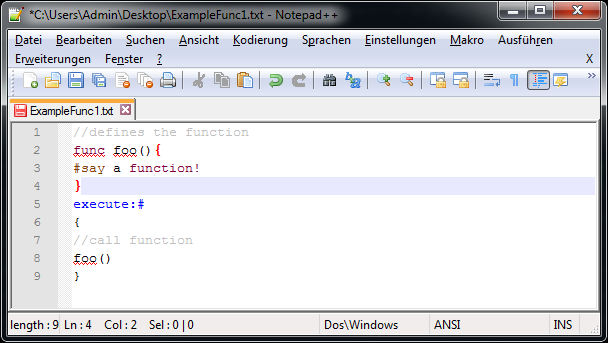
In the above example, we declare a new function called "foo" without parameters and call it later.
When we call a function, the function gets replaced by the actual code, in this example only one command
"/say i am a function!".
You can also call a function inside a function, but be aware recrusive functions aren't possible!
A function with parameters:
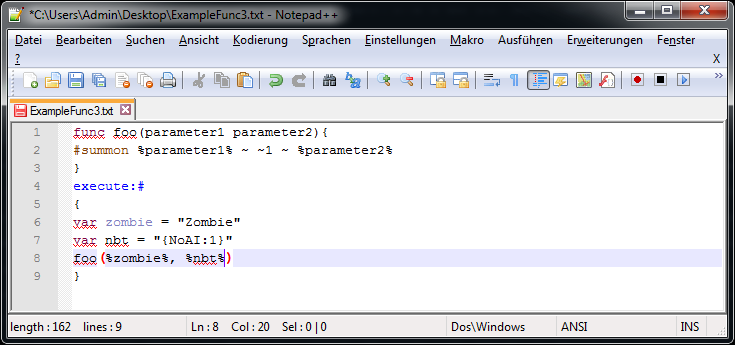
The above code will create a command block with the command "/summon Zombie ~ ~1 ~ {NoAi:1}"
And you can of course pass function parameters as parameter to other functions:
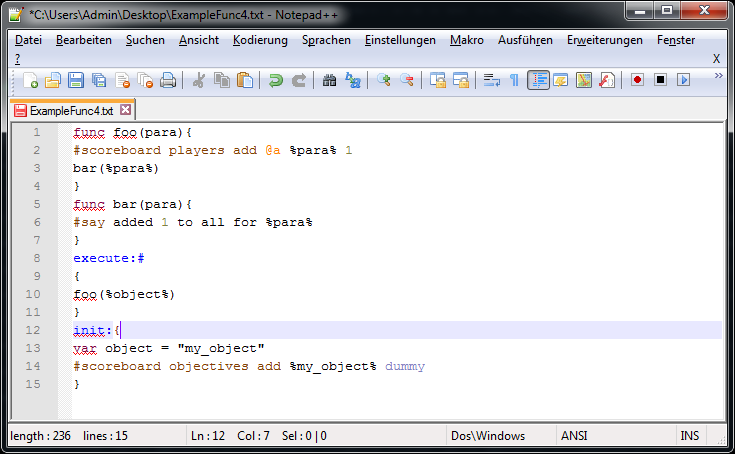
The
example above first initiates the scoreboard and creates a variable
called "object", the commandLine contains 2 command blocks with the
commands "/scoreboard players add @a my_object 1" and "/say added 1 to
all for my_object"
In the above example, we declare a new function called "foo" without parameters and call it later.
When we call a function, the function gets replaced by the actual code, in this example only one command
"/say i am a function!".
You can also call a function inside a function, but be aware recrusive functions aren't possible!
A function with parameters:
The above code will create a command block with the command "/summon Zombie ~ ~1 ~ {NoAi:1}"
And you can of course pass function parameters as parameter to other functions:
The
example above first initiates the scoreboard and creates a variable
called "object", the commandLine contains 2 command blocks with the
commands "/scoreboard players add @a my_object 1" and "/say added 1 to
all for my_object"
Spoiler - click to reveal
Parameters are used in order to change the proccess of generation.
CBS knows 9 different parameters:
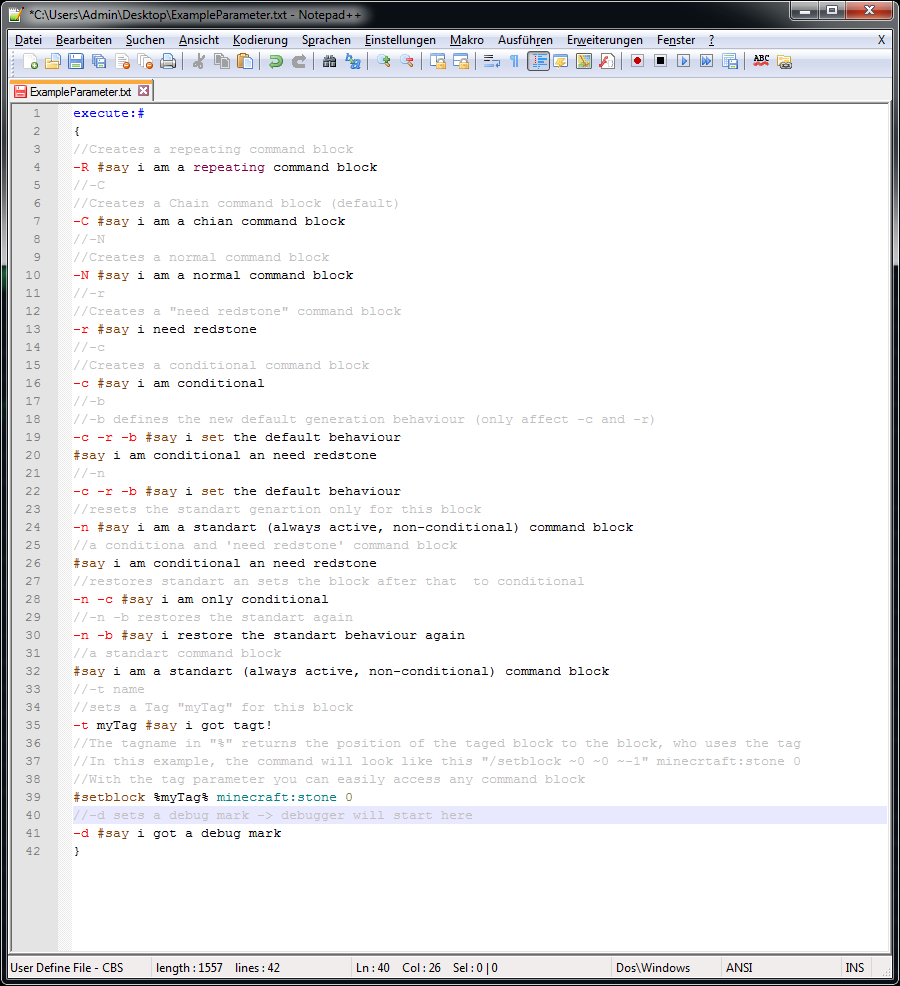
CBS knows 9 different parameters:
CBS also provides a debug mode, it allows an even easier bugtracking:
In order to get an even better overview, cbs now implements a "RawData" creater.
The "RawData" creator creates a simple .txt file with informations about alle commands:
2 Update Logs
Update #2 : by Lexxer 01/15/2016 7:21:05 amJanuary 15, 2016 @ 12:21 pm UTC
Update:
added Compile option to Debug mode
Fixed:
- "-r" not recognized
added Compile option to Debug mode
Fixed:
- "-r" not recognized
LOAD MORE LOGS
More like this
 Fast Command Block Commands Generator v2.5Minecraft 1.6.2 Program Mod
 Xbxp
7/9/13 4:56
• posted 3/2/13 8:22
50.8k 7.1k 70x 76436
Xbxp
7/9/13 4:56
• posted 3/2/13 8:22
50.8k 7.1k 70x 76436![[v.1.1][Windows|1.7+|Map making tool][Fixed & Working] /give command generator! No need of memorizing that stupid data tags! Minecraft Mod](https://static.planetminecraft.com/files/resource_media/screenshot/1350/Main_screeen_6812169_thumb.jpg) [v.1.1][Windows|1.7+|Map making tool][Fixed & Working] /give command generator! No need of memorizing that stupid data tags!Minecraft 1.7.2 Program Mod
[v.1.1][Windows|1.7+|Map making tool][Fixed & Working] /give command generator! No need of memorizing that stupid data tags!Minecraft 1.7.2 Program Mod justinruaya123
2/3/14 2:36
• posted 12/13/13 8:08
19.3k 4k 45x 11413
justinruaya123
2/3/14 2:36
• posted 12/13/13 8:08
19.3k 4k 45x 11413 Minecraft Ban Script (PHP Ban Script)Minecraft 1.8.1 Other Mod
 MCxJB
•10/24/15 1:11
5.1k 194 2x 1109
MCxJB
•10/24/15 1:11
5.1k 194 2x 1109 CommandBlockEnvironmentMinecraft 1.10 Program Mod
 Lexxer
7/28/16 4:27
• posted 6/3/16 9:45
4.4k 301 14x 72313
Lexxer
7/28/16 4:27
• posted 6/3/16 9:45
4.4k 301 14x 72313
3541383
7




 User5987451G






Have something to say?
For reference, this is what I had on line 29:
-r #kill @e[type=ArmorStand,name=center]
Here is the Init code I am using if it helps:
//add armor objective
Init:{
#scoreboard objectives add armor armor
}
How do we use the cbs.jar?