


• 1/7/26 10:27 am
- 415 views • 1 today
- save_alt 17 downloads
- Game Version
- Minecraft 1.21.11
- Progress
- 100% complete

2
🎨 Dithering3D - Surface-Stable Fractal Dithering




____________________________________________________________________
✨ A Revolutionary Visual Experience
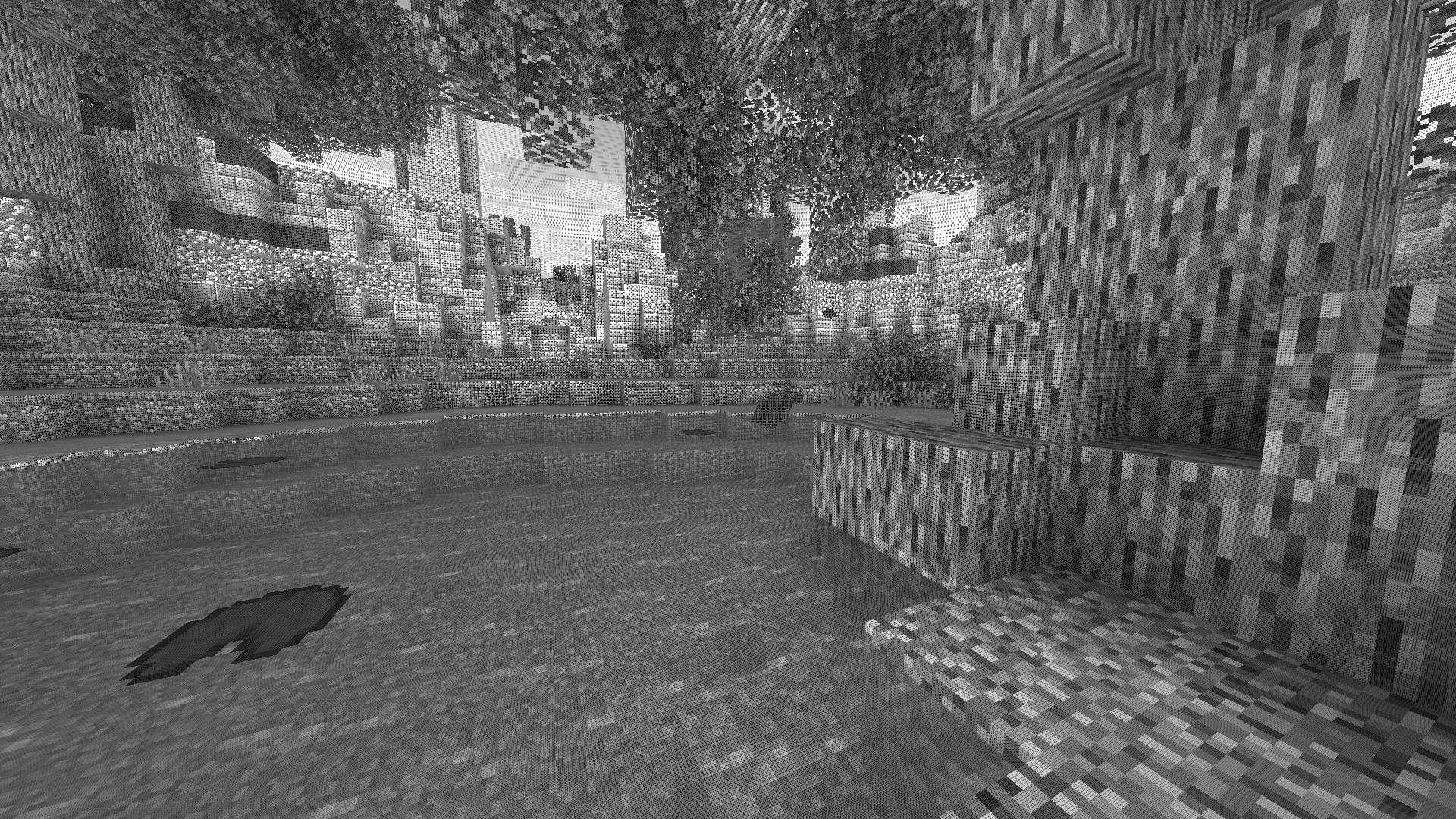
Transform your Minecraft world with Surface-Stable Fractal Dithering — a groundbreaking rendering technique where dither dots stick to 3D surfaces instead of the screen, creating a unique manga/comic book aesthetic that feels alive.
🎬 Based on the innovative work by Rune Skovbo Johansen — Watch the explainer video
____________________________________________________________________
🖼️ What Makes This Shader Special?
📌 Surface-Stable Dots
Unlike traditional dithering where patterns "swim" on screen, Dither3D anchors each dot to the actual 3D surface. Walk around blocks, and the dots stay perfectly attached!
🔄 Fractal Scaling Magic
As you move closer or farther from surfaces, dots dynamically split or merge to maintain constant screen-space density. It's mesmerizing to watch!
🎨 Three Color Modes
- Grayscale
Classic black & white dithering — clean, minimalist, timeless - RGB
Each color channel gets its own dot layer — vibrant and unique - CMYK Halftone
Authentic newspaper/comic print simulation with rotated dot angles
____________________________________________________________________
⚡ Features at a Glance
- 🎯 Precision Dithering
SVD-based frequency analysis for mathematically perfect dot placement - 🌀 Anti-Stretch Technology
Anisotropic smoothing keeps dots circular even on oblique surfaces - 🎥 Camera Stable
Radial compensation prevents dot swimming during camera rotation - ⚙️ Highly Configurable
10+ parameters to fine-tune your perfect look - 🚀 Performance Optimized
Efficient 3D texture sampling for smooth gameplay - 📱 Universal Compatibility
Works with OptiFine AND Iris on virtually any Minecraft version
____________________________________________________________________
🎛️ Customization Options
Fine-tune every aspect of the dithering effect with our intuitive in-game sliders:
🔧 Dither Settings
- Dot Scale (2 - 10): Control overall dot size (exponential)
- Size Variability (0 - 1): 0 = Bayer pattern, 1 = Halftone style
- Dot Contrast (0 - 2): Sharpen or soften dot edges
- Stretch Smooth (0 - 2): Combat stretched dots on angled surfaces
💡 Input Controls
- Exposure (0 - 5): Brightness multiplier
- Offset (-1 to 1): Brightness offset adjustment
🎮 Additional Options
- Inverse Dots — Flip dot colors for a negative effect
- Radial Compensation — Stabilize during camera rotation (recommended!)
- Quantize Layers — Prevent dot morphing for a more "classic" look
- Debug Mode — Visualize fractal layers for development
____________________________________________________________________
📦 Installation
For OptiFine Users
1. Download and extract the shader pack
2. Place the shaders folder in .minecraft/shaderpacks/
3. Launch Minecraft → Options → Video Settings → Shaders
4. Select Dithering3D and enjoy!
For Iris Users (Fabric/Quilt)
1. Install Iris Shaders mod (1.2.0+)
2. Download and extract the shader pack
3. Place the shaders folder in .minecraft/shaderpacks/
4. Press O in-game to open shader menu
5. Select Dithering3D
💡 Tip: Press F3 + T to quickly reload shaders after making changes!
____________________________________________________________________
🎨 Preset Profiles
Choose from pre-configured profiles for instant results:
- 🟢 LOW (Grayscale - 4.0)
Best for performance & retro feel. - 🟡 MEDIUM (Grayscale - 5.0)
Best for a balanced experience. - 🟠 HIGH (RGB - 5.0)
Best for colorful, artistic visuals. - 🔴 ULTRA (CMYK - 6.0)
Best for maximum visual impact.
____________________________________________________________________
🌟 Perfect For
- 📸 Screenshot enthusiasts — Create unique, artistic captures
- 🎬 Content creators — Stand out with a distinctive visual style
- 🎮 Retro lovers — Relive the charm of 1-bit graphics
- 🎨 Artists — Manga, comic book, and newspaper aesthetics
- 🧪 Tech enthusiasts — Experience cutting-edge rendering techniques
____________________________________________________________________
❓ FAQ
Q: Does this work with other shaders?
Dithering3D is a standalone shader pack. Combining with other shaders may cause conflicts.
Q: Why do some surfaces look different?
The sky and some special effects may appear different as surface-stable dithering reveals flat geometry.
Q: Performance impact?
Moderate. The 3D texture sampling is optimized but more demanding than vanilla rendering. Most GPUs handle it smoothly.
Q: Can I use this in my modpack?
Yes! Under MPL-2.0 license. Credit appreciated.
____________________________________________________________________
🔬 The Science Behind It
Dithering3D uses Singular Value Decomposition (SVD) to analyze UV coordinate derivatives in real-time, determining the exact frequency and direction of surface textures.
- ✅ Perfectly uniform dot density regardless of distance
- ✅ Seamless fractal transitions between detail levels
- ✅ Circular dots even on extremely angled surfaces
- ✅ Rotation-stable patterns that don't "swim"
____________________________________________________________________
📚 Credits & Resources
- 🔗 Original Algorithm: Rune Skovbo Johansen
- 🎥 Technique Explanation: YouTube Video
- 💬 Technical Discussion: FAQ Thread
____________________________________________________________________
📄 License
Mozilla Public License 2.0 (MPL-2.0)____________________________________________________________________
🎨 Transform your world. Experience Dithering3D. 🎨
If you enjoy this shader, consider leaving a ⭐ and sharing this shader page !
If you enjoy this shader, consider leaving a ⭐ and sharing this shader page !
More like this
 Voyager shader 1.6.1Minecraft 1.16.5 Aesthetic Mod
 SixSeven67
5/26/21 7:03
• posted 7/18/19 4:09
323.7k 89k 85x 10360380
SixSeven67
5/26/21 7:03
• posted 7/18/19 4:09
323.7k 89k 85x 10360380![RedHat Shader v33.3 [OPTIFINE/IRIS SHADER] Minecraft Mod](https://static.planetminecraft.com/files/image/minecraft/mod/2021/006/14996053_s.jpg) RedHat Shader v33.3 [OPTIFINE/IRIS SHADER]Minecraft 1.19 Aesthetic Mod
RedHat Shader v33.3 [OPTIFINE/IRIS SHADER]Minecraft 1.19 Aesthetic Mod mlgimposter
•6/9/21 9:42
99.2k 23.6k 27x 105485
mlgimposter
•6/9/21 9:42
99.2k 23.6k 27x 105485

 aehmttw
 GamesofDev
 mewshaders
6821936
7


![Housing [dimension] Minecraft Mod](https://static.planetminecraft.com/files/image/minecraft/mod/2023/365/16936400_s.jpg)




 StillRim

 DrSkunk
![Nebze's Cape [1.21.11] Minecraft Mod](https://static.planetminecraft.com/files/image/minecraft/mod/2026/852/20125239-gallery_s.jpg)
 1nebze
![Nebze's Cape [1.21] Minecraft Mod](https://static.planetminecraft.com/files/image/minecraft/mod/2026/857/20125248-gallery_s.jpg)


 melodyjellyfr
 AmplleFawn7332
Have something to say?