


• 12/15/12 10:41 am
- 1.1k views • 0 today
- save_alt 56 downloads
- Game Version
- Minecraft 1.4.6
- Progress
- 100% complete


10
Merncrerft 1.4.6
Version 3
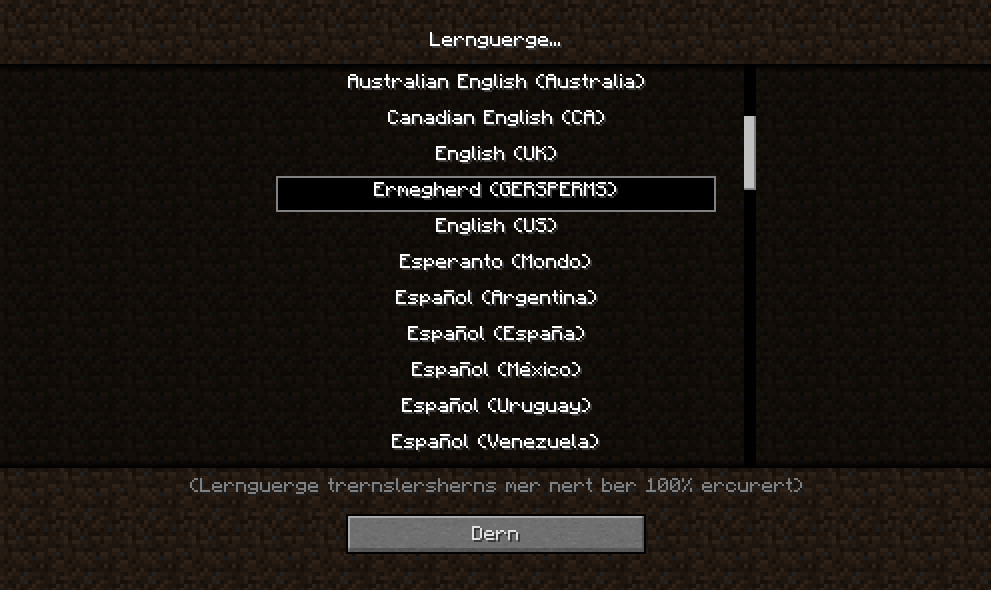
Ermegherd! Merncrerft! Merncrerft is a language mod which basically makes everything in the game sound it was being said by a harcore Goosebumps fan. It operates by replacing the Pirate Speak language, and has fairly easy installation.
Changed text:
-Items and blocks
-Mobs
-Achievements
-Menu buttons
-Automated chat messages (xxx drowned, xxx was given xxx, etc.)
Updates from the last version:
-Changed "Black Werl" to "Blerk Werl"
-Changed "Enrdermern" to "Erndermern"
-Changed the "Ernfernerter" enchantment to "Ernfernerder"
-Added the "Terns" enchantment
-Added the "Terchscrern Merd" option
-Added "Feryerwerks" and related words
-Added "Nerder Brerk Slerbs"
-Added "Ernchernterd Berks"
Installation instructions for PC:
1. Open minecraft.jar in whatever archiving software that you use (I personally like 7Zip since it's free)
2. Open the "lang" folder
3. Delete "en_PT.lang" and "languages.txt" in the "lang" folder
4. Copy the "en_PT.lang" and "languages.txt" from the "Merncrerft_1.4.5" folder into the "lang" folder
5. Delete the "META_INF" folder in minecraft.jar
6. Start up the game, and select Ermegherd (GERSPERMS) from the languages menu
Version 3
Ermegherd! Merncrerft! Merncrerft is a language mod which basically makes everything in the game sound it was being said by a harcore Goosebumps fan. It operates by replacing the Pirate Speak language, and has fairly easy installation.
Changed text:
-Items and blocks
-Mobs
-Achievements
-Menu buttons
-Automated chat messages (xxx drowned, xxx was given xxx, etc.)
Updates from the last version:
-Changed "Black Werl" to "Blerk Werl"
-Changed "Enrdermern" to "Erndermern"
-Changed the "Ernfernerter" enchantment to "Ernfernerder"
-Added the "Terns" enchantment
-Added the "Terchscrern Merd" option
-Added "Feryerwerks" and related words
-Added "Nerder Brerk Slerbs"
-Added "Ernchernterd Berks"
Installation instructions for PC:
1. Open minecraft.jar in whatever archiving software that you use (I personally like 7Zip since it's free)
2. Open the "lang" folder
3. Delete "en_PT.lang" and "languages.txt" in the "lang" folder
4. Copy the "en_PT.lang" and "languages.txt" from the "Merncrerft_1.4.5" folder into the "lang" folder
5. Delete the "META_INF" folder in minecraft.jar
6. Start up the game, and select Ermegherd (GERSPERMS) from the languages menu
More like this

 The Bob Mod (1.4.6) UPDATEDMinecraft 1.4 Aesthetic Mod
 ImTheAugello
12/21/12 5:03
• posted 11/22/12 4:17
3.1k 136 11x 64
ImTheAugello
12/21/12 5:03
• posted 11/22/12 4:17
3.1k 136 11x 64 Technos Pack Language ExtensionMinecraft 1.2.4 Aesthetic Mod
 Rockdude101
•4/1/12 9:14
2.8k 378 9x 15
Rockdude101
•4/1/12 9:14
2.8k 378 9x 15![Tyzanite Mod [1.4.6][Modloader] Minecraft Mod](https://static.planetminecraft.com/files/resource_media/screenshot/1251/2_4474873_thumb.jpg)

 deluxe1mod
1746658
7

 7craft
 Triloms



 ThatYoutubeHater


 CarrotNoRanch
![Macaw's Roads [1.16.5 -> 26.3 NeoForge/Forge/Fabric] Minecraft Mod](https://static.planetminecraft.com/files/image/minecraft/mod/2026/259/20179987_s.jpg)
 SketchMacaw
Have something to say?
is
the
biggest
innovation
in
minecraft
YET!!!