


• • 3/10/25 10:47 am • 1 logs
- 7.4k views • 3 today
- save_alt 575 downloads • 1 today
- Game Version
- Minecraft 1.20.1
- Progress
- 100% complete

8
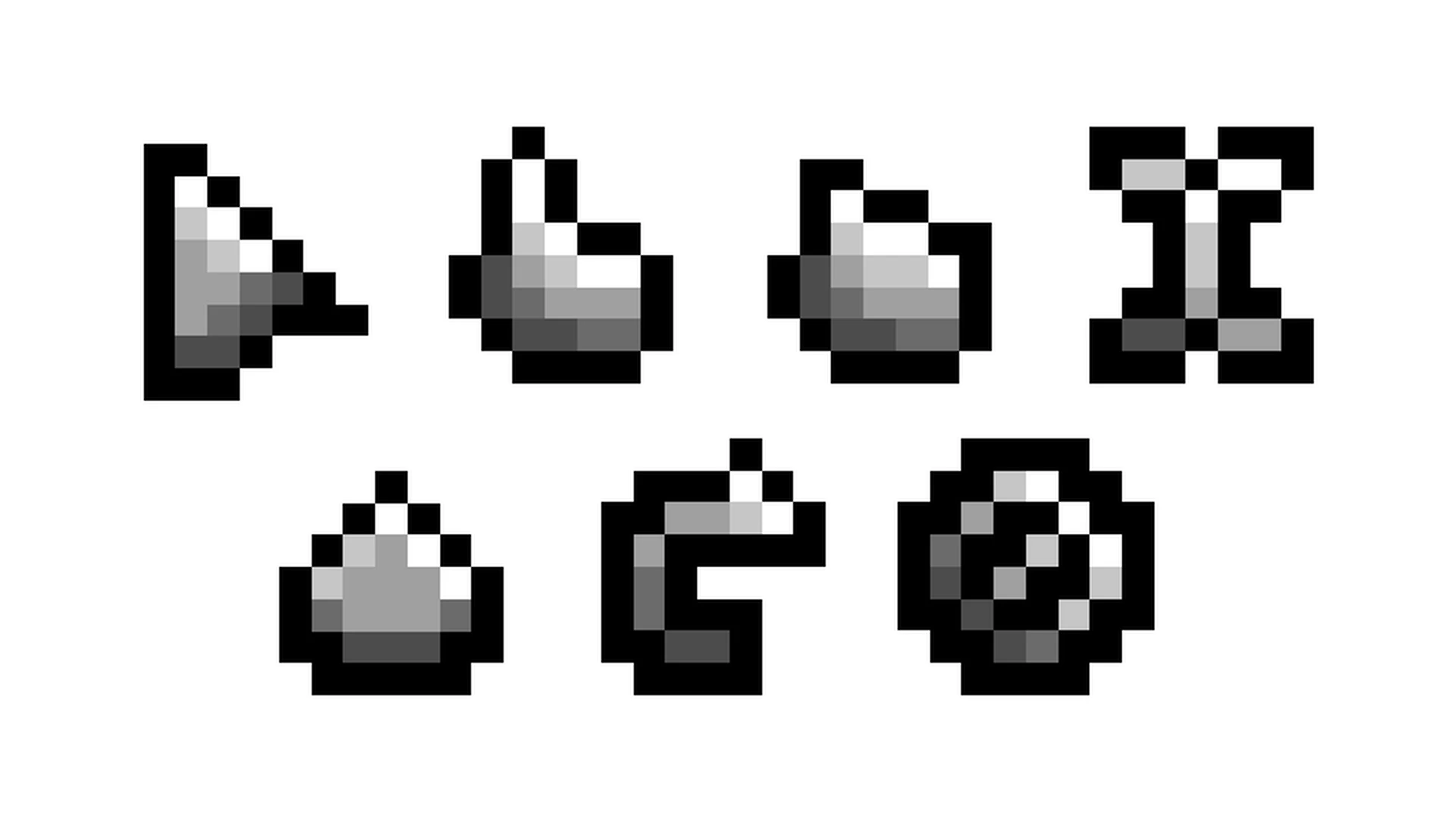
Replaces the boring old default system cursor with Minecraft-themed cursors.
![Minecraft Cursor [1.20.1, 1.21.1+] Minecraft Mod](https://github.com/user-attachments/assets/6c632b54-e284-47a0-8634-f4ba1ef03f29)
![Minecraft Cursor [1.20.1, 1.21.1+] Minecraft Mod](https://github.com/user-attachments/assets/83a41d81-5a0b-4399-8d70-61ca421117c0)
![Minecraft Cursor [1.20.1, 1.21.1+] Minecraft Mod](https://github.com/user-attachments/assets/bdcd6392-a8bb-40af-b2fa-10a465363545)


Visit the Minecraft Cursor Wiki for more details: https://fishstiz.github.io/minecraft-cursor-wiki/resource-pack/getting-started
🚀 Java API
The Minecraft Cursor mod provides an API for mod developers to:
Visit the Minecraft Cursor Wiki for more details: https://fishstiz.github.io/minecraft-cursor-wiki/java-api/introduction
Mods that shift the sizes and positions of certain GUIs may lead to unexpected cursor switching. Adaptive cursor can be disabled on affected GUIs from the Adaptive Cursor options.
The list of registered vanilla widgets with an associated cursor are found here. More on the source code.
To check if an element is detected, Inspect Element can be toggled from the Debug Options. More info on how an element is detected (and how to make it detectable) on the wiki.
Note that some mods are unknowingly conflicting with Minecraft Cursor due to the libraries they are embedding/depending on (most notably with ImGui). These features work around that
Likewise, Fabric mods that initialize GLFW early, such as some early loading screen mods, will also disable these features.
NOT AN OFFICIAL MINECRAFT PRODUCT. NOT APPROVED BY OR ASSOCIATED WITH MOJANG OR MICROSOFT.
📌 Requirements
- Fabric/Forge/Neoforge 1.20.1 or 1.21.1+
- When on Fabric: Fabric API
✨ Adaptive Cursor
- The cursor adapts to native or derived Minecraft elements and certain other actions.
- Toggle from the Adaptive Cursor options or toggle each cursor manually.
🔧 Configure Cursors
- Configure from Mod Menu (if installed on Fabric)
- Configure from Options > Controls > Mouse Settings... > Cursor Settings...
- Each cursor can be toggled on or off, with the default cursor used when disabled.
🎨 Resource Pack Support
Create your own theme with customized and animated cursor designs, and configure cursor settings with resource packs.Visit the Minecraft Cursor Wiki for more details: https://fishstiz.github.io/minecraft-cursor-wiki/resource-pack/getting-started
🚀 Java API
The Minecraft Cursor mod provides an API for mod developers to:
- Create new cursors.
- Map elements with cursor type functions.
- or declare the cursor type within the element itself.
- Directly change the cursor, bypassing the element-based system.
Visit the Minecraft Cursor Wiki for more details: https://fishstiz.github.io/minecraft-cursor-wiki/java-api/introduction
🔗 Mod Compatibility
Mods that shift the sizes and positions of certain GUIs may lead to unexpected cursor switching. Adaptive cursor can be disabled on affected GUIs from the Adaptive Cursor options.
The list of registered vanilla widgets with an associated cursor are found here. More on the source code.
To check if an element is detected, Inspect Element can be toggled from the Debug Options. More info on how an element is detected (and how to make it detectable) on the wiki.
Fabric Only Compatibility Features
Note that some mods are unknowingly conflicting with Minecraft Cursor due to the libraries they are embedding/depending on (most notably with ImGui). These features work around that
- When another mod sets a custom cursor through GLFW, the adaptive cursor will be disabled to let it do its thing.
- Standard system cursors from GLFW will be remapped to their Minecraft Cursor equivalents.
Likewise, Fabric mods that initialize GLFW early, such as some early loading screen mods, will also disable these features.
NOT AN OFFICIAL MINECRAFT PRODUCT. NOT APPROVED BY OR ASSOCIATED WITH MOJANG OR MICROSOFT.
1 Update Logs
Forge & Neoforge Support : by fishstiz 03/10/2025 10:47:23 amMarch 10, 2025 @ 2:47 pm UTC
- Minecraft Cursor now supports Forge 1.20.1 & Neoforge 1.21.1+
- Dropped support for 1.21, use 1.21.1 instead
More like this
 C418 Dog-Disc Java port ((Neo)Forge/Fabric 1.12.2 - 1.21.8 - 26.3)Minecraft 26.3 snapshot Other Mod
 Pinguinmike
9/25/26 11:15
• posted 1/7/23 2:30
2.7k 150 2x 177
Pinguinmike
9/25/26 11:15
• posted 1/7/23 2:30
2.7k 150 2x 177 Pinguinmike,s (MVS) Dragon Toy (1.12.2 - 1.21.8 - 26.3 (Fabric/(Neo)Forge))Minecraft 26.3 snapshot Other ModPinguinmike
9/25/26 11:14
• posted 1/7/25 9:17
2.1k 303x 165
Pinguinmike,s (MVS) Dragon Toy (1.12.2 - 1.21.8 - 26.3 (Fabric/(Neo)Forge))Minecraft 26.3 snapshot Other ModPinguinmike
9/25/26 11:14
• posted 1/7/25 9:17
2.1k 303x 165
 Create: Pìpboy ( neoforge 1.21.1 / forge 1.20.1 )Minecraft 1.21.1 Functional Mod
 JxstCris_
•8/5/26 11:41
250 28x 233
JxstCris_
•8/5/26 11:41
250 28x 233
 Aquarius_playz
 ProMainer
6522842
7
![Minecraft Cursor [1.20.1, 1.21.1+] Minecraft Mod](https://static.planetminecraft.com/files/image/minecraft/mod/2025/842/18876729-banner_s.jpg)
 mikanana
 Grid Lock


 Ray Rocketchu



 mochacakepop
![DIE OF CRAFT [Forsaken blocked DLC] -die of death addon- Minecraft Mod](https://static.planetminecraft.com/files/image/minecraft/mod/2026/926/20209468-untitled_s.jpg)
 RAGG3D_JAGG3R


Have something to say?