



• 3/18/20 11:47 pm
- 1.6k views • 0 today
- save_alt 54 downloads
- Progress
- 100% complete


29
Currently broken due to update from snapshot to full release of 1.16. I'm upgrading to 64 colour but am waiting on some stuff.
https://www.reddit.com/r/redstone/comments/fl3gsq/32_colour_display/ for gif of it working
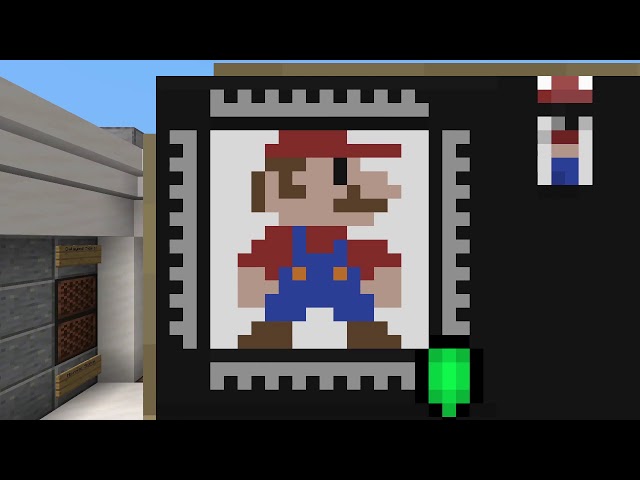
This is my 16*16 32 Colour Display that runs on a 4rt cycle(4 redstone ticks) or 2.5hz that is expandable to 64*64 in its current configuration. The display is actually infinetly expandable, even allowing the addition of more colours in sets of 8, though this adds a lag of 2rt per 8 additional colour.
This new display adds new functions not included in my previous 16 colour display that greatly increases the speed that a programmed image can be generated. However due to limited space and the reduction of cycle time, the lag has been slightly increase.
Inorder for easier operation of the display, I have added in a more user friendly control centre. This includes preset commands for all colours and operations. Therefore only the individual selection of columns and rows requires manuel input.
The programming of the display has also been eased with a new ROM format that no longer requires a gap every 10 bytes and the use of structure blocks. This allows the programming of the display to move up from a 1st level(binary) program to a 2nd level(assembly) program. Therefore it allows for faster programming and debugging of the display.
In the worst case senario the larges program size required for a 16*16 image is 292 bytes, being just under 2 minutes.
To program using sturcture blocks type
"p"(Pigment) followed by a no. from "0" to "31" for a colour
"c" or "r" for column or row followed by a no. from "0" to "31" for a column or row invertion
"o" for operator followed by...
"ac" - All clear
or
"c" or "r" for column or row specific followed by...
"c" - Clear
"s" - Single Sel
"o" - Odd Invert
"e" - Even Invert
"f" - Shift Forward (shifts current sellection forward)
"b" - Shift Backward
"af" - Auto Shift Forward
"ab" - Auto Shift Backward (shift current selection backwards after every colour is selected)
e.g. "ocaf" = toggles the operator that auto shifts forwards the column selection
https://www.reddit.com/r/redstone/comments/fl3gsq/32_colour_display/ for gif of it working
This is my 16*16 32 Colour Display that runs on a 4rt cycle(4 redstone ticks) or 2.5hz that is expandable to 64*64 in its current configuration. The display is actually infinetly expandable, even allowing the addition of more colours in sets of 8, though this adds a lag of 2rt per 8 additional colour.
This new display adds new functions not included in my previous 16 colour display that greatly increases the speed that a programmed image can be generated. However due to limited space and the reduction of cycle time, the lag has been slightly increase.
Inorder for easier operation of the display, I have added in a more user friendly control centre. This includes preset commands for all colours and operations. Therefore only the individual selection of columns and rows requires manuel input.
The programming of the display has also been eased with a new ROM format that no longer requires a gap every 10 bytes and the use of structure blocks. This allows the programming of the display to move up from a 1st level(binary) program to a 2nd level(assembly) program. Therefore it allows for faster programming and debugging of the display.
In the worst case senario the larges program size required for a 16*16 image is 292 bytes, being just under 2 minutes.
To program using sturcture blocks type
"p"(Pigment) followed by a no. from "0" to "31" for a colour
"c" or "r" for column or row followed by a no. from "0" to "31" for a column or row invertion
"o" for operator followed by...
"ac" - All clear
or
"c" or "r" for column or row specific followed by...
"c" - Clear
"s" - Single Sel
"o" - Odd Invert
"e" - Even Invert
"f" - Shift Forward (shifts current sellection forward)
"b" - Shift Backward
"af" - Auto Shift Forward
"ab" - Auto Shift Backward (shift current selection backwards after every colour is selected)
e.g. "ocaf" = toggles the operator that auto shifts forwards the column selection
More like this
![Giant 32x16 redstone Map-Display [Displays Mario, Kirby...] (12w34b) Minecraft Map & Project](https://static.planetminecraft.com/files/resource_media/screenshot/1234/NAYT_3377727_thumb.jpg) Giant 32x16 redstone Map-Display [Displays Mario, Kirby...] (12w34b)Redstone Device Map
Giant 32x16 redstone Map-Display [Displays Mario, Kirby...] (12w34b)Redstone Device Map jerry1921
•8/24/12 12:01
1.6k 133 4x 181
jerry1921
•8/24/12 12:01
1.6k 133 4x 181
![[Redstone] Binary Display Minecraft Map & Project](https://static.planetminecraft.com/files/resource_media/screenshot/1240/2012-10-02_162238_3749196_thumb.jpg)


 Inzane
 the_porkchop458
4491927
2


 Grid Lock



 Ray Rocketchu



 vaporr

 Benjimin_MC
 ASAKA828

Have something to say?