


2
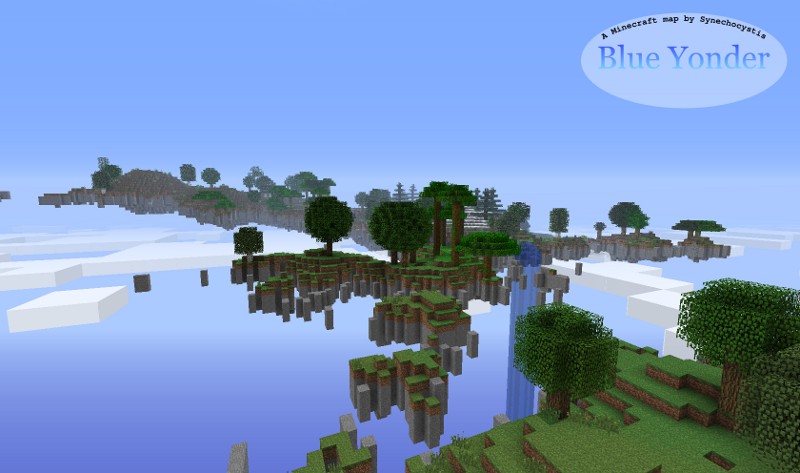
Blue Yonder is a floating islands map created by procedural generation, including features not seem in a standard Minecraft map (such as castles). Journey into the wild Blue Yonder for a unique twist on Minecraft gameplay.


The .zip file contains a server folder. To host Blue Yonder, extract the folder, open the folder, and then run Minecraft_server.jar (not included, download from minecraft.net) from inside the Blue Yonder folder. You can join from the same computer by typing localhost as the IP address in the multiplayer menu (your friends will enter the IP address of your computer to join).
Spoiler: Map of Blue Yonder 1.03
Additional Notes
As of Minecraft 1.3, all you need to do is extract BlueYonder_1-03-sp.zip into the saves folder of your Minecraft installation and then play it from the Single Player menu in Minecraft. To host a LAN game, hit the escape key and then click open to LAN. Your LAN friends should then see your game on the Multiplayer menu.The .zip file contains a server folder. To host Blue Yonder, extract the folder, open the folder, and then run Minecraft_server.jar (not included, download from minecraft.net) from inside the Blue Yonder folder. You can join from the same computer by typing localhost as the IP address in the multiplayer menu (your friends will enter the IP address of your computer to join).
2 Update Logs
Update #2 : by Synechocystis 08/02/2012 9:43:30 pmAugust 3, 2012 @ 1:43 am UTC
Modified the file structure for Minecraft 1.3 single-player (version 1.03-sp). Now you can just extract into the saves folder and do a LAN game using the Minecraft 1.3 interface (escape > open to LAN). I modified the level.dat file to make you spawn in the correct place in single player.
LOAD MORE LOGS
More like this


 Mcpe: Four Floating IslandsEnvironment / Landscaping Map
 Daveyo12
•6/20/15 10:44
1.1k 115 1x 541
Daveyo12
•6/20/15 10:44
1.1k 115 1x 541

 Xatrix
 tyr3434
 IntenseBRer
 GodzGiftboy
1049926
2
![Learn How to Play Minecraft [tutorial] Minecraft Map & Project](https://static.planetminecraft.com/files/resource_media/screenshot/1229/MinecraftTutorialShot_2929770_thumb.jpg)

![Blue Yonder [floating island generated terrain] Minecraft Map & Project](https://static.planetminecraft.com/files/resource_media/screenshot/1228/BY08_2670594_thumb.jpg)
 Sithfruit
 Laeviatien
 Najk
Najk
 hugobossvaneck


 AquaLessPantsu
 JustPinkCake
 Rics888
 Nexzy1
 Benjimin_MC
Have something to say?