



• 3/9/25 1:13 pm
- 314 views • 0 today
- save_alt 14 downloads
- Progress
- 100% complete

1
Creative Canvas: A Minecraft Drawing System
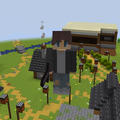
Welcome to Creative Canvas, a unique interactive map for Minecraft where you can create pixel art and designs directly in the game. This system, built entirely with command blocks, allows players to paint on a 4x4 canvas, choose colors, erase, and clear the canvas with ease. Whether you're creating simple artwork or just having fun with friends, this map offers a cool way to express your creativity in Minecraft.
The heart of the Creative Canvas is its simple yet effective color selection system. Players can choose from a variety of colors—black, red, blue, yellow, and more—by clicking buttons that set their scoreboard to a specific value. When you click on the canvas, it places the selected color at the spot you're looking at. The system uses raycasting to make sure the color is applied accurately, so you have total control over your design.
Making mistakes while drawing is normal, and with the Creative Canvas, erasing is easy. You can activate the eraser, which simply places white blocks over any color you’ve already placed. This lets you fix errors quickly and smoothly, without needing to manually clear out every pixel.
Starting over is simple. With a single click, you can activate the Clear Canvas feature, which wipes all the artwork off the 4x4 grid. It’s an easy way to reset your canvas and begin a new drawing without any hassle.
Instead of complicated layers, the Creative Canvas lets the most recent color placed override the previous one. If you put red over green, the green block will change to red. This keeps the drawing process straightforward and easy to manage, so you don’t have to worry about layering or complicated controls.
The map is designed to be user-friendly. You won’t need to deal with complicated menus or settings. The color selection is clear, and the canvas is simple to use, with easy-to-follow instructions to get you started. Whether you're drawing for fun or creating detailed art, everything is intuitive and quick to use.
Behind the scenes, the Creative Canvas system is powered by a few simple command blocks. These allow for smooth operation and ensure that everything works as expected. The command block system is both efficient and lightweight, ensuring that the map runs smoothly without bogging down your game.
With Creative Canvas, you’re free to create whatever you like. You can design pixel art, create logos, or simply doodle. The best part is that you can clear the canvas and start fresh as many times as you want, making it easy to try out new ideas without worrying about space or time.
Welcome to Creative Canvas, a unique interactive map for Minecraft where you can create pixel art and designs directly in the game. This system, built entirely with command blocks, allows players to paint on a 4x4 canvas, choose colors, erase, and clear the canvas with ease. Whether you're creating simple artwork or just having fun with friends, this map offers a cool way to express your creativity in Minecraft.
Key Features
Color Selection System
The heart of the Creative Canvas is its simple yet effective color selection system. Players can choose from a variety of colors—black, red, blue, yellow, and more—by clicking buttons that set their scoreboard to a specific value. When you click on the canvas, it places the selected color at the spot you're looking at. The system uses raycasting to make sure the color is applied accurately, so you have total control over your design.
Eraser
Making mistakes while drawing is normal, and with the Creative Canvas, erasing is easy. You can activate the eraser, which simply places white blocks over any color you’ve already placed. This lets you fix errors quickly and smoothly, without needing to manually clear out every pixel.
Clear Canvas Button
Starting over is simple. With a single click, you can activate the Clear Canvas feature, which wipes all the artwork off the 4x4 grid. It’s an easy way to reset your canvas and begin a new drawing without any hassle.
No Layers, Just Overriding Colors
Instead of complicated layers, the Creative Canvas lets the most recent color placed override the previous one. If you put red over green, the green block will change to red. This keeps the drawing process straightforward and easy to manage, so you don’t have to worry about layering or complicated controls.
Simple and Intuitive Interface
The map is designed to be user-friendly. You won’t need to deal with complicated menus or settings. The color selection is clear, and the canvas is simple to use, with easy-to-follow instructions to get you started. Whether you're drawing for fun or creating detailed art, everything is intuitive and quick to use.
Command Block-Powered
Behind the scenes, the Creative Canvas system is powered by a few simple command blocks. These allow for smooth operation and ensure that everything works as expected. The command block system is both efficient and lightweight, ensuring that the map runs smoothly without bogging down your game.
Create, Share, and Repeat
With Creative Canvas, you’re free to create whatever you like. You can design pixel art, create logos, or simply doodle. The best part is that you can clear the canvas and start fresh as many times as you want, making it easy to try out new ideas without worrying about space or time.
More like this

 Umbroid Studios
6556994
2


 JeZoofyGopter17





 CraftyFoxe
![Vezilx's World Map Highlight: Aether Paradise - Pokémon Sun & Moon [WIP / Unfinished] Minecraft Map & Project](https://static.planetminecraft.com/files/image/minecraft/project/2026/746/20069825-screenshot-minecraft_s.jpg)
 vezilx
 ony
ony

Have something to say?